CustomFit.ai — Website personalization, A/B testing and CRO for Shopify and D2C
Product
Features
✱
Website Personalization
Adapt to each visitor's behavior & intent
⧖
A/B & Multivariate Testing
Rigorous experimentation
✨
AI CopilotNEW
Personalize with a prompt
🤖
AI WingmanNEW
Auto-optimize toward winners
🎯
AI Conversion OptimizerNEW
GPT-grade test ideas
✎
No-Code Visual Editor
Drag-and-drop edit any element
▦
Product Recommendations
Personalized recs that lift AOV
⚑
Feature Flags
Ship safely with kill-switches
◧
Chrome Extension
Edit your store in the browser
⧉
Shopify, WooCommerce & more
All platform integrations
View all features →
Use Cases
$
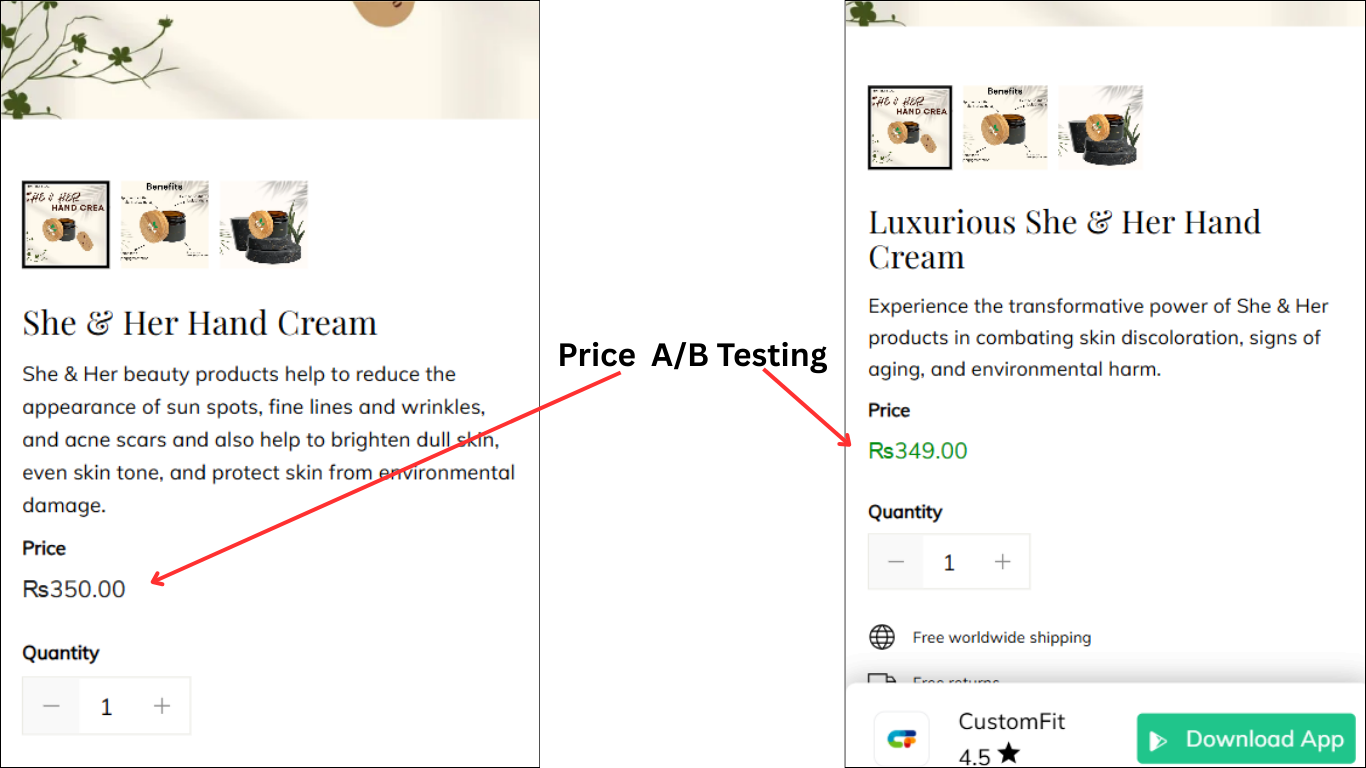
Price A/B Testing
Test price points to maximize revenue
▦
Theme A/B Testing
Compare whole layouts & designs
🗂
Template A/B Testing
Test whole PDP/PLP templates
🏷
Discount A/B Testing
Find the offer that converts
🚚
Shipping A/B Testing
Thresholds, speed & copy
✍
Content A/B Testing
Copy, images & reviews
💳
Checkout Gateway A/B
Payments & one-click
⌖
Geo-Based Personalization
Per-location content & offers
⚡
Buyer-Intent Nudges
Exit-intent & retargeting
↔
Split-URL / Redirection
Full-page redirect tests
View all use cases →
Solutions & Guides
⤢
Conversion Rate Optimization
The complete CRO guide
⧖
A/B Testing Software
Buyer's guide for D2C
🛒
Cart Abandonment Recovery
Win back lost carts
📰
Landing Page Optimization
Convert more paid traffic
S
Shopify A/B Testing
Test your store, no code
S
Shopify Personalization
Tailor the store per shopper
◔
First-Time Visitor Offers
Convert new shoppers with trust & offers
★
Repeat-Customer Experiences
Reward and re-engage loyal buyers
◎
Campaign-Matched Pages
Match the landing page to the ad
⌖
Location-Based Experiences
Currency, language & regional offers
Explore CRO →
Customer stories
GIVA
+32%
conversion via personalized recs
GIVA
Mamaearth
+18%
revenue lift from PDP A/B tests
ME
The Sleep Company
+24%
AOV from product recommendations
TSC
Read customer stories →
Integrations
SWsfGA+15
✦
Not sure where to start?
Let AI Copilot pick your first tests

“We wake up to evidence-backed tests ready to deploy — not a backlog of maybe ideas.”

AN
Anirudh S.
Growth · Chargebee
★★★★★4.8on G2 · 2,400+ brands
Talk to our team →
Widgets
Integrations
Ecommerce & Checkout
Shopify
Shopline
Shoplazza
GoKwik
ShopFlo
Razorpay Magic Checkout
Breeze
Shiprocket
View all integrations →
Analytics & Behavior
Google Analytics 4
Microsoft Clarity
Hotjar
Mixpanel
Amplitude
Heap
Adobe Analytics
Segment (CDP)
View all integrations →
Engagement, CRM & More
Klaviyo
MoEngage
CleverTap
WebEngage
HubSpot
Salesforce
Slack
Meta Ads
View all integrations →
CustomersPricing
Resources
CRO
▤
Playbooks
Proven strategies to boost conversions
🎙
Interviews
D2C leaders & marketing experts
▶
Webinars
Live deep dives & product sessions
Learn
✎
Blog
Tips, experiments & best practices
📕
Free E-Books
Mastering personalization
📖
Conversion Glossary
Every CRO term, defined
✦AI CopilotNEWLog inBook a demo
Start free trial
Select your platform — Install in 2 minsWe'll tailor the setup
⚡ Risk-free 14-day trial · No credit card · Cancel anytime
S
Shopify
Install from Shopify App Store
›
W
WooCommerce
Install the WooCommerce plugin
›
B
BigCommerce
Install from BigCommerce App Marketplace
›
SL
Shopline
Install from Shopline App Store
›
M
Salesforce / Magento
Install from the marketplace
›
SZ
Shoplazza
Install from Shoplazza App Store
›
WP
WordPress / Webflow
Install plugin or paste the script
›
◧
Others
Custom-built on React, Next.js, etc.
›
Tip: pick your platform — we handle the restBook a demo →
Product
Website PersonalizationA/B & Multivariate TestingAI CopilotAI WingmanAI Conversion OptimizerNo-Code Visual EditorProduct RecommendationsFeature FlagsView all features →
Use Cases
Price A/B TestingTheme A/B TestingTemplate A/B TestingDiscount A/B TestingShipping A/B TestingContent A/B TestingCheckout Gateway A/BGeo-Based PersonalizationBuyer-Intent NudgesSplit-URL / Redirection
Solutions & Guides
Conversion Rate OptimizationA/B Testing SoftwareCart Abandonment RecoveryLanding Page OptimizationShopify A/B TestingShopify Personalization
Explore
WidgetsIntegrationsCustomersPricing
Resources
BlogPlaybooksWebinarsInterviewsE-BooksConversion Glossary
Platforms
ShopifyShoplineShoplazzaChrome ExtensionAll integrations
Start free trialBook a demo
Home›Blog›A/B Testing on Shoplazza Using CustomFit 2025: A Practical Guide for Ecommerce Brands

A/B Testing on Shoplazza Using CustomFit 2025: A Practical Guide for Ecommerce Brands

Learn how to run A/B Testing on Shoplazza using CustomFit.ai. Boost conversions, reduce drop-offs, and personalize shopping experiences with ease.

SJSapna JoharNovember 28, 202512 min read
On this page
  1. Why Shoplazza Stores Need A/B Testing
  2. The Questions A/B Testing Answers
  3. Practical Shoplazza Examples
  4. Why Shoplazza + A/B Testing Is a Strong Match
  5. The Basics of A/B Testing in Ecommerce
  6. How to Set Up CustomFit on Your Shoplazza Store
  7. Step 1: Log in to Shoplazza
  8. Step 2: Go to the Shoplazza App Store
  9. Step 3: Install the CustomFit App
  10. Step 4: Open CustomFit App from Shoplazza
  11. Step 5: Log in to CustomFit
  12. Step 6: Access Your CustomFit Dashboard
  13. Step 7: Start Creating A/B Tests and Personalizations
  14. How Shoplazza Merchants Can Run A/B Tests with CustomFit.ai
  15. Step 1: Identify What to Test
  16. Step 2: Set Up Variations
  17. Step 3: Define the Metric
  18. Step 4: Launch the Experiment
  19. Step 5: Measure and Decide
  20. Real-World Examples of A/B Testing on Shoplazza
  21. Common Mistakes in Shoplazza A/B Testing
  22. Beyond A/B Testing: Personalization on Shoplazza
  23. SEO Benefits of A/B Testing on Shoplazza
  24. Practical Workflow: Running Your First Shoplazza Test in a Week
  25. FAQs
0%
A/B Testing on Shoplazza Using CustomFit 2025: A Practical Guide for Ecommerce Brands

From the conversion glossary

Concepts referenced in this article, defined.

Definition
What Is Subscription? Definition & Guide
Definition
What Is Experiment? Definition, Formula & Guide
Definition
What Is Control? Definition, Formula & Guide
Definition
What Is FOMO? Definition & Guide
Definition
What Is Lift? Definition, Formula & Guide
Try CustomFit.ai

Run A/B tests and personalize your store without code. 14-day free trial, no credit card.

Start free trial →
Share
XLinkedInEmail

Start lifting conversions today.

Run rigorous A/B tests and personalize every visit on Shopify or any storefront — no engineers required.

Start free trialBook a demo

Built for every D2C category

🧴
Skincare
💄
Beauty
🌿
Wellness
☕
F&B
👟
Apparel
💍
Jewelry
🛋️
Home
🍼
Baby
Live · Right now
Mamaearth — free-shipping band +12.4% AOVGIVA — festive collection page +34% revenueBellavita — PDP CTA test +27.4% CVRKapiva — Quiz-driven recs +9.48% CTRThe Sleep Co — landing personalized 2× capturesPlum — Returning shopper swap +18.2% CVRMamaearth — free-shipping band +12.4% AOVGIVA — festive collection page +34% revenueBellavita — PDP CTA test +27.4% CVRKapiva — Quiz-driven recs +9.48% CTRThe Sleep Co — landing personalized 2× capturesPlum — Returning shopper swap +18.2% CVR
Get in touch

Tell us about your store.

We reply within an hour during business hours. No sales pitch, no spam — just answers from someone who's seen 2,400+ D2C stores.

✓ Reply within 1 hour✓ No spam, ever✓ Free demo & setup help
✓ Thanks! We'll be in touch shortly.
CustomFit.ai

The all-in-one website personalization, A/B testing & CRO platform for high-growth D2C brands. Made by marketers, fueled by coffee.

in𝕏◎▶f
Product
  • Features
  • A/B Testing
  • Personalization
  • AI Copilot
  • AI Wingman
  • AI Conversion Optimizer
  • Feature Flags
  • Widgets
  • Integrations
  • ROI Calculator
Platforms
  • Shopify
  • Shopline
  • Shoplazza
  • Salesforce
  • Chrome Extension
  • All Integrations
Resources
  • Blog
  • Playbooks
  • Webinars
  • GrowthFit Interviews
  • Free E-Books
  • Conversion Glossary
  • Case Studies
Compare
  • vs VWO
  • vs Optimizely
  • vs Google Optimize
  • vs Mutiny
  • vs Intelligems
  • vs Shoplift
  • vs AB Tasty
  • vs Convert
  • vs Kameleoon
Company
  • About Us
  • Partners
  • CustomFit Awards
  • Recognition
  • Contact
  • Privacy Policy
  • Terms & Conditions
© 2026 CustomFit.ai · Valley Monks Pvt Ltd · Made by marketers, fueled by coffee, and obsessed with conversions.
SOC 2 Type II · GDPR · CCPA · ISO 27001

Running a Direct-to-Consumer (D2C) brand is like building a house while people are already living inside it. You can’t stop the flow of visitors and sales, but you also know something needs fixing, tweaking, or improving. Nowhere is this truer than on your ecommerce website. The smallest design choice, copy tweak, or layout shift can mean the difference between a customer completing checkout or abandoning their cart.

That’s where A/B Testing comes in. If you’re on Shoplazza, you’ve already got an ecommerce platform designed for scale. But how do you figure out what works for your specific audience? How do you know if your new homepage hero banner convinces more visitors to stay, or if your checkout flow makes things easier or more frustrating? You test. You don’t just guess, you measure.

In this blog, we’ll go beyond theory. We’ll break down how to run A/B Testing on Shoplazza using CustomFit.ai, what steps to take, what mistakes to avoid, and how this practical approach helps you increase conversion rate ecommerce in ways you can actually see in your analytics.

‍

Why Shoplazza Stores Need A/B Testing

If you’ve spent even one week running ads for your Shoplazza store, you’ve probably felt the frustration of pouring money into traffic and watching it evaporate. Visitors land, scroll, and vanish without buying. Others add to cart, hover at checkout, and then bounce.

It’s easy to assume it’s about the product, but often, it’s about the experience. Small elements of your site—the placement of a button, the clarity of your shipping details, or even how your product photos are presented—can make or break the sale.

The Questions A/B Testing Answers

Every Shoplazza merchant asks these questions at some point:

  • Are my product pages answering the questions customers actually have?
  • Do my images load quickly enough, especially on mobile?
  • Is my shipping information visible before checkout, or does it surprise people too late?
  • Is my “Add to Cart” button easy to find on small screens?

The problem is, most people guess at these answers. But with an A/B Testing Platform like CustomFit.ai, you don’t have to. You can run controlled experiments that tell you exactly what works and what doesn’t for your specific audience.

Practical Shoplazza Examples

To see why this matters, let’s make it concrete.

  • A skincare brand on Shoplazza might test whether placing the “Subscribe & Save” option above the product description increases subscription adoption. If the ab test shows higher uptake, that’s recurring revenue unlocked by a simple layout change.
  • A D2C footwear brand might test whether lifestyle photos (a model wearing the shoes outdoors) perform better than plain white-background images. If lifestyle shots increase add-to-cart clicks, the brand knows how to style future collections.
  • An electronics brand could ab test whether adding “Free Shipping over $50” in the product page banner reduces cart abandonment. If it does, that insight isn’t just a win for conversion—it’s a long-term strategy to increase conversion rate in ecommerce.
  • A gift store during festivals might experiment with two checkout flows: one with guest checkout enabled vs one requiring account creation. Testing reveals whether convenience drives higher completion, or whether account creation helps retain repeat buyers without killing conversions.

Why Shoplazza + A/B Testing Is a Strong Match

Shoplazza gives you the tools to set up your storefront and manage sales, but every store has a unique audience. What works for one merchant may not work for another, even in the same niche. That’s why A/B Testing is critical—it adapts the store to your buyers, not just ecommerce best practices in theory.

CustomFit.ai fits into this by letting Shoplazza merchants run experiments without coding. You can drag-and-drop changes, set up tests, and see results in real time. Instead of debating whether your banner text or checkout layout is the issue, you can test it, measure it, and know for sure

‍

The Basics of A/B Testing in Ecommerce

Before diving into Shoplazza-specific details, let’s strip A/B Testing down to its core.

A/B Testing means: You create two (or more) versions of something, say, a landing page, and show them to different groups of visitors. Then you measure which performs better against a clear metric (conversion, clicks, revenue).

Why it works in ecommerce:

  • Every small interaction matters (from homepage banners to checkout CTAs).
  • Customer behavior is unpredictable—you need data, not assumptions.
  • It helps you increase conversion rate ecommerce without always spending more on ads.

‍

How to Set Up CustomFit on Your Shoplazza Store

Getting started with CustomFit on Shoplazza is a simple process. You first log in to your Shoplazza account, install the CustomFit app from the Shoplazza App Store, and then connect your CustomFit account. Once connected, you can access the CustomFit dashboard directly from your Shoplazza store and begin creating A/B tests and website personalization experiences. Below are the detailed steps to guide you through the process.
‍

Step 1: Log in to Shoplazza

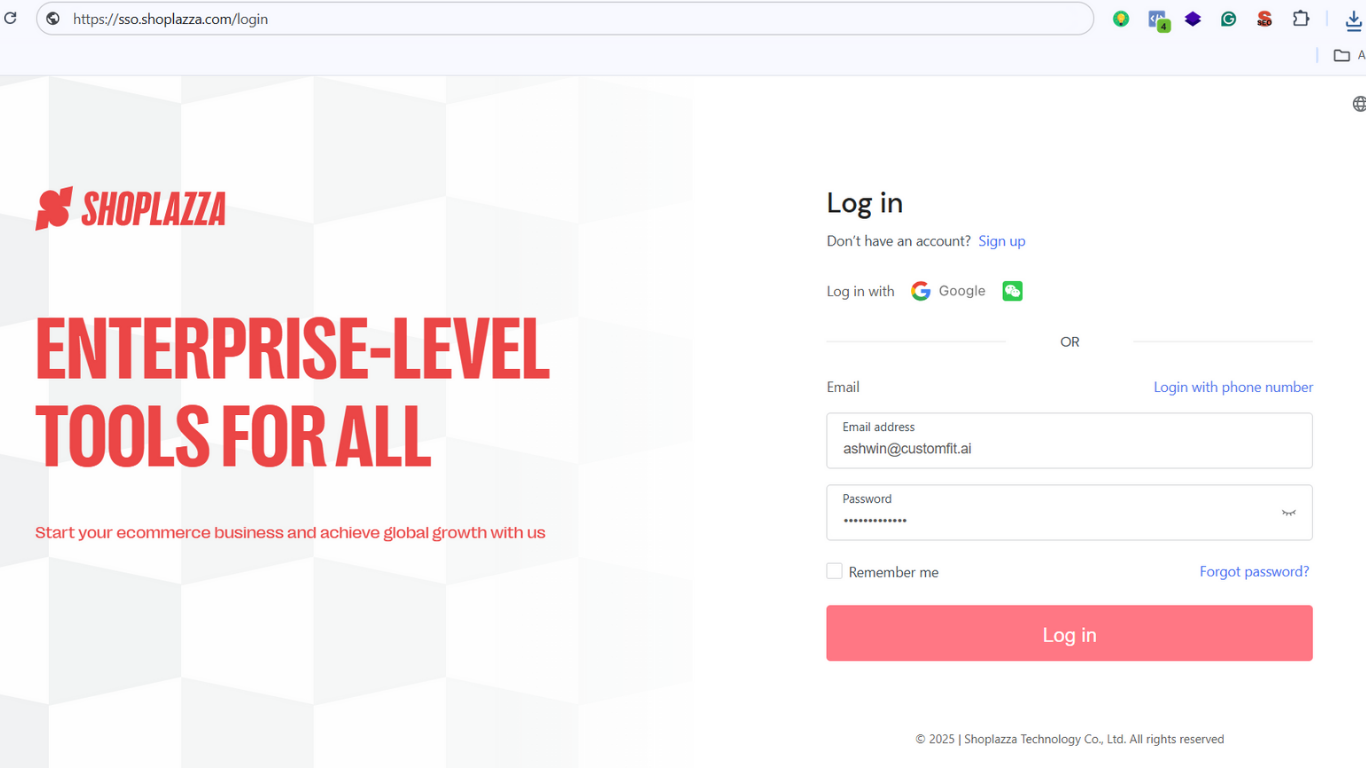
  1. Go to Shoplazza login page.
  2. Enter your registered email and password, or log in using Google/WeChat.
  3. Once logged in, you will land in your Shoplazza admin dashboard.

Shoplazza

Step 2: Go to the Shoplazza App Store

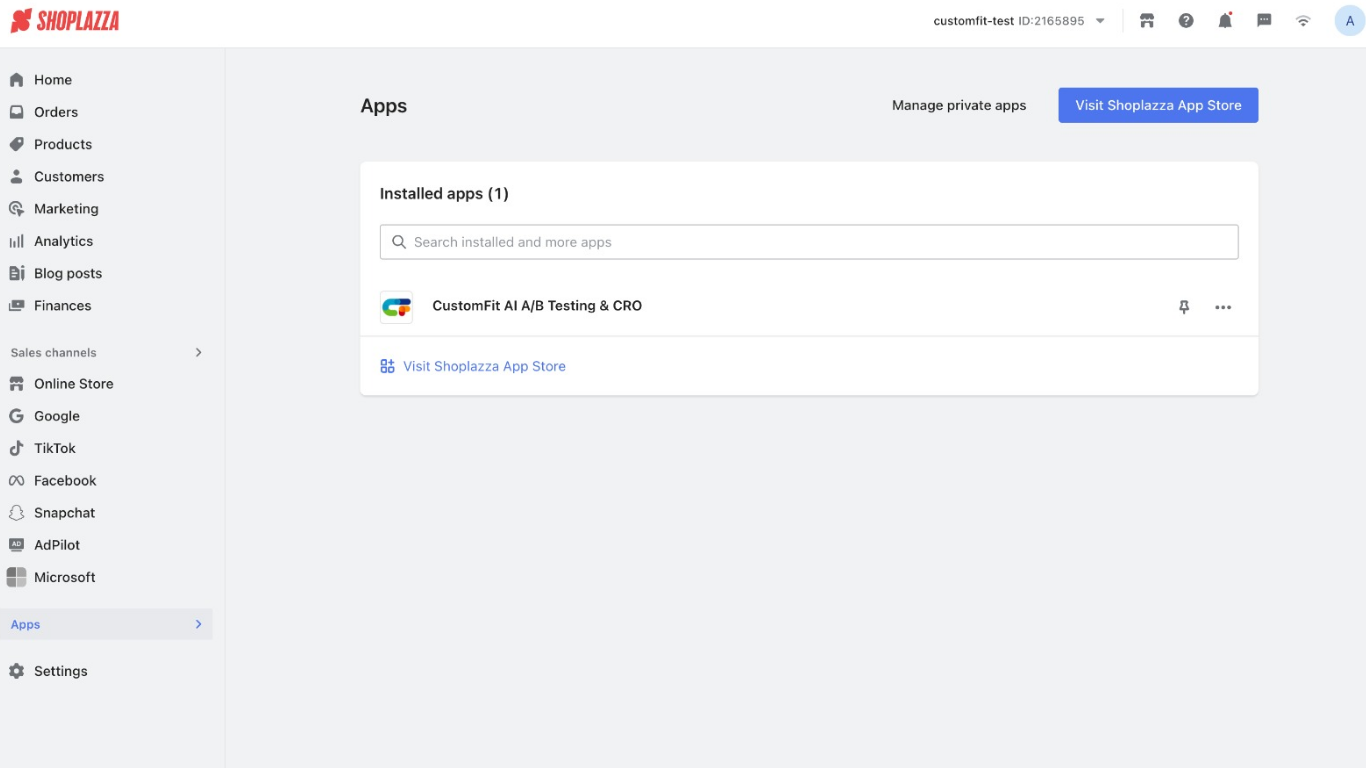
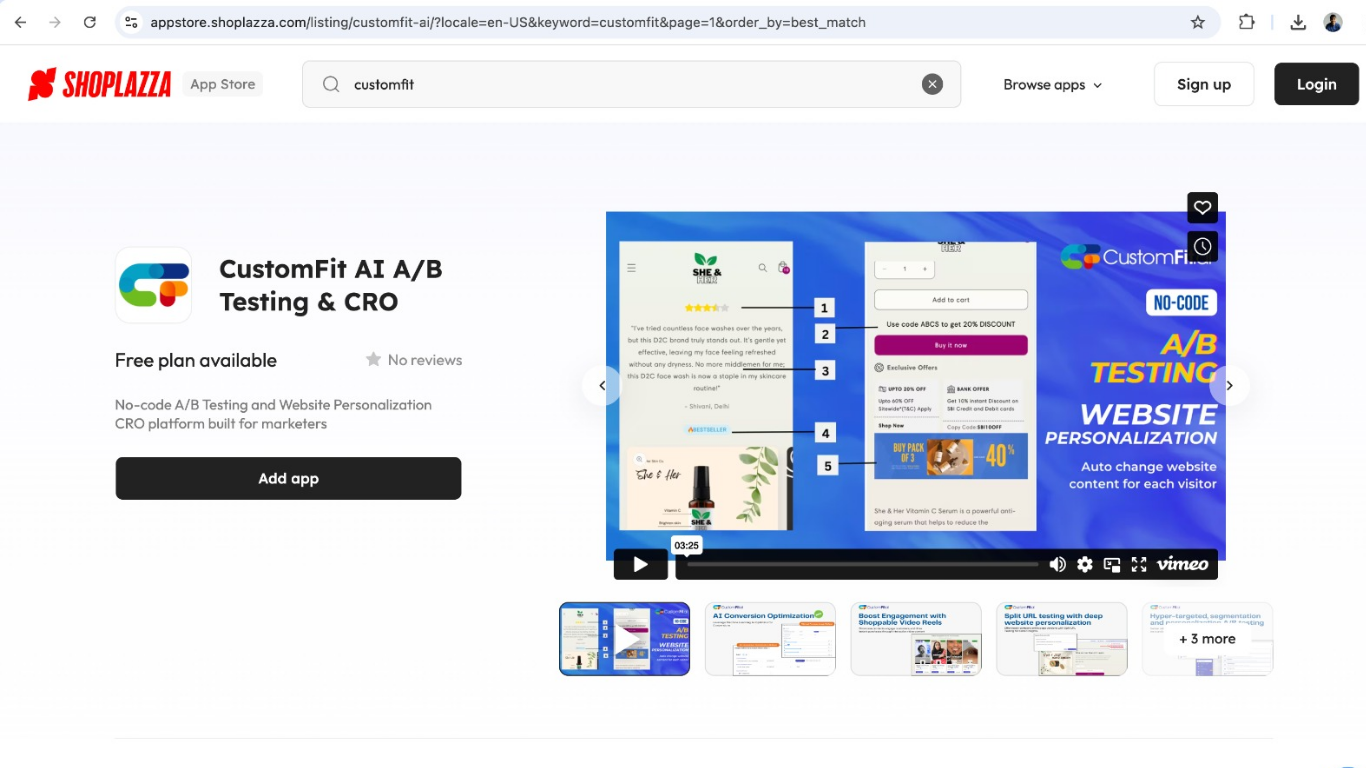
  1. From the admin dashboard, click Apps in the left-hand menu.
  2. Select Visit Shoplazza App Store.
  3. In the App Store search bar, type CustomFit and open the listing for CustomFit AI A/B Testing & CRO.

customfit app

Step 3: Install the CustomFit App

  1. On the app listing page, click Add app.
  2. Follow the on-screen instructions to install the app into your store.
  3. Once installed, you will see CustomFit AI A/B Testing & CRO under the list of installed apps in your Shoplazza dashboard.

CustomFit AI A/B Testing & CRO

Step 4: Open CustomFit App from Shoplazza

  1. In your Shoplazza dashboard, go to Apps.
  2. Click on CustomFit AI A/B Testing & CRO.
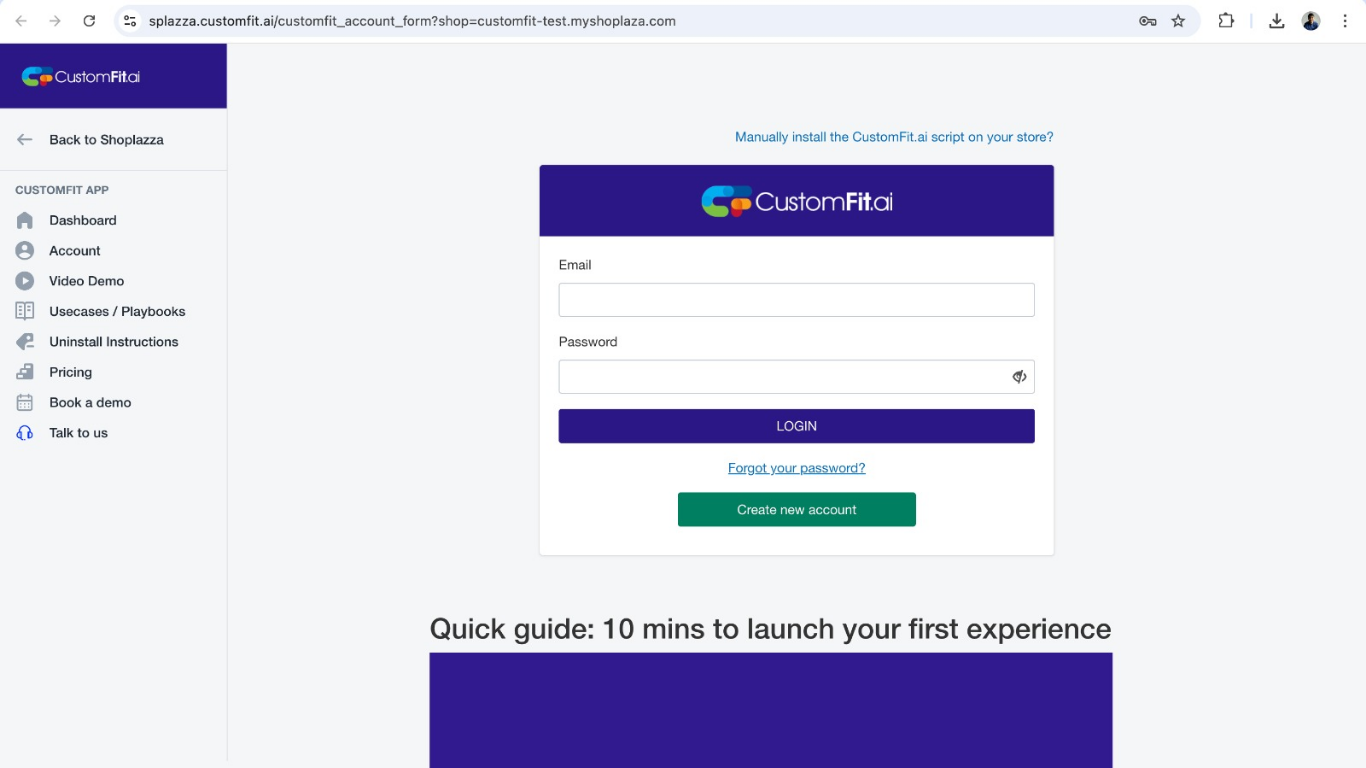
  3. You will be redirected to the CustomFit login page.

login page of customfit

Step 5: Log in to CustomFit

  1. If you already have a CustomFit account, log in with your email and password.
  2. If not, click Create new account and sign up with your details.
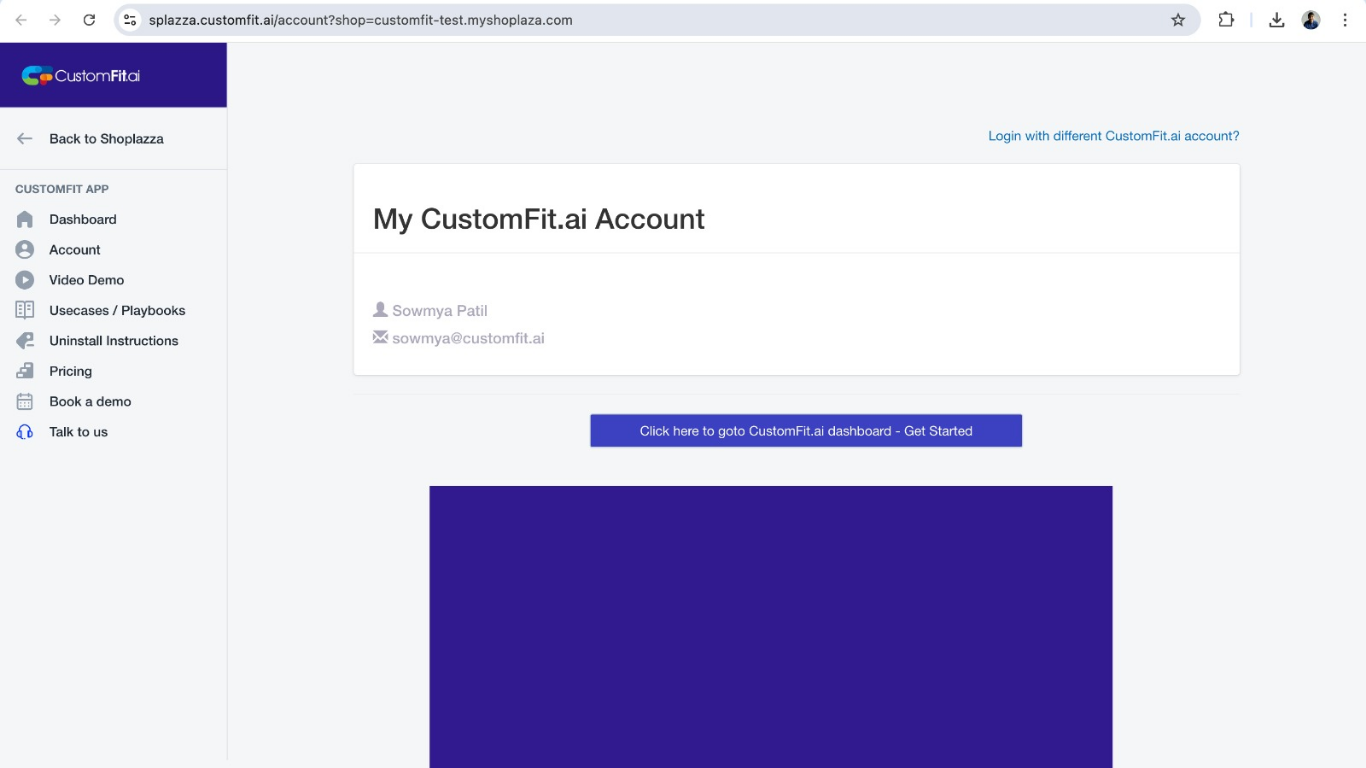
  3. Once logged in, your CustomFit account will be connected with your Shoplazza store.

customfit

‍

‍

Step 6: Access Your CustomFit Dashboard

  1. After logging in, you will see your CustomFit account page with your details.
  2. Click Go to CustomFit.ai dashboard – Get Started.
  3. This will take you to the main CustomFit dashboard where you can begin setting up experiments.

‍

Step 7: Start Creating A/B Tests and Personalizations

  1. From the dashboard, explore the options to create your first A/B test or personalization.
  2. You can access playbooks, video demos, and quick guides to help you set up.
  3. Once your first experiment is ready, launch it on your Shoplazza store.

customfit a/b testing and

How Shoplazza Merchants Can Run A/B Tests with CustomFit.ai

Shoplazza doesn’t come with a full-fledged A/B Testing Platform out of the box. That’s where tools like CustomFit.ai fit in. Instead of heavy development work, it allows you to set up A/B Testing and personalization directly on your store.

Here’s how you’d do it in practice:

Step 1: Identify What to Test

Don’t start with random guesses. Instead, focus on high-impact areas of your Shoplazza store. Examples:

  • Homepage banner: Does a discount-driven headline (“Flat 20% Off Today”) convert better than an emotional story-driven one (“Handmade With Care”)?
  • Product page layout: Does moving customer reviews above the fold increase trust and sales?
  • Checkout page CTA: Does “Complete Your Order” perform better than “Buy Now”?

Tip: Use your analytics. Where are people dropping off? That’s your first testing ground.

Step 2: Set Up Variations

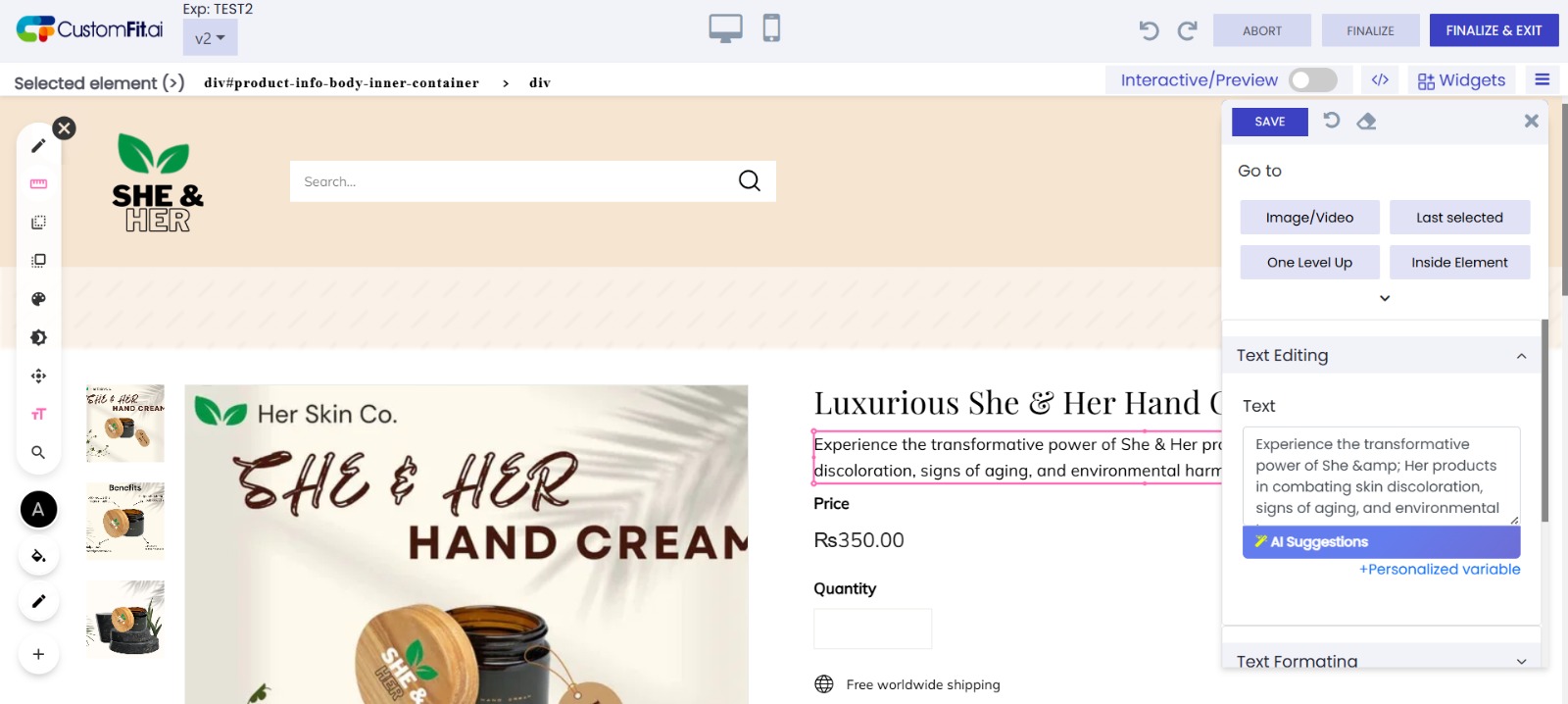
With CustomFit.ai, you don’t need a developer every time. You can create two (or more) versions of a page element. For instance:
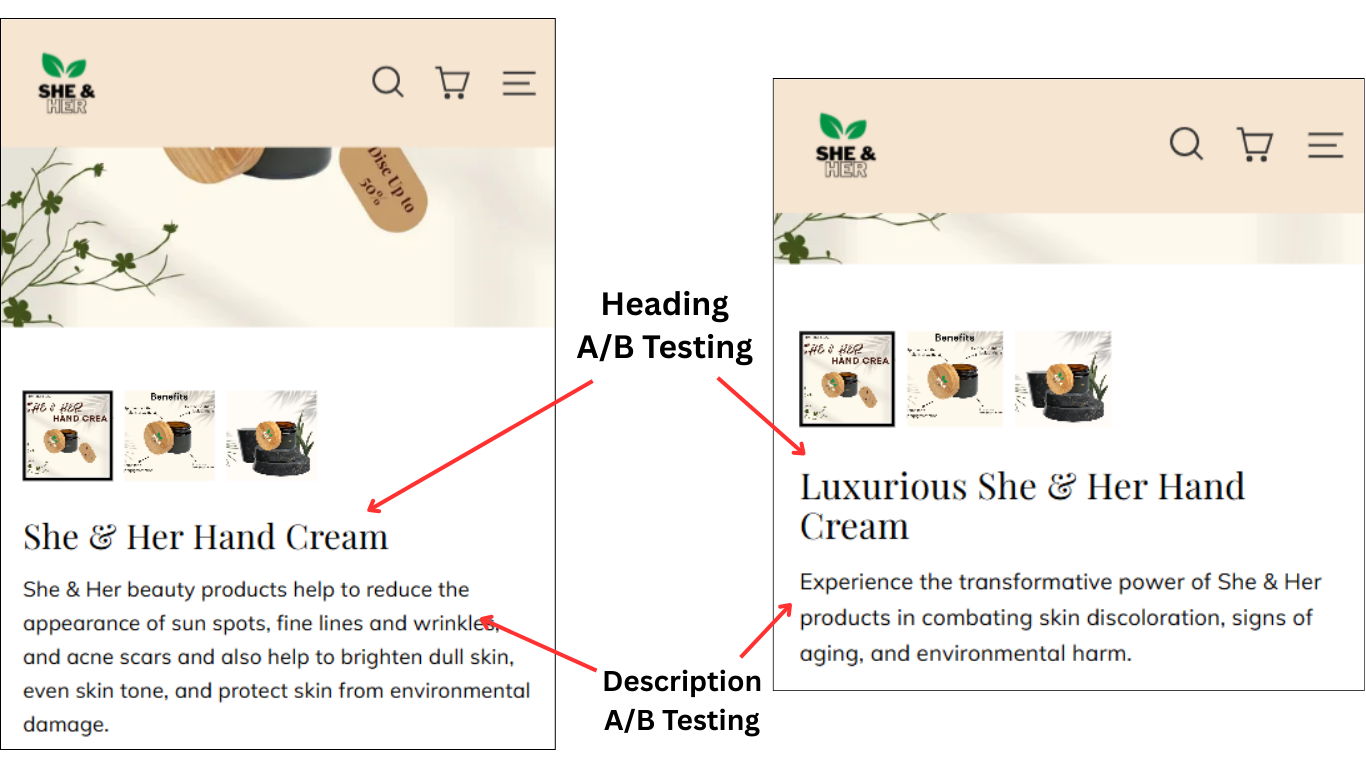
  • Variation A: Original heading and description
  • Variation B: Different headingand description

heading and description a/b testing

‍

Step 3: Define the Metric

Be crystal clear. Do you want:

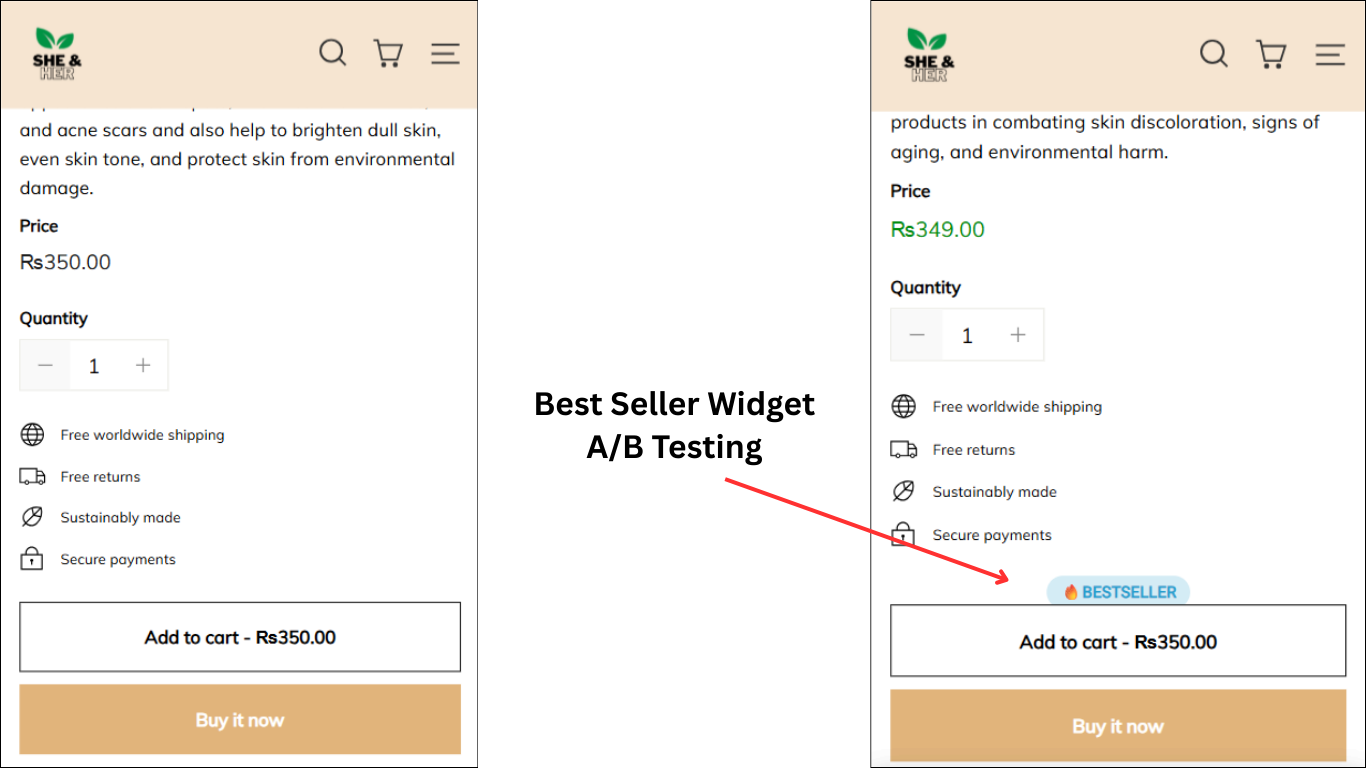
  • More Add-to-Cart clicks? If yes then test different pricing, CTA etc

  • Higher checkout completions?

  • Increased subscription sign-ups?

price a/b testing

‍

Having a single, clear goal avoids confusion.

Step 4: Launch the Experiment

CustomFit.ai handles the distribution of traffic between your control and variation. Some visitors see Version A, others see Version B. Everything runs seamlessly on your Shoplazza store.

Ypu can different widgets like Bestsellers as people feel FOMO and end up buying the product.
bestseller widget

‍

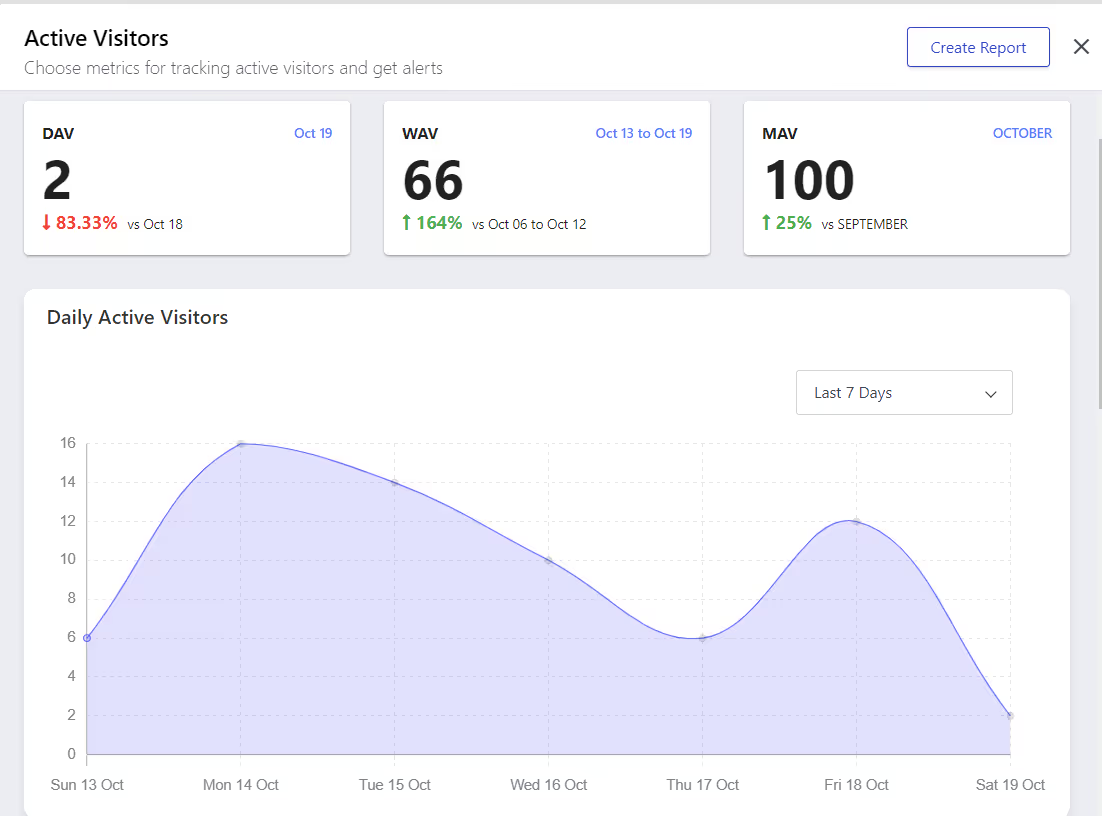
Step 5: Measure and Decide

Once you’ve gathered enough data, you can see which version drives better results. Did moving reviews above the fold actually boost sales, or was it just a nice design idea?

This way, every decision is backed by proof.
‍

__wf_reserved_inherit

Real-World Examples of A/B Testing on Shoplazza

Let’s make this practical with scenarios you can imagine for your own store.

  1. Fashion Brand Testing Size Chart Placement Problem: Too many returns due to sizing issues.
    Test: Place the size chart link near the “Add to Cart” button vs. below the description.
    Result: Placement near the CTA reduced size-related returns by 15%.
  2. Electronics Store Testing Warranty Callout Problem: Visitors hesitant on high-ticket items.
    Test: Add a “1-Year Warranty” badge next to the price vs. leaving it in the description.
    Result: Warranty badge increased checkout completions by 12%.
  3. Health Supplement Brand Testing Subscription Copy Problem: Low subscription adoption rate.
    Test: Copy “Subscribe & Save 10%” vs. “Never Run Out + Save 10%.”
    Result: Second variation led to 25% higher subscription sign-ups.

These are not gimmicks. They directly increase conversion rate ecommerce in a way you can measure and trust.

‍

Common Mistakes in Shoplazza A/B Testing

Even the best ecommerce brands mess this up. Avoid these traps:

  • Testing too many changes at once: If you change layout, copy, and pricing in the same test, you’ll never know what caused the lift.
  • Stopping too early: A small early win doesn’t mean it will hold. Give the test enough traffic and time.
  • Ignoring mobile: Most Shoplazza visitors are on mobile. Always test with mobile in mind.
  • Not setting a goal: “Let’s just see what happens” is not A/B Testing. Pick one measurable outcome.

‍

Beyond A/B Testing: Personalization on Shoplazza

Here’s where CustomFit.ai quietly extends beyond being just an A/B Testing Platform. It lets you not only test but also personalize experiences.

Imagine:

  • Showing first-time visitors a discount offer.
  • Showing repeat buyers a “Welcome back” banner with recommended products.
  • Adjusting homepage content based on whether someone came from Instagram or Google Ads.

This isn’t just testing—it’s giving each visitor a store that feels designed for them. And in today’s crowded ecommerce space, that’s how you truly increase conversion rate ecommerce sustainably.

‍

Ready to boost Magento store performance?

CustomFit enables seamless A/B testing and personalised optimisation.

Download the CustomFit A/B Testing App from Shopify today!

‍

SEO Benefits of A/B Testing on Shoplazza

You might wonder: does AB Testing affect SEO? The short answer is no, if done right.

  • Google supports A/B Testing as long as you don’t cloak or serve different content to bots.
  • With tools like CustomFit.ai, the variations are user-focused and temporary, so they don’t harm indexing.
  • The long-term effect is positive, because a better converting site often leads to stronger engagement metrics, which indirectly support SEO.

So yes, AB Testing for SEO is a smart play, as long as you keep it clean.

‍

Practical Workflow: Running Your First Shoplazza Test in a Week

Monday: Pick a test idea (example: test “Add to Cart” button color).

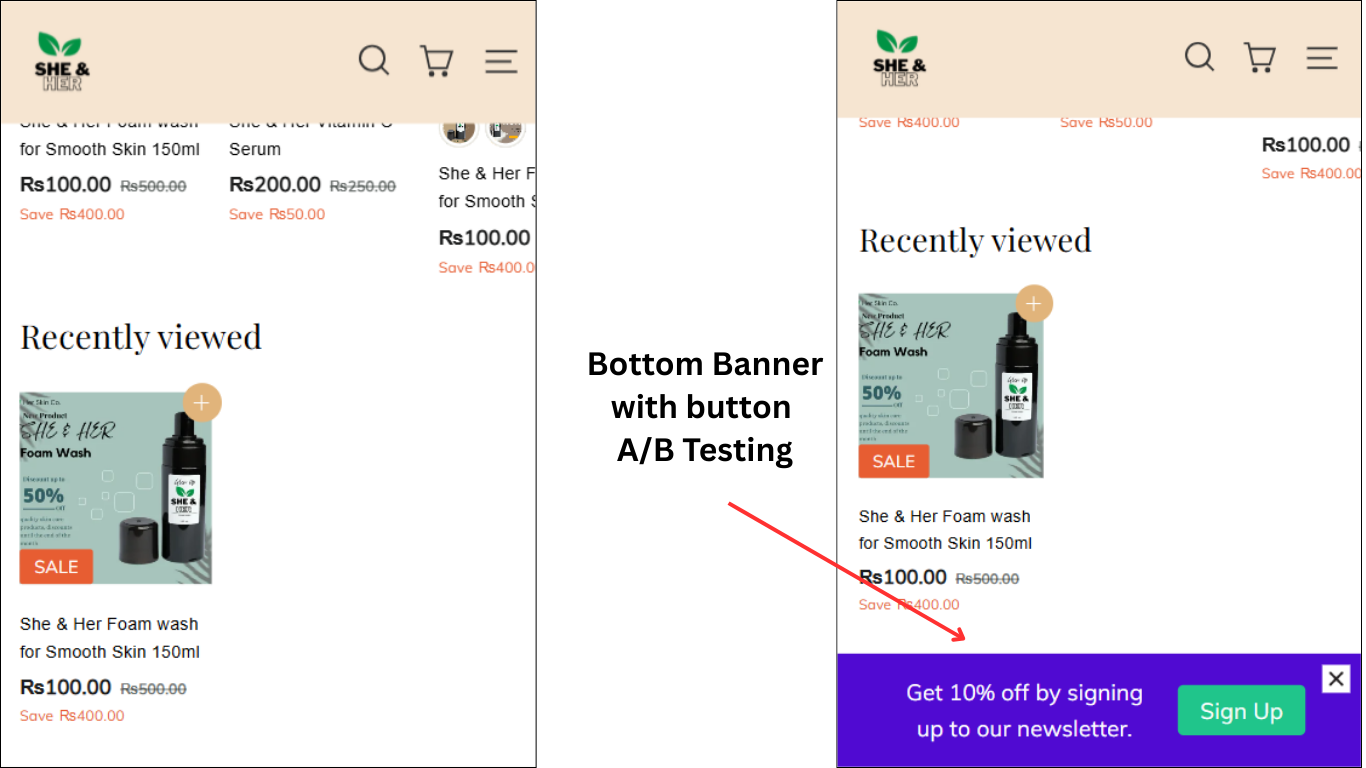
Tuesday: Create two variations in CustomFit.ai. One with bottom banner with button to attract customers by giving them offer.
__wf_reserved_inherit

‍

Wednesday: Launch the test.

Thursday-Sunday: Let traffic flow.

Next Monday: Review results, decide winner, and roll it out permanently.

This rhythm helps you build a testing culture without overcomplicating things.

‍

FAQs

**Q1: What is A/B Testing on Shoplazza?**A/B Testing on Shoplazza means creating two or more versions of your store pages or elements and showing them to different visitor groups to see which version performs better. Tools like CustomFit.ai help merchants run these experiments without coding.

**Q2: How does A/B Testing increase conversion rate ecommerce?**By testing elements like CTAs, product images, and page layouts, ecommerce brands can discover what resonates most with their audience. The winning version helps reduce drop-offs, leading to a higher conversion rate.

**Q3: Does A/B Testing impact SEO on Shoplazza?**No, A/B Testing does not hurt SEO when implemented correctly. Google supports AB Testing for SEO purposes, provided you don’t serve misleading content.

**Q4: Can CustomFit.ai integrate with Shoplazza easily?**Yes, CustomFit.ai works seamlessly with Shoplazza, enabling merchants to run A/B Tests and personalize experiences without needing developers.

**Q5: Why should ecommerce brands on Shoplazza use an A/B Testing Platform?**Because guessing is expensive. An A/B Testing Platform ensures that every change, whether in design, copy, or layout, is backed by real customer behavior data, not assumptions.