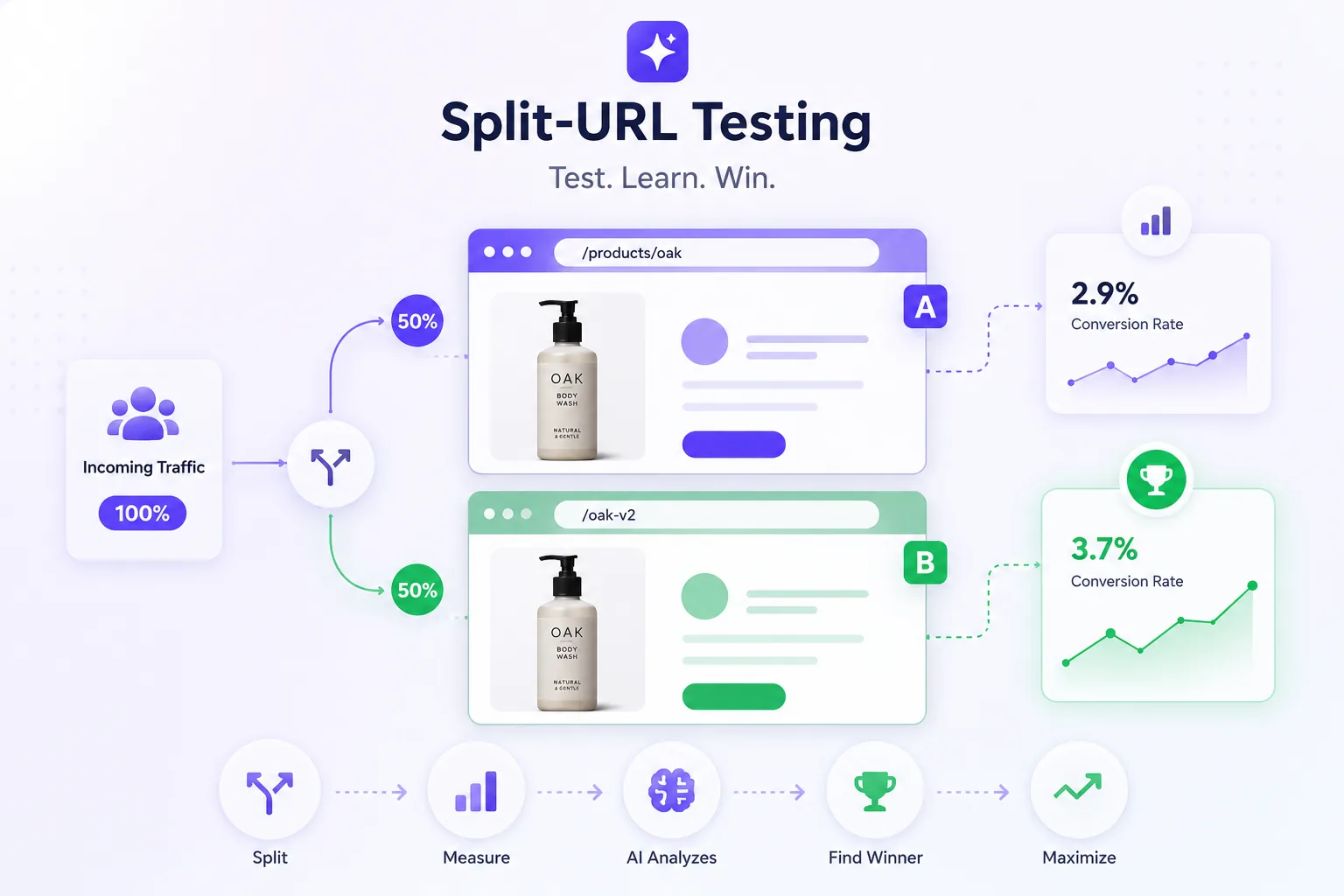
When a change is too big for an in-page tweak — a full redesign, a headless template, a separately built landing page — split-URL testing sends part of your traffic to the new URL, keeps SEO clean, and tells you which version actually earns more. AI handles the stats and surfaces the winner automatically.

Compare two entirely separate URLs — ideal for redesigns, new page builders, or headless templates that can't be a single in-page variant.
Automatic canonical tags and 302 redirects keep search engines indexing your primary URL — no duplicate-content or ranking risk.
The split happens before the page loads, so visitors land on their version directly — no visible redirect bounce, no flicker.
In-page A/B testing is perfect for swapping a headline or a button. But when you've rebuilt the PDP in a new framework, launched a campaign microsite, or are migrating to headless, the challenger lives at its own URL — and split-URL is the only honest way to compare them.
Done wrong, split tests create duplicate content and leak link equity. CustomFit handles canonicals and temporary redirects automatically, keeps each visitor on a stable variant, and always serves crawlers the canonical page — so your SEO is never the price of a test.
We piloted our headless PDP rebuild as a split test on 30% of traffic. It won, we migrated with data in hand instead of a leap of faith.
From two URLs to a live, SEO-safe experiment — no redirect config, no engineering.
Point CustomFit at your control URL and the challenger URL.
Choose the traffic share — start at 10% and scale as it proves out.
Canonicals and 302 redirects are applied automatically at the edge.
Revenue-per-visitor and segment results tell you when to promote.
Split-URL testing (also called redirect testing) splits traffic between two or more separate URLs — ideal when a change is too large for an in-page variant, like a full redesign, a headless template, or a separately built landing page. CustomFit handles canonicals and temporary redirects so your SEO is never the price of a test.
Some changes are too large for an in-page tweak — split-URL is the honest way to compare.
Done wrong, split tests leak SEO; CustomFit handles it automatically.
Migrate to a redesign or headless build only once it proves it wins.
A/B a full new page against the original.
Compare a new stack page to your current one.
Test radically different campaign landing pages.
Split URL testing (redirect testing) splits traffic between two or more separate URLs — ideal when a change is too large for an in-page variant, like a full redesign, a headless template, or a separately built landing page. CustomFit handles canonicals and 302 redirects so your SEO is never the price of a test.
When you've rebuilt a PDP in a new framework or launched a campaign microsite, the challenger lives at its own URL, and split-URL is the only honest way to compare it. The split decision happens at the edge before the page loads, so visitors land on their assigned version with no visible redirect bounce.
Done wrong, split tests create duplicate content and leak link equity; CustomFit applies canonical tags pointing variants at the original, keeps each visitor on a sticky variant, and always serves crawlers the canonical page — then reports the winner on revenue per visitor.
Use split-URL when the change is too big for an in-page variant — a full redesign, a different page builder, a headless template, or a separately hosted landing page.
No, when set up correctly. CustomFit applies canonical tags and 302 redirects automatically so search engines keep indexing your primary URL.
No. The split is decided at the edge before the page loads, so the visitor lands on their assigned version directly with no flicker.
When the change is too large for an in-page variant — a full redesign, a different page builder, a headless template, or a separately hosted landing page. The variant lives at its own URL and traffic is split to it.
No, when set up correctly. CustomFit applies canonical tags pointing the variant at the original and uses 302 (temporary) redirects so search engines keep indexing your primary URL — handled automatically.
No. The split decision is made at the edge before the page loads, so the visitor lands on their assigned version directly — no visible bounce between URLs.
Yes. The control can be your Shopify theme and the challenger a headless or separately hosted build — split-URL doesn't care what renders each page.
No. Marketers build experiments and personalized experiences in a no-code visual editor; developers can use the API and SDKs when they want deeper control.
Run your first split-URL test this week — SEO handled, free to start.