CustomFit.ai — Website personalization, A/B testing and CRO for Shopify and D2C
Product
Features
✱
Website Personalization
Adapt to each visitor's behavior & intent
⧖
A/B & Multivariate Testing
Rigorous experimentation
✨
AI CopilotNEW
Personalize with a prompt
🤖
AI WingmanNEW
Auto-optimize toward winners
🎯
AI Conversion OptimizerNEW
GPT-grade test ideas
✎
No-Code Visual Editor
Drag-and-drop edit any element
▦
Product Recommendations
Personalized recs that lift AOV
⚑
Feature Flags
Ship safely with kill-switches
◧
Chrome Extension
Edit your store in the browser
⧉
Shopify, WooCommerce & more
All platform integrations
View all features →
Use Cases
$
Price A/B Testing
Test price points to maximize revenue
▦
Theme A/B Testing
Compare whole layouts & designs
🗂
Template A/B Testing
Test whole PDP/PLP templates
🏷
Discount A/B Testing
Find the offer that converts
🚚
Shipping A/B Testing
Thresholds, speed & copy
✍
Content A/B Testing
Copy, images & reviews
💳
Checkout Gateway A/B
Payments & one-click
⌖
Geo-Based Personalization
Per-location content & offers
⚡
Buyer-Intent Nudges
Exit-intent & retargeting
↔
Split-URL / Redirection
Full-page redirect tests
View all use cases →
Solutions & Guides
⤢
Conversion Rate Optimization
The complete CRO guide
⧖
A/B Testing Software
Buyer's guide for D2C
🛒
Cart Abandonment Recovery
Win back lost carts
📰
Landing Page Optimization
Convert more paid traffic
S
Shopify A/B Testing
Test your store, no code
S
Shopify Personalization
Tailor the store per shopper
◔
First-Time Visitor Offers
Convert new shoppers with trust & offers
★
Repeat-Customer Experiences
Reward and re-engage loyal buyers
◎
Campaign-Matched Pages
Match the landing page to the ad
⌖
Location-Based Experiences
Currency, language & regional offers
Explore CRO →
Customer stories
GIVA
+32%
conversion via personalized recs
GIVA
Mamaearth
+18%
revenue lift from PDP A/B tests
ME
The Sleep Company
+24%
AOV from product recommendations
TSC
Read customer stories →
Integrations
SWsfGA+15
✦
Not sure where to start?
Let AI Copilot pick your first tests

“We wake up to evidence-backed tests ready to deploy — not a backlog of maybe ideas.”

AN
Anirudh S.
Growth · Chargebee
★★★★★4.8on G2 · 2,400+ brands
Talk to our team →
Widgets
Integrations
Ecommerce & Checkout
Shopify
Shopline
Shoplazza
GoKwik
ShopFlo
Razorpay Magic Checkout
Breeze
Shiprocket
View all integrations →
Analytics & Behavior
Google Analytics 4
Microsoft Clarity
Hotjar
Mixpanel
Amplitude
Heap
Adobe Analytics
Segment (CDP)
View all integrations →
Engagement, CRM & More
Klaviyo
MoEngage
CleverTap
WebEngage
HubSpot
Salesforce
Slack
Meta Ads
View all integrations →
CustomersPricing
Resources
CRO
▤
Playbooks
Proven strategies to boost conversions
🎙
Interviews
D2C leaders & marketing experts
▶
Webinars
Live deep dives & product sessions
Learn
✎
Blog
Tips, experiments & best practices
📕
Free E-Books
Mastering personalization
📖
Conversion Glossary
Every CRO term, defined
✦AI CopilotNEWLog inBook a demo
Start free trial
Select your platform — Install in 2 minsWe'll tailor the setup
⚡ Risk-free 14-day trial · No credit card · Cancel anytime
S
Shopify
Install from Shopify App Store
›
W
WooCommerce
Install the WooCommerce plugin
›
B
BigCommerce
Install from BigCommerce App Marketplace
›
SL
Shopline
Install from Shopline App Store
›
M
Salesforce / Magento
Install from the marketplace
›
SZ
Shoplazza
Install from Shoplazza App Store
›
WP
WordPress / Webflow
Install plugin or paste the script
›
◧
Others
Custom-built on React, Next.js, etc.
›
Tip: pick your platform — we handle the restBook a demo →
Product
Website PersonalizationA/B & Multivariate TestingAI CopilotAI WingmanAI Conversion OptimizerNo-Code Visual EditorProduct RecommendationsFeature FlagsView all features →
Use Cases
Price A/B TestingTheme A/B TestingTemplate A/B TestingDiscount A/B TestingShipping A/B TestingContent A/B TestingCheckout Gateway A/BGeo-Based PersonalizationBuyer-Intent NudgesSplit-URL / Redirection
Solutions & Guides
Conversion Rate OptimizationA/B Testing SoftwareCart Abandonment RecoveryLanding Page OptimizationShopify A/B TestingShopify Personalization
Explore
WidgetsIntegrationsCustomersPricing
Resources
BlogPlaybooksWebinarsInterviewsE-BooksConversion Glossary
Platforms
ShopifyShoplineShoplazzaChrome ExtensionAll integrations
Start free trialBook a demo
Home›Blog›email retention›Browse Abandonment Emails: Setup & Optimize

Browse Abandonment Emails: Setup & Optimize

AKAshwin KumarCo-Founder & CEO, CustomFit.aiJanuary 15, 20258 min read
On this page
  1. When Browse Abandonment Emails Make Sense
  2. How Browse Abandonment Tracking Works
  3. The 2-Email Browse Abandonment Sequence
  4. Email 1: The Gentle Reminder (Send: 2–4 hours after browse)
  5. Email 2: Social Proof + Optional Incentive (Send: 24 hours after Email 1, if no conversion)
  6. Timing Strategies
  7. Segmentation for Browse Abandonment
  8. What to Show When Someone Browsed Multiple Products
  9. Personalizing the On-Site Experience for Browse Abandoners
  10. Browse Abandonment for COD Shoppers
  11. Metrics to Track
  12. Tips and Best Practices
  13. Key Takeaways
0%
Browse Abandonment Emails: Setup & Optimize

From the conversion glossary

Concepts referenced in this article, defined.

Definition
What Is Social Proof? Definition & Guide
Definition
What Is Urgency? Definition & Guide
Definition
What Is AOV Lift? Definition, Formula & Guide
Definition
What Is Bundle? Definition & Guide
Definition
What Is Cookie? Definition & Guide
← Back to Email Retention guide
Try CustomFit.ai

Run A/B tests and personalize your store without code. 14-day free trial, no credit card.

Start free trial →
Share
XLinkedInEmail

Related articles

email retention

Win-Back Email Campaigns for D2C Brands

Sapna Johar· 8 min read
email retention

WhatsApp Marketing for D2C in India

Sapna Johar· 7 min read
email retention

Welcome Email Series: Templates for Ecommerce

Sapna Johar· 8 min read

Start lifting conversions today.

Run rigorous A/B tests and personalize every visit on Shopify or any storefront — no engineers required.

Start free trialBook a demo

Built for every D2C category

🧴
Skincare
💄
Beauty
🌿
Wellness
☕
F&B
👟
Apparel
💍
Jewelry
🛋️
Home
🍼
Baby
Live · Right now
Mamaearth — free-shipping band +12.4% AOVGIVA — festive collection page +34% revenueBellavita — PDP CTA test +27.4% CVRKapiva — Quiz-driven recs +9.48% CTRThe Sleep Co — landing personalized 2× capturesPlum — Returning shopper swap +18.2% CVRMamaearth — free-shipping band +12.4% AOVGIVA — festive collection page +34% revenueBellavita — PDP CTA test +27.4% CVRKapiva — Quiz-driven recs +9.48% CTRThe Sleep Co — landing personalized 2× capturesPlum — Returning shopper swap +18.2% CVR
Get in touch

Tell us about your store.

We reply within an hour during business hours. No sales pitch, no spam — just answers from someone who's seen 2,400+ D2C stores.

✓ Reply within 1 hour✓ No spam, ever✓ Free demo & setup help
✓ Thanks! We'll be in touch shortly.
CustomFit.ai

The all-in-one website personalization, A/B testing & CRO platform for high-growth D2C brands. Made by marketers, fueled by coffee.

in𝕏◎▶f
Product
  • Features
  • A/B Testing
  • Personalization
  • AI Copilot
  • AI Wingman
  • AI Conversion Optimizer
  • Feature Flags
  • Widgets
  • Integrations
  • ROI Calculator
Platforms
  • Shopify
  • Shopline
  • Shoplazza
  • Salesforce
  • Chrome Extension
  • All Integrations
Resources
  • Blog
  • Playbooks
  • Webinars
  • GrowthFit Interviews
  • Free E-Books
  • Conversion Glossary
  • Case Studies
Compare
  • vs VWO
  • vs Optimizely
  • vs Google Optimize
  • vs Mutiny
  • vs Intelligems
  • vs Shoplift
  • vs AB Tasty
  • vs Convert
  • vs Kameleoon
Company
  • About Us
  • Partners
  • CustomFit Awards
  • Recognition
  • Contact
  • Privacy Policy
  • Terms & Conditions
© 2026 CustomFit.ai · Valley Monks Pvt Ltd · Made by marketers, fueled by coffee, and obsessed with conversions.
SOC 2 Type II · GDPR · CCPA · ISO 27001

Browse abandonment emails are sent to subscribers who visited a product page and left without adding anything to cart. They're not as high-intent as cart abandoners, but there are far more of them—for every visitor who adds to cart, 3–5 more look at a product page and leave. Recapturing even 2% of those browsers adds meaningful revenue. Here's how to set them up and make them worth sending.

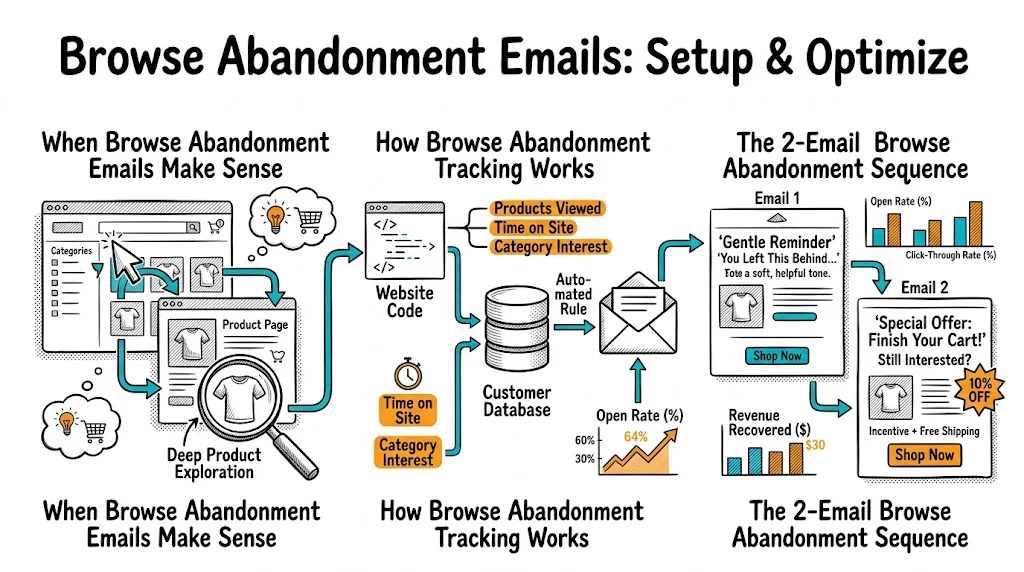
When Browse Abandonment Emails Make Sense

Not every store should prioritize browse abandonment. It's worth setting up if:

  • You have a substantial email list (5,000+ subscribers who visit regularly)
  • Your store has identified subscribers — you can only send browse abandonment to people whose email you know
  • Your product pages get meaningful traffic (100+ daily views per category)
  • You have a marketing automation tool capable of behavioral triggers (Klaviyo, Omnisend, MoEngage, WebEngage)

For new brands or those with small email lists, cart abandonment emails give more return per hour spent. Build that first.

How Browse Abandonment Tracking Works

For browse abandonment to work, three things must happen:

  1. Visitor identification: The visitor must be identified—either logged into an account, or their email must be known from a previous session cookie matched to a Klaviyo/MoEngage profile.

  2. Page view tracking: Your email platform must receive a "product viewed" event with the specific product ID and URL. In Klaviyo on Shopify, this happens automatically via the Klaviyo pixel. In other platforms, you may need to configure the event via GTM.

  3. Filter for add-to-cart: Only send the email if the visitor viewed the product but did not add it to cart (and did not purchase). Without this filter, you'll email buyers mid-checkout—a poor experience.

The 2-Email Browse Abandonment Sequence

Email 1: The Gentle Reminder (Send: 2–4 hours after browse)

Job: Surface the product they looked at, gently. Not pushy. Like a friend saying "hey, you were looking at this."

Subject line options:

  • "Still thinking about [Product Name]?"
  • "You left something interesting behind"
  • "We noticed you were browsing [Product Category]"

Template:

Hi [First Name],

We saw you checking out [Product Name] earlier.

[Product Image]

[Product Name] — [One-line benefit description]

If you had questions or weren't sure if it's right for you, here's what [X] customers say:

"[Short, specific review]" — [Name, City]

[View [Product Name] →]

No pressure — just wanted to make sure you didn't lose track of something you liked.

Key rules:

  • Don't include a discount in Email 1. You're testing whether gentle nudging converts. Save the offer for Email 2.
  • Use the actual product name and image — generic "items you viewed" emails without specific product context underperform.
  • Keep it short. This is a reminder, not a sales pitch.

Email 2: Social Proof + Optional Incentive (Send: 24 hours after Email 1, if no conversion)

Job: Address hesitation. Provide more proof. Add a light incentive if needed.

Subject line options:

  • "Other customers who loved [Product Name] also bought..."
  • "Questions about [Product Name]? Here's the honest answer."
  • "One reason most people choose [Product Name]"

Template:

Hi [First Name],

[Product Name] keeps coming back to mind? Here's what you should know:

✓ [Key differentiator 1] ✓ [Key differentiator 2] ✓ [Trust signal — e.g., "10,000+ orders shipped", "4.7 stars across 900 reviews"]

Frequently asked questions:

Is it suitable for [common concern relevant to your category]? Yes, [clear answer].

How long before I see results? [Honest answer.]

[Buy [Product Name] Now →]

P.S. We offer [free returns / COD / free shipping above ₹X] so there's no risk in trying it.

Key rules:

  • Answer the real objections specific to your product category
  • For wellness/beauty products: address skin type concerns, ingredients, or usage
  • Mention COD if your audience is COD-heavy — it removes a purchase barrier

Timing Strategies

Immediacy matters, but don't be creepy: Sending within 1 hour of a browse session can feel too fast—the visitor may still be on your site. 2–4 hours is the recommended first send for most categories.

Consider shopping hours: Indian shoppers browse heavily between 9–11 PM. A browse abandonment email sent at midnight often performs worse than one sent the next morning at 10 AM. Test timing by when it reaches the inbox, not just when the browse happened.

Weekend vs. weekday: Saturday browse abandonment emails get opened less than Tuesday-Thursday sends. If you browse-track on Saturday, consider sending Monday morning.

Segmentation for Browse Abandonment

Not all browsers are equal. Segment for better results:

High-value category browsers: Visitors who browsed your ₹2,000+ products are worth a slightly more generous incentive than someone browsing your ₹299 entry-level items. The AOV justifies the offer.

Repeat browsers: Someone who has browsed the same product twice or three times in a week has strong intent. Escalate the sequence—offer a stronger incentive or create urgency ("Only 8 left in stock").

New subscribers vs. long-time subscribers: New subscribers who browse immediately after signing up may just be exploring. Long-time subscribers who rarely browse but suddenly look at a specific product have unusual intent—treat them as high-priority.

Category-specific messaging: A subscriber browsing your men's grooming section should get a browse abandonment email that's specifically framed for men. Sending a generic "you viewed something" email feels impersonal when you know exactly what they looked at and who they are.

What to Show When Someone Browsed Multiple Products

If a visitor viewed 3–5 products, most automation tools will default to the most recently viewed product. This is usually right, but consider:

  • If one product is your hero SKU, feature it even if they viewed it earlier
  • If one product is significantly higher-value, feature it (opportunity for AOV lift)
  • If the products are from the same category, feature a "complete the look / complete the routine" bundle message

Personalizing the On-Site Experience for Browse Abandoners

When browse abandoners click through your email, show them the product they viewed immediately—don't send them to your homepage and make them hunt.

CustomFit.ai lets you create personalized landing experiences for email traffic. When someone comes back via a browse abandonment email, you can show them a page that highlights the specific product they viewed, with relevant reviews, and a trust-forward layout. This continuity between email and page lifts conversion meaningfully—visitors who see a matching experience convert at 1.5–2x the rate of those sent to a generic page.

See how to build email-to-landing-page continuity with CustomFit.ai →

Browse Abandonment for COD Shoppers

COD shoppers in India often have a different hesitation profile. The barrier isn't payment risk (COD eliminates that) but uncertainty about:

  • Whether the product is right for them
  • Delivery time (especially for time-sensitive festive purchases)
  • Whether they'll be home for delivery

Your browse abandonment emails for COD audiences should address these specifically:

  • "Cash on delivery available — no card needed"
  • "Ships within 24 hours — arrives before [date]" during festive seasons
  • "Easy returns if it's not right for you"

These trust signals matter more than discounts for many COD-heavy segments.

Metrics to Track

  • Open rate: Target 25–40% for browse abandonment (higher than average campaign, lower than cart abandonment)
  • Click-to-open rate: 15–25% is strong for Email 1; Email 2 with social proof/FAQ should hit 20–30%
  • Conversion rate from click: 5–15%. This is where landing page experience matters most.
  • Revenue per recipient: The north star metric. Combine open rate, click rate, and AOV to get a single number you can optimize against.

Tips and Best Practices

  • Always exclude cart abandoners and buyers. If someone added to cart after browsing, suppress them from browse abandonment and move them to the cart abandonment flow. If they bought, suppress completely.
  • Limit to 2 emails in the browse series. More than 2 becomes annoying for lower-intent traffic. If they haven't converted after 2 emails, they weren't ready—don't burn the relationship.
  • Use product images prominently. Browse abandonment emails live or die on the product image. Use the same high-quality images from your product page.
  • Test "low stock" triggers carefully. "Only 3 left" urgency works when true. False scarcity destroys trust permanently with Indian shoppers who will check and call you out on social media.

Key Takeaways

  • Browse abandonment emails target product-page visitors who didn't add to cart — more browsers than cart abandoners, lower individual intent
  • Requires visitor identification and product-view tracking via your email platform
  • Two-email sequence: gentle reminder at 2–4 hours, social proof + optional offer at 24 hours
  • Don't offer a discount in Email 1—test whether nudging alone converts before spending discount budget
  • Segment by intent signals: repeat browsers, high-value category, COD region
  • Pair email click-through with personalized landing pages to convert returning visitors at higher rates