CustomFit.ai β€” Website personalization, A/B testing and CRO for Shopify and D2C
Product
Features
✱
Website Personalization
Adapt to each visitor's behavior & intent
β§–
A/B & Multivariate Testing
Rigorous experimentation
✨
AI CopilotNEW
Personalize with a prompt
πŸ€–
AI WingmanNEW
Auto-optimize toward winners
🎯
AI Conversion OptimizerNEW
GPT-grade test ideas
✎
No-Code Visual Editor
Drag-and-drop edit any element
β–¦
Product Recommendations
Personalized recs that lift AOV
βš‘
Feature Flags
Ship safely with kill-switches
β—§
Chrome Extension
Edit your store in the browser
⧉
Shopify, WooCommerce & more
All platform integrations
View all features β†’
Use Cases
$
Price A/B Testing
Test price points to maximize revenue
β–¦
Theme A/B Testing
Compare whole layouts & designs
πŸ—‚
Template A/B Testing
Test whole PDP/PLP templates
🏷
Discount A/B Testing
Find the offer that converts
🚚
Shipping A/B Testing
Thresholds, speed & copy
✍
Content A/B Testing
Copy, images & reviews
πŸ’³
Checkout Gateway A/B
Payments & one-click
βŒ–
Geo-Based Personalization
Per-location content & offers
⚑
Buyer-Intent Nudges
Exit-intent & retargeting
↔
Split-URL / Redirection
Full-page redirect tests
View all use cases β†’
Solutions & Guides
β€’
Conversion Rate Optimization
The complete CRO guide
β§–
A/B Testing Software
Buyer's guide for D2C
πŸ›’
Cart Abandonment Recovery
Win back lost carts
πŸ“°
Landing Page Optimization
Convert more paid traffic
S
Shopify A/B Testing
Test your store, no code
S
Shopify Personalization
Tailor the store per shopper
β—”
First-Time Visitor Offers
Convert new shoppers with trust & offers
β˜…
Repeat-Customer Experiences
Reward and re-engage loyal buyers
β—Ž
Campaign-Matched Pages
Match the landing page to the ad
βŒ–
Location-Based Experiences
Currency, language & regional offers
Explore CRO β†’
Customer stories
GIVA
+32%
conversion via personalized recs
GIVA
Mamaearth
+18%
revenue lift from PDP A/B tests
ME
The Sleep Company
+24%
AOV from product recommendations
TSC
Read customer stories β†’
Integrations
SWsfGA+15
✦
Not sure where to start?
Let AI Copilot pick your first tests

β€œWe wake up to evidence-backed tests ready to deploy β€” not a backlog of maybe ideas.”

AN
Anirudh S.
Growth Β· Chargebee
β˜…β˜…β˜…β˜…β˜…4.8on G2 Β· 2,400+ brands
Talk to our team β†’
Widgets
Integrations
Ecommerce & Checkout
Shopify
Shopline
Shoplazza
GoKwik
ShopFlo
Razorpay Magic Checkout
Breeze
Shiprocket
View all integrations β†’
Analytics & Behavior
Google Analytics 4
Microsoft Clarity
Hotjar
Mixpanel
Amplitude
Heap
Adobe Analytics
Segment (CDP)
View all integrations β†’
Engagement, CRM & More
Klaviyo
MoEngage
CleverTap
WebEngage
HubSpot
Salesforce
Slack
Meta Ads
View all integrations β†’
CustomersPricing
Resources
CRO
β–€
Playbooks
Proven strategies to boost conversions
πŸŽ™
Interviews
D2C leaders & marketing experts
β–Ά
Webinars
Live deep dives & product sessions
Learn
✎
Blog
Tips, experiments & best practices
πŸ“•
Free E-Books
Mastering personalization
πŸ“–
Conversion Glossary
Every CRO term, defined
✦AI CopilotNEWLog inBook a demo
Start free trial
Select your platform β€” Install in 2 minsWe'll tailor the setup
⚑ Risk-free 14-day trial · No credit card · Cancel anytime
S
Shopify
Install from Shopify App Store
β€Ί
W
WooCommerce
Install the WooCommerce plugin
β€Ί
B
BigCommerce
Install from BigCommerce App Marketplace
β€Ί
SL
Shopline
Install from Shopline App Store
β€Ί
M
Salesforce / Magento
Install from the marketplace
β€Ί
SZ
Shoplazza
Install from Shoplazza App Store
β€Ί
WP
WordPress / Webflow
Install plugin or paste the script
β€Ί
β—§
Others
Custom-built on React, Next.js, etc.
β€Ί
Tip: pick your platform β€” we handle the restBook a demo β†’
Product
Website PersonalizationA/B & Multivariate TestingAI CopilotAI WingmanAI Conversion OptimizerNo-Code Visual EditorProduct RecommendationsFeature FlagsView all features β†’
Use Cases
Price A/B TestingTheme A/B TestingTemplate A/B TestingDiscount A/B TestingShipping A/B TestingContent A/B TestingCheckout Gateway A/BGeo-Based PersonalizationBuyer-Intent NudgesSplit-URL / Redirection
Solutions & Guides
Conversion Rate OptimizationA/B Testing SoftwareCart Abandonment RecoveryLanding Page OptimizationShopify A/B TestingShopify Personalization
Explore
WidgetsIntegrationsCustomersPricing
Resources
BlogPlaybooksWebinarsInterviewsE-BooksConversion Glossary
Platforms
ShopifyShoplineShoplazzaChrome ExtensionAll integrations
Start free trialBook a demo
Homeβ€ΊBlogβ€Ίemail retentionβ€ΊPost-Purchase Email Flow: Optimize for LTV

Post-Purchase Email Flow: Optimize for LTV

SKSharan KumarCo-Founder & CTO, CustomFit.aiJanuary 15, 20259 min read
On this page
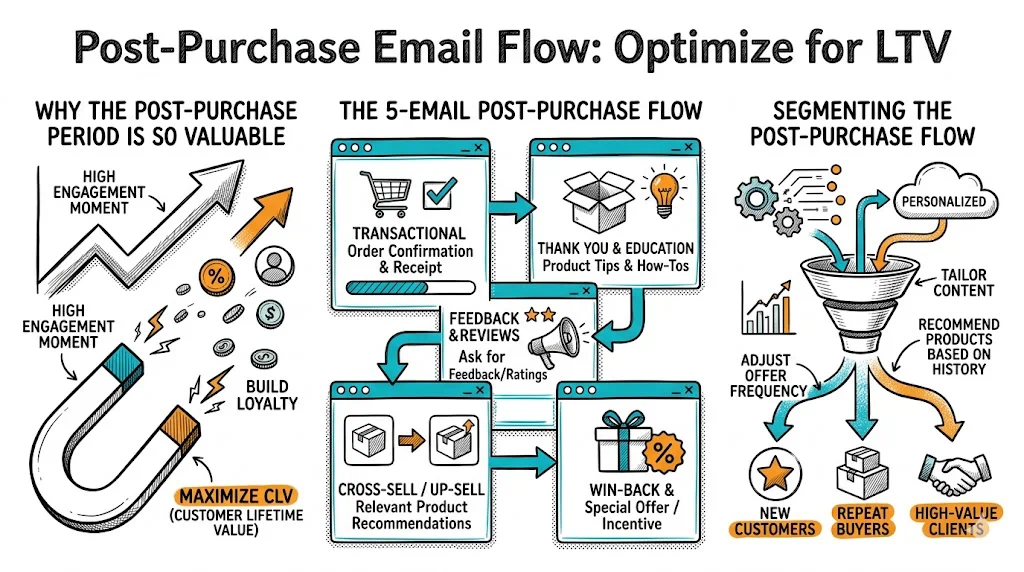
  1. Why the Post-Purchase Period Is So Valuable
  2. The 5-Email Post-Purchase Flow
  3. Email 1: Order Confirmation + Excitement (Send: Immediately after purchase)
  4. Email 2: Shipping Update + "While You Wait" Content (Send: When order ships)
  5. Email 3: Usage Education + First Review Ask (Send: Day 5–7 after delivery)
  6. Email 4: Review Request (Send: Day 10–14 after delivery)
  7. Email 5: Replenishment / Cross-Sell (Send: 60–75% of expected repurchase cycle)
  8. Segmenting the Post-Purchase Flow
  9. Using Post-Purchase Data to Improve Your Store
  10. Metrics to Track for Post-Purchase Flows
  11. Tips and Best Practices
  12. Key Takeaways
0%
Post-Purchase Email Flow: Optimize for LTV

From the conversion glossary

Concepts referenced in this article, defined.

Definition
What Is Bundle? Definition & Guide
Definition
What Is Baseline? Definition, Formula & Guide
Definition
What Is Repeat Purchase Rate? Definition & Guide
Definition
What Is Social Proof? Definition & Guide
Definition
What Is Upsell? Definition & Guide
← Back to Email Retention guide
Try CustomFit.ai

Run A/B tests and personalize your store without code. 14-day free trial, no credit card.

Start free trial β†’
Share
XLinkedInEmail

Related articles

email retention

Win-Back Email Campaigns for D2C Brands

Sapna JoharΒ· 8 min read
email retention

WhatsApp Marketing for D2C in India

Sapna JoharΒ· 7 min read
email retention

Welcome Email Series: Templates for Ecommerce

Sapna JoharΒ· 8 min read

Start lifting conversions today.

Run rigorous A/B tests and personalize every visit on Shopify or any storefront β€” no engineers required.

Start free trialBook a demo

Built for every D2C category

🧴
Skincare
πŸ’„
Beauty
🌿
Wellness
β˜•
F&B
πŸ‘Ÿ
Apparel
πŸ’
Jewelry
πŸ›‹οΈ
Home
🍼
Baby
Live Β· Right now
Mamaearth β€” free-shipping band +12.4% AOVGIVA β€” festive collection page +34% revenueBellavita β€” PDP CTA test +27.4% CVRKapiva β€” Quiz-driven recs +9.48% CTRThe Sleep Co β€” landing personalized 2Γ— capturesPlum β€” Returning shopper swap +18.2% CVRMamaearth β€” free-shipping band +12.4% AOVGIVA β€” festive collection page +34% revenueBellavita β€” PDP CTA test +27.4% CVRKapiva β€” Quiz-driven recs +9.48% CTRThe Sleep Co β€” landing personalized 2Γ— capturesPlum β€” Returning shopper swap +18.2% CVR
Get in touch

Tell us about your store.

We reply within an hour during business hours. No sales pitch, no spam β€” just answers from someone who's seen 2,400+ D2C stores.

βœ“ Reply within 1 hourβœ“ No spam, everβœ“ Free demo & setup help
βœ“ Thanks! We'll be in touch shortly.
CustomFit.ai

The all-in-one website personalization, A/B testing & CRO platform for high-growth D2C brands. Made by marketers, fueled by coffee.

inπ•β—Žβ–Άf
Product
  • Features
  • A/B Testing
  • Personalization
  • AI Copilot
  • AI Wingman
  • AI Conversion Optimizer
  • Feature Flags
  • Widgets
  • Integrations
  • ROI Calculator
Platforms
  • Shopify
  • Shopline
  • Shoplazza
  • Salesforce
  • Chrome Extension
  • All Integrations
Resources
  • Blog
  • Playbooks
  • Webinars
  • GrowthFit Interviews
  • Free E-Books
  • Conversion Glossary
  • Case Studies
Compare
  • vs VWO
  • vs Optimizely
  • vs Google Optimize
  • vs Mutiny
  • vs Intelligems
  • vs Shoplift
  • vs AB Tasty
  • vs Convert
  • vs Kameleoon
Company
  • About Us
  • Partners
  • CustomFit Awards
  • Recognition
  • Contact
  • Privacy Policy
  • Terms & Conditions
Β© 2026 CustomFit.ai Β· Valley Monks Pvt Ltd Β· Made by marketers, fueled by coffee, and obsessed with conversions.
SOC 2 Type II Β· GDPR Β· CCPA Β· ISO 27001

The post-purchase email flow is your single best opportunity to convert a one-time buyer into a loyal, repeat customer. Acquiring that customer cost you β‚Ή300–₹500 or more in ads and marketing. The post-purchase flow is how you make that cost worthwhile. Most brands send a receipt and disappear. The brands with strong LTV send a structured, personalized sequence that builds trust, generates reviews, and creates the context for a second purchase. Here's how to build one.

Why the Post-Purchase Period Is So Valuable

A buyer who just purchased from you is in a uniquely receptive state:

  • They committed money, so they're motivated to have a good experience
  • They're curious about the product and open to learning how to use it
  • Trust is at its highest (the transaction happened)
  • They're not yet exhausted by your marketing

This windowβ€”from order confirmation through the first 30 daysβ€”is where you either reinforce the decision to buy or let doubt creep in. Doubt leads to returns, negative reviews, and customers who never come back.

Done well, a post-purchase flow increases repeat purchase rate by 15–25% and generates 4–7x more reviews than passive post-purchase experiences.

The 5-Email Post-Purchase Flow

Email 1: Order Confirmation + Excitement (Send: Immediately after purchase)

Job: Confirm the order, build excitement, reduce buyer's remorse.

Subject line: "Your order is confirmed β€” here's what happens next"

Template:

Hi [First Name],

Your order is on its way! Here's what you ordered:

[Order details: Product Name, Quantity, Amount, Order #]

What happens next:

  • We'll pack your order within [24 hours / same day]
  • You'll get a shipping confirmation with tracking details
  • Expected delivery: [Date Range]

While you wait, here's a quick guide to getting the most from [Product Name]: [Link to usage blog post or guide]

If you have any questions, reply to this email or reach us at [support email / WhatsApp number].

Excited for you to try it, [Name], [Brand Team]

Key rules:

  • Include order details prominently β€” this reduces "where's my order" support queries
  • Add excitement, not just logistics β€” the customer should feel good about their purchase
  • Link to a usage guide or content that builds anticipation

Email 2: Shipping Update + "While You Wait" Content (Send: When order ships)

Job: Confirm shipping, build anticipation, deliver value before the product arrives.

Subject line: "Your [Product Name] is on its way! Track it here"

Template:

Hi [First Name],

Great news β€” your order has shipped!

Track it here: [Tracking Link]

Expected arrival: [Date]

While you wait, here's how to get the best results from [Product Name]:

[2–3 tip bullet points, or link to video/blog content]

[Photo of product / brand photo that builds anticipation]

Reach out if delivery doesn't arrive by [date + 2 days] β€” we'll sort it immediately.

Key rules:

  • The tracking link is the primary job of this email β€” make it prominent
  • Usage tips before arrival create positive anticipation and reduce "I don't know how to use this" first-experience problems
  • Set explicit delivery date expectations; uncertainty is the #1 driver of "where's my order" anxiety

Email 3: Usage Education + First Review Ask (Send: Day 5–7 after delivery)

Job: Help them succeed with the product. Ask for feedback (not yet a public review β€” that's next).

Subject line options:

  • "How's [Product Name] working for you?"
  • "Quick question about your [Brand] order"
  • "Getting the most out of [Product Name] β€” a few tips"

Template:

Hi [First Name],

You've had [Product Name] for a few days now β€” how's it going?

Here are the most common questions we get from new customers:

Q: [Most common question] A: [Short, clear answer]

Q: [Second question] A: [Answer]

If anything isn't right β€” wrong size, not what you expected, any issue at all β€” reply here and we'll fix it. No hoops to jump through.

And if things are going well, we'd love to hear that too. Even a quick reply means a lot.

Key rules:

  • Ask for private feedback before public reviews β€” this catches problems before they become 1-star reviews
  • Use FAQ format to proactively address doubts
  • The "reply here and we'll fix it" line builds enormous trust and catches unhappy customers before they go to Google

Email 4: Review Request (Send: Day 10–14 after delivery)

Job: Convert satisfied customers into public advocates.

Subject line options:

  • "Your honest review would mean the world to us"
  • "Can we ask you one quick thing, [First Name]?"
  • "Help other customers like you β€” share your experience"

Template:

Hi [First Name],

You've had [Product Name] for a couple of weeks now. If it's been good, could you take 2 minutes to share your experience?

Reviews from customers like you help other [target customer, e.g., "Indian moms looking for chemical-free skincare"] decide if [Brand] is right for them.

[Leave a Review on Google β†’] [Leave a Review on our website β†’]

If your experience wasn't great, please reply to this email first β€” we want to make it right before anything else.

Thank you, [Brand Team]

Key rules:

  • Ask for honest reviews, not "5-star reviews" β€” the request feels more genuine and customers respond better
  • Give two review pathways: website reviews (for social proof on your store) and Google (for local/brand trust)
  • Always include the unhappy-customer redirect

Email 5: Replenishment / Cross-Sell (Send: 60–75% of expected repurchase cycle)

Job: Trigger the second purchase at exactly the right moment.

Subject line options:

  • "Time to reorder [Product Name]?"
  • "Your [Product] is probably running low β€” here's a quick refill"
  • "Most customers reorder around now β€” here's why"

Template:

Hi [First Name],

If you've been using [Product Name] as recommended, you're probably getting close to the end of your supply.

Most customers reorder around this point. Here's a quick link to make it easy:

[Reorder [Product Name] β†’]

And if you're ready to add something new to your routine, customers who love [Product Name] often pair it with:

  • [Complementary Product 1] β€” [One-line benefit]
  • [Complementary Product 2] β€” [One-line benefit]

Both ship with your reorder, so you get free shipping on the bundle.

Key rules:

  • Time this based on your actual product's usage period β€” don't guess
  • The cross-sell should be genuinely complementary, not random
  • Bundle framing (free shipping together) is an AOV lever

Segmenting the Post-Purchase Flow

One sequence won't fit all buyers. Segment at minimum by:

First-time buyers vs. repeat buyers: First-timers need more brand education. Repeat buyers know the brand β€” skip the education and focus on relationship and upsell.

Product category: A supplements customer needs different usage education than a fashion customer. Build separate flows per product category or at least per category group.

COD vs. prepaid: COD customers in India have slightly different psychology post-purchase. They're more likely to cancel on delivery if something feels off. Your COD post-purchase flow should be more reassurance-heavy: delivery date confirmation, easy return process explained upfront.

High-AOV vs. low-AOV orders: A β‚Ή3,000+ order deserves a more premium post-purchase experience. Consider a handwritten note card in the package, a more personalized email from the founder/team, and a higher-value review incentive.

Using Post-Purchase Data to Improve Your Store

Post-purchase email engagement reveals what customers care about most. High open rates on usage tip emails signal your customers want education. High click rates on cross-sell products point to bundle opportunities on your product pages.

Use this data to personalize the returning visitor experience with CustomFit.ai. Customers who opened your usage tip email but haven't bought again can see a specific "next step" message when they return to your store. Customers who clicked the review request but didn't leave a review can see a gentle reminder in a site banner.

See how CustomFit.ai connects email behavior to on-site experience β†’

Metrics to Track for Post-Purchase Flows

  • Sequence open rate: Average across all 5 emails. Target: 35–50%
  • Review generation rate: Reviews generated / orders that entered the flow. Target: 5–15%
  • Second purchase rate within 90 days: The ultimate LTV metric. Track cohort-by-cohort.
  • Refund/return rate: A well-executed post-purchase flow reduces returns by catching dissatisfied customers before they initiate returns. Track this against a baseline.
  • Revenue attributed to reorder email (Email 5): Directly measure how much of your repeat revenue flows from the replenishment trigger.

Tips and Best Practices

  • Automate everything. Post-purchase flows only work at scale if they're automated. Set them up once in Klaviyo, Omnisend, or MoEngage; let them run.
  • Update usage tip content seasonally. Monsoon usage tips for skincare products differ from summer tips. Refresh your Email 3 content quarterly.
  • Don't over-email. 5 emails over 2 months is enough. Adding more emails after this point is promotional email territory, not post-purchase.
  • Monitor for the best reorder timing. Your product might have a 45-day cycle on average, but it could be 30 days for one segment and 60 for another. Segment your replenishment trigger by actual purchase history.
  • Add WhatsApp follow-ups for COD-heavy segments. In India, WhatsApp order updates have dramatically higher open rates than email. Consider layering WhatsApp notifications on top of the email flow for delivery confirmation and review requests.

Key Takeaways

  • The post-purchase period is peak trust and peak openness β€” the brands that show up consistently in this window build dramatically higher LTV
  • Five-email structure: order confirmation, shipping update, usage education + feedback, review request, replenishment/cross-sell
  • Segment by first-time vs. repeat, COD vs. prepaid, and product category for meaningfully better results
  • The private feedback request (Email 3) is a review filter that catches unhappy customers before 1-star public reviews
  • Time your replenishment email at 60–75% of the expected usage period, not a fixed 60 days
  • Connect post-purchase email behavior to on-site personalization with CustomFit.ai to close the returning customer loop