CustomFit.ai โ€” Website personalization, A/B testing and CRO for Shopify and D2C
Product
Features
โœฑ
Website Personalization
Adapt to each visitor's behavior & intent
โง–
A/B & Multivariate Testing
Rigorous experimentation
โœจ
AI CopilotNEW
Personalize with a prompt
๐Ÿค–
AI WingmanNEW
Auto-optimize toward winners
๐ŸŽฏ
AI Conversion OptimizerNEW
GPT-grade test ideas
โœŽ
No-Code Visual Editor
Drag-and-drop edit any element
โ–ฆ
Product Recommendations
Personalized recs that lift AOV
โš‘
Feature Flags
Ship safely with kill-switches
โ—ง
Chrome Extension
Edit your store in the browser
โง‰
Shopify, WooCommerce & more
All platform integrations
View all features โ†’
Use Cases
$
Price A/B Testing
Test price points to maximize revenue
โ–ฆ
Theme A/B Testing
Compare whole layouts & designs
๐Ÿ—‚
Template A/B Testing
Test whole PDP/PLP templates
๐Ÿท
Discount A/B Testing
Find the offer that converts
๐Ÿšš
Shipping A/B Testing
Thresholds, speed & copy
โœ
Content A/B Testing
Copy, images & reviews
๐Ÿ’ณ
Checkout Gateway A/B
Payments & one-click
โŒ–
Geo-Based Personalization
Per-location content & offers
โšก
Buyer-Intent Nudges
Exit-intent & retargeting
โ†”
Split-URL / Redirection
Full-page redirect tests
View all use cases โ†’
Solutions & Guides
โคข
Conversion Rate Optimization
The complete CRO guide
โง–
A/B Testing Software
Buyer's guide for D2C
๐Ÿ›’
Cart Abandonment Recovery
Win back lost carts
๐Ÿ“ฐ
Landing Page Optimization
Convert more paid traffic
S
Shopify A/B Testing
Test your store, no code
S
Shopify Personalization
Tailor the store per shopper
โ—”
First-Time Visitor Offers
Convert new shoppers with trust & offers
โ˜…
Repeat-Customer Experiences
Reward and re-engage loyal buyers
โ—Ž
Campaign-Matched Pages
Match the landing page to the ad
โŒ–
Location-Based Experiences
Currency, language & regional offers
Explore CRO โ†’
Customer stories
GIVA
+32%
conversion via personalized recs
GIVA
Mamaearth
+18%
revenue lift from PDP A/B tests
ME
The Sleep Company
+24%
AOV from product recommendations
TSC
Read customer stories โ†’
Integrations
SWsfGA+15
โœฆ
Not sure where to start?
Let AI Copilot pick your first tests

โ€œWe wake up to evidence-backed tests ready to deploy โ€” not a backlog of maybe ideas.โ€

AN
Anirudh S.
Growth ยท Chargebee
โ˜…โ˜…โ˜…โ˜…โ˜…4.8on G2 ยท 2,400+ brands
Talk to our team โ†’
Widgets
Integrations
Ecommerce & Checkout
Shopify
Shopline
Shoplazza
GoKwik
ShopFlo
Razorpay Magic Checkout
Breeze
Shiprocket
View all integrations โ†’
Analytics & Behavior
Google Analytics 4
Microsoft Clarity
Hotjar
Mixpanel
Amplitude
Heap
Adobe Analytics
Segment (CDP)
View all integrations โ†’
Engagement, CRM & More
Klaviyo
MoEngage
CleverTap
WebEngage
HubSpot
Salesforce
Slack
Meta Ads
View all integrations โ†’
CustomersPricing
Resources
CRO
โ–ค
Playbooks
Proven strategies to boost conversions
๐ŸŽ™
Interviews
D2C leaders & marketing experts
โ–ถ
Webinars
Live deep dives & product sessions
Learn
โœŽ
Blog
Tips, experiments & best practices
๐Ÿ“•
Free E-Books
Mastering personalization
๐Ÿ“–
Conversion Glossary
Every CRO term, defined
โœฆAI CopilotNEWLog inBook a demo
Start free trial
Select your platform โ€” Install in 2 minsWe'll tailor the setup
โšก Risk-free 14-day trial ยท No credit card ยท Cancel anytime
S
Shopify
Install from Shopify App Store
โ€บ
W
WooCommerce
Install the WooCommerce plugin
โ€บ
B
BigCommerce
Install from BigCommerce App Marketplace
โ€บ
SL
Shopline
Install from Shopline App Store
โ€บ
M
Salesforce / Magento
Install from the marketplace
โ€บ
SZ
Shoplazza
Install from Shoplazza App Store
โ€บ
WP
WordPress / Webflow
Install plugin or paste the script
โ€บ
โ—ง
Others
Custom-built on React, Next.js, etc.
โ€บ
Tip: pick your platform โ€” we handle the restBook a demo โ†’
Product
Website PersonalizationA/B & Multivariate TestingAI CopilotAI WingmanAI Conversion OptimizerNo-Code Visual EditorProduct RecommendationsFeature FlagsView all features โ†’
Use Cases
Price A/B TestingTheme A/B TestingTemplate A/B TestingDiscount A/B TestingShipping A/B TestingContent A/B TestingCheckout Gateway A/BGeo-Based PersonalizationBuyer-Intent NudgesSplit-URL / Redirection
Solutions & Guides
Conversion Rate OptimizationA/B Testing SoftwareCart Abandonment RecoveryLanding Page OptimizationShopify A/B TestingShopify Personalization
Explore
WidgetsIntegrationsCustomersPricing
Resources
BlogPlaybooksWebinarsInterviewsE-BooksConversion Glossary
Platforms
ShopifyShoplineShoplazzaChrome ExtensionAll integrations
Start free trialBook a demo
Homeโ€บBlogโ€บplatformsโ€บWebsite Personalization for BigCommerce

Website Personalization for BigCommerce

AKAshwin KumarCo-Founder & CEO, CustomFit.aiJanuary 15, 20259 min read
On this page
  1. What Personalization Can Do for BigCommerce Merchants
  2. BigCommerce's Native Personalization Features
  3. Customer Groups
  4. Promotions Engine
  5. Stencil Theme Personalization
  6. Adding External Personalization Tools to BigCommerce
  7. Script Manager (Recommended)
  8. Direct Theme File Editing
  9. BigCommerce App Marketplace
  10. Personalization Scenarios to Implement First
  11. Scenario 1: New Visitor Trust Building
  12. Scenario 2: Returning Non-Purchaser Recovery
  13. Scenario 3: Traffic Source Matching
  14. Scenario 4: Cart Value Personalization
  15. Scenario 5: Geo-Based Content
  16. Measuring Personalization Impact on BigCommerce
  17. BigCommerce Personalization and SEO
  18. Tips and Best Practices
  19. Key Takeaways
0%
Website Personalization for BigCommerce

From the conversion glossary

Concepts referenced in this article, defined.

Definition
What Is Control? Definition, Formula & Guide
Definition
What Is Collection Page? Definition & Guide
Definition
What Is Custom Event? Definition, Formula & Guide
Definition
What Is Free Shipping Threshold? Definition & Guide
Definition
What Is Funnel Analysis? Definition & Guide
โ† Back to Platforms guide
Try CustomFit.ai

Run A/B tests and personalize your store without code. 14-day free trial, no credit card.

Start free trial โ†’
Share
XLinkedInEmail

Related articles

platforms

Website Personalization for WooCommerce

Ashwin Kumarยท 9 min read
platforms

Website Personalization for Magento

Ashwin Kumarยท 8 min read
platforms

Best Ecommerce Platform for CRO in 2026

Sapna Joharยท 9 min read

Start lifting conversions today.

Run rigorous A/B tests and personalize every visit on Shopify or any storefront โ€” no engineers required.

Start free trialBook a demo

Built for every D2C category

๐Ÿงด
Skincare
๐Ÿ’„
Beauty
๐ŸŒฟ
Wellness
โ˜•
F&B
๐Ÿ‘Ÿ
Apparel
๐Ÿ’
Jewelry
๐Ÿ›‹๏ธ
Home
๐Ÿผ
Baby
Live ยท Right now
Mamaearth โ€” free-shipping band +12.4% AOVGIVA โ€” festive collection page +34% revenueBellavita โ€” PDP CTA test +27.4% CVRKapiva โ€” Quiz-driven recs +9.48% CTRThe Sleep Co โ€” landing personalized 2ร— capturesPlum โ€” Returning shopper swap +18.2% CVRMamaearth โ€” free-shipping band +12.4% AOVGIVA โ€” festive collection page +34% revenueBellavita โ€” PDP CTA test +27.4% CVRKapiva โ€” Quiz-driven recs +9.48% CTRThe Sleep Co โ€” landing personalized 2ร— capturesPlum โ€” Returning shopper swap +18.2% CVR
Get in touch

Tell us about your store.

We reply within an hour during business hours. No sales pitch, no spam โ€” just answers from someone who's seen 2,400+ D2C stores.

โœ“ Reply within 1 hourโœ“ No spam, everโœ“ Free demo & setup help
โœ“ Thanks! We'll be in touch shortly.
CustomFit.ai

The all-in-one website personalization, A/B testing & CRO platform for high-growth D2C brands. Made by marketers, fueled by coffee.

in๐•โ—Žโ–ถf
Product
  • Features
  • A/B Testing
  • Personalization
  • AI Copilot
  • AI Wingman
  • AI Conversion Optimizer
  • Feature Flags
  • Widgets
  • Integrations
  • ROI Calculator
Platforms
  • Shopify
  • Shopline
  • Shoplazza
  • Salesforce
  • Chrome Extension
  • All Integrations
Resources
  • Blog
  • Playbooks
  • Webinars
  • GrowthFit Interviews
  • Free E-Books
  • Conversion Glossary
  • Case Studies
Compare
  • vs VWO
  • vs Optimizely
  • vs Google Optimize
  • vs Mutiny
  • vs Intelligems
  • vs Shoplift
  • vs AB Tasty
  • vs Convert
  • vs Kameleoon
Company
  • About Us
  • Partners
  • CustomFit Awards
  • Recognition
  • Contact
  • Privacy Policy
  • Terms & Conditions
ยฉ 2026 CustomFit.ai ยท Valley Monks Pvt Ltd ยท Made by marketers, fueled by coffee, and obsessed with conversions.
SOC 2 Type II ยท GDPR ยท CCPA ยท ISO 27001

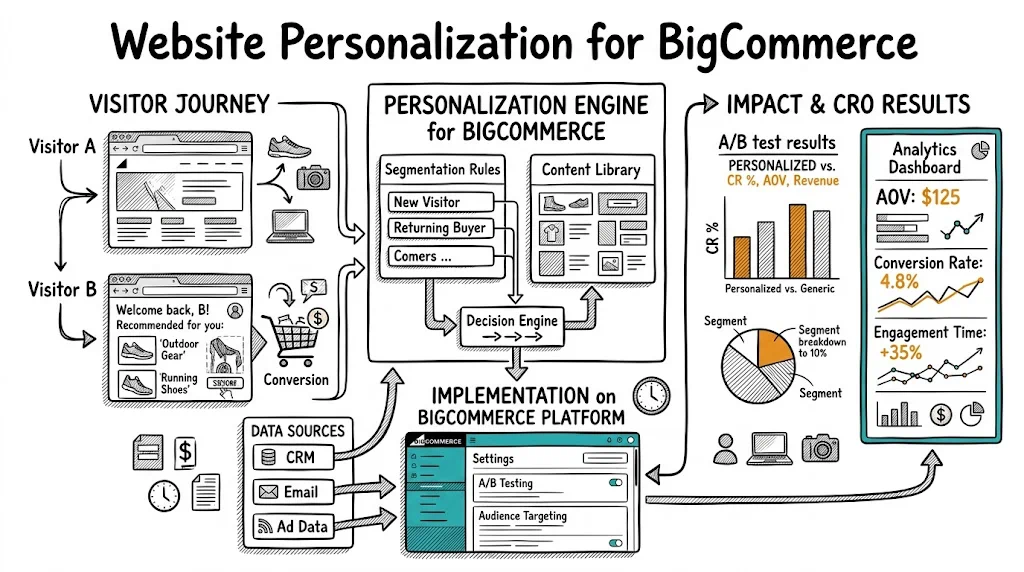
BigCommerce powers a wide range of merchants โ€” from mid-market D2C brands to B2B businesses โ€” and its personalization ecosystem has matured significantly. While it doesn't match Shopify's sheer breadth of third-party personalization apps, BigCommerce offers solid native features and integrates well with external personalization tools. For merchants who want to move beyond showing the same experience to every visitor and start delivering content, offers, and messaging that match each buyer's context, this guide covers everything you need to implement personalization effectively on BigCommerce.

What Personalization Can Do for BigCommerce Merchants

Before diving into implementation, it's worth understanding what personalization actually changes:

For new visitors: Show trust-heavy messaging (certifications, reviews, return policy), social proof ("10,000+ happy customers"), and first-order incentives. New visitors need trust before they'll buy.

For returning visitors who haven't purchased: Show urgency cues, the products they previously browsed, and a gentle incentive to complete their first purchase.

For existing customers: Show "Welcome back," recently purchased products (for reorder), and new arrivals in categories they've purchased from before.

For traffic from specific sources: A visitor from a "best protein powder India" Google search has different intent than one from an Instagram ad. Match your hero messaging to the channel.

For cart abandoners returning to the site: Show a recovery message ("You left something behind") and the specific products in their abandoned cart.

Each of these is a personalization scenario that can lift CVR meaningfully โ€” typically 10โ€“25% depending on how many visitors fall into each segment.

BigCommerce's Native Personalization Features

Customer Groups

BigCommerce's Customer Groups feature is one of the most powerful native personalization tools on any ecommerce platform. It allows you to:

  • Segment pricing: Show different prices to different customer groups (wholesale vs. retail, VIP vs. standard, logged-in vs. guest)
  • Control product visibility: Show or hide specific products to specific customer groups
  • Apply automatic discounts: Trigger promotions for specific customer groups

Practical use cases:

  • B2B wholesale pricing: logged-in wholesale accounts see trade prices; retail visitors see standard pricing
  • VIP loyalty tier: customers with 5+ orders automatically assigned to a VIP group that sees exclusive products and pricing
  • Geographic groups: international buyers see products that can be shipped to their region

To set up: Go to Customers > Customer Groups in your BigCommerce admin, create groups with their rules, and assign customers manually or through rules.

Promotions Engine

BigCommerce's Promotions engine allows condition-based offers:

  • "Spend over โ‚น2,000, get 15% off" โ€” AOV threshold promotion
  • "Free shipping for logged-in customers" โ€” account-based reward
  • "Buy 3 get 1 free" โ€” volume promotion
  • "First order discount" โ€” one-time new customer offer

Promotions aren't behavioral personalization in the richest sense, but they're powerful levers that BigCommerce merchants often underutilize.

Stencil Theme Personalization

BigCommerce's Stencil theme framework allows conditional content blocks via Handlebars templating. Developers can show different content based on:

  • Whether the customer is logged in
  • Which customer group they belong to
  • Which device they're using (desktop vs. mobile)
  • Which region they're browsing from (via IP geolocation in some setups)

This requires theme development work but creates a permanent, server-side personalization layer without relying on JavaScript tools.

Adding External Personalization Tools to BigCommerce

For behavioral personalization beyond what native features support, external tools are the right approach.

Script Manager (Recommended)

BigCommerce's Script Manager (Storefront > Script Manager) is the easiest way to add third-party scripts without editing theme files:

  1. Go to Storefront > Script Manager
  2. Click "Create a Script"
  3. Enter a name and description for your script
  4. Select "Script" as the script type
  5. Choose "All pages" or a specific page type
  6. Set Location to "Head" (critical for personalization to load before content renders)
  7. Paste your personalization tool's JavaScript snippet
  8. Save and verify in your testing tool's dashboard

Script Manager is available on Plus, Pro, and Enterprise plans. On Essentials, you'll need to edit theme files directly.

Direct Theme File Editing

For Essentials plan merchants or those who need more control:

  1. Go to Storefront > My Themes
  2. Click "Advanced" on your active theme
  3. Select "Edit Theme Files"
  4. Open templates/layout/base.html
  5. Add your script snippet in the <head> section
  6. Save changes

BigCommerce App Marketplace

Several personalization apps are available natively in the BigCommerce App Marketplace:

LimeSpot: Product recommendation personalization โ€” "Recently viewed," "Customers also bought," "Trending in this category." Works natively with BigCommerce product data.

Nosto: AI-driven product recommendations and behavioral personalization. Strong integration with BigCommerce, including collection page and email personalization.

Klaviyo: Primarily an email tool, but Klaviyo's BigCommerce integration also enables onsite personalization for email-identified visitors โ€” showing personalized content to visitors whose email you've captured.

CustomFit.ai: Loaded via Script Manager, provides behavioral A/B testing and personalization targeting based on visitor behavior (new vs. returning, traffic source, device, geo, cart value) with a no-code visual editor.

Personalization Scenarios to Implement First

Scenario 1: New Visitor Trust Building

Target: Visitors with no cookies / first session on the site

What to show: Trust-heavy hero banner ("10,000+ happy customers," "Free returns in 30 days"), review count prominently, certification badges above the fold, first-order welcome offer

What to hide or de-emphasize: Loyalty program prompts (irrelevant until they've bought), "Welcome back" copy

Expected impact: 8โ€“15% improvement in new visitor CVR

Setup in CustomFit.ai: Create a segment rule "Is new visitor = yes" and apply different hero content to that segment. No developer needed.

Scenario 2: Returning Non-Purchaser Recovery

Target: Visitors who have been to the site before but have never completed a purchase

What to show: The products they previously browsed, a compelling "Still thinking about it?" message, an incentive to complete first purchase (โ‚น100 off, free shipping)

Setup: "Visited site before AND no previous orders = yes" segment rule

Scenario 3: Traffic Source Matching

Target: Visitors from specific campaigns or search queries

What to show: Hero messaging that matches the ad creative or keyword โ€” "Seen our beard oil ad? Here's why 50,000 men switched" for Facebook traffic from beard oil ads

Setup: UTM parameter targeting โ€” visitors arriving with utm_campaign=beard-oil-aug25 see the beard oil-specific hero

Expected impact: 15โ€“25% CVR improvement for traffic-matched pages vs. generic homepage

Scenario 4: Cart Value Personalization

Target: Visitors with cart value between โ‚น800 and โ‚น999 (just below a โ‚น1,000 free shipping threshold)

What to show: A progress bar ("Add โ‚น200 more for free shipping!") and complementary product recommendations in the cart sidebar

Setup: Cart value segment + dynamic progress bar widget + curated recommendations

Scenario 5: Geo-Based Content

Target: Visitors from Tier 2/3 Indian cities (based on IP geolocation)

What to show: COD availability prominently featured, value-for-money messaging, regional language product descriptions if available

Setup: Geolocation segment rule in your personalization tool

Measuring Personalization Impact on BigCommerce

A/B test your personalization rules: Don't assume personalization is working โ€” test it. Show your personalized experience to 50% of the target segment and the default experience to the other 50%. Measure CVR, AOV, and revenue per session for each group.

Connect to GA4: BigCommerce integrates with Google Analytics 4. Ensure your personalization tool fires a custom event (or custom dimension) when a personalization rule is applied. Then segment GA4 reports by this dimension to compare personalized vs. non-personalized sessions.

BigCommerce Ecommerce Analytics: BigCommerce's built-in analytics can validate macro-level trends, though it doesn't natively segment by personalization rule.

Revenue per session by segment: The most useful metric for personalization impact. A 20% higher revenue per session for personalized visitors vs. control tells you the personalization is working.

BigCommerce Personalization and SEO

A common concern: does personalization hurt SEO? For BigCommerce, the key principles:

  • Client-side personalization doesn't affect crawlers: Googlebots see the default page content, not the personalized version. This is typically fine โ€” you want Google to see your core content, not a visitor-specific variant.
  • Don't use personalization to hide content from crawlers: Showing relevant content to visitors while hiding it from search engines (cloaking) violates Google's guidelines.
  • Customer Group pricing and product visibility is generally SEO-safe: Price differences for logged-in users are a normal commerce practice; as long as the core product content is crawlable, this is fine.

For technical SEO questions specific to your BigCommerce setup, consult with an SEO specialist who knows the platform.

Tips and Best Practices

  • Start with new vs. returning visitor personalization โ€” it's the highest-impact scenario with the simplest targeting rule; start here before building more complex rules
  • Use Script Manager instead of theme file edits โ€” it's safer, easier to manage, and doesn't break during theme updates
  • Limit simultaneous personalization rules to 3โ€“5 โ€” too many overlapping rules create unpredictable interactions; build and test rules one at a time
  • Test BigCommerce Customer Groups for B2B personalization โ€” if you have B2B customers, native Customer Groups provide the most reliable server-side personalization without third-party tools
  • Check BigCommerce plan limitations โ€” Script Manager and some advanced features are plan-limited; verify your plan supports the implementation approach you need
  • Archive personalization rules when campaigns end โ€” inactive rules that still fire create unexpected experiences; keep your rule library clean

Key Takeaways

  1. BigCommerce's native Customer Groups and Promotions engine provide strong server-side personalization without third-party tools โ€” use them for pricing, product visibility, and rule-based offers
  2. For behavioral personalization (new vs. returning, traffic source, cart value), use Script Manager to add an external personalization tool like CustomFit.ai without editing theme files
  3. New visitor trust-building and traffic source matching are the two highest-impact personalization scenarios to implement first
  4. Always A/B test personalization rules โ€” don't assume they're working; measure CVR for personalized vs. control segments
  5. Connect your personalization tool to GA4 with custom dimensions to enable full-funnel analysis beyond tool-level metrics
  6. Client-side personalization is SEO-safe as long as you're not hiding content from Googlebots that you're showing to real visitors

Related reading: Platforms Pillar | Personalization Pillar | A/B Testing on Salesforce Commerce Cloud | A/B Testing on Shoplazza | Website Personalization