CustomFit.ai โ€” Website personalization, A/B testing and CRO for Shopify and D2C
Product
Features
โœฑ
Website Personalization
Adapt to each visitor's behavior & intent
โง–
A/B & Multivariate Testing
Rigorous experimentation
โœจ
AI CopilotNEW
Personalize with a prompt
๐Ÿค–
AI WingmanNEW
Auto-optimize toward winners
๐ŸŽฏ
AI Conversion OptimizerNEW
GPT-grade test ideas
โœŽ
No-Code Visual Editor
Drag-and-drop edit any element
โ–ฆ
Product Recommendations
Personalized recs that lift AOV
โš‘
Feature Flags
Ship safely with kill-switches
โ—ง
Chrome Extension
Edit your store in the browser
โง‰
Shopify, WooCommerce & more
All platform integrations
View all features โ†’
Use Cases
$
Price A/B Testing
Test price points to maximize revenue
โ–ฆ
Theme A/B Testing
Compare whole layouts & designs
๐Ÿ—‚
Template A/B Testing
Test whole PDP/PLP templates
๐Ÿท
Discount A/B Testing
Find the offer that converts
๐Ÿšš
Shipping A/B Testing
Thresholds, speed & copy
โœ
Content A/B Testing
Copy, images & reviews
๐Ÿ’ณ
Checkout Gateway A/B
Payments & one-click
โŒ–
Geo-Based Personalization
Per-location content & offers
โšก
Buyer-Intent Nudges
Exit-intent & retargeting
โ†”
Split-URL / Redirection
Full-page redirect tests
View all use cases โ†’
Solutions & Guides
โคข
Conversion Rate Optimization
The complete CRO guide
โง–
A/B Testing Software
Buyer's guide for D2C
๐Ÿ›’
Cart Abandonment Recovery
Win back lost carts
๐Ÿ“ฐ
Landing Page Optimization
Convert more paid traffic
S
Shopify A/B Testing
Test your store, no code
S
Shopify Personalization
Tailor the store per shopper
โ—”
First-Time Visitor Offers
Convert new shoppers with trust & offers
โ˜…
Repeat-Customer Experiences
Reward and re-engage loyal buyers
โ—Ž
Campaign-Matched Pages
Match the landing page to the ad
โŒ–
Location-Based Experiences
Currency, language & regional offers
Explore CRO โ†’
Customer stories
GIVA
+32%
conversion via personalized recs
GIVA
Mamaearth
+18%
revenue lift from PDP A/B tests
ME
The Sleep Company
+24%
AOV from product recommendations
TSC
Read customer stories โ†’
Integrations
SWsfGA+15
โœฆ
Not sure where to start?
Let AI Copilot pick your first tests

โ€œWe wake up to evidence-backed tests ready to deploy โ€” not a backlog of maybe ideas.โ€

AN
Anirudh S.
Growth ยท Chargebee
โ˜…โ˜…โ˜…โ˜…โ˜…4.8on G2 ยท 2,400+ brands
Talk to our team โ†’
Widgets
Integrations
Ecommerce & Checkout
Shopify
Shopline
Shoplazza
GoKwik
ShopFlo
Razorpay Magic Checkout
Breeze
Shiprocket
View all integrations โ†’
Analytics & Behavior
Google Analytics 4
Microsoft Clarity
Hotjar
Mixpanel
Amplitude
Heap
Adobe Analytics
Segment (CDP)
View all integrations โ†’
Engagement, CRM & More
Klaviyo
MoEngage
CleverTap
WebEngage
HubSpot
Salesforce
Slack
Meta Ads
View all integrations โ†’
CustomersPricing
Resources
CRO
โ–ค
Playbooks
Proven strategies to boost conversions
๐ŸŽ™
Interviews
D2C leaders & marketing experts
โ–ถ
Webinars
Live deep dives & product sessions
Learn
โœŽ
Blog
Tips, experiments & best practices
๐Ÿ“•
Free E-Books
Mastering personalization
๐Ÿ“–
Conversion Glossary
Every CRO term, defined
โœฆAI CopilotNEWLog inBook a demo
Start free trial
Select your platform โ€” Install in 2 minsWe'll tailor the setup
โšก Risk-free 14-day trial ยท No credit card ยท Cancel anytime
S
Shopify
Install from Shopify App Store
โ€บ
W
WooCommerce
Install the WooCommerce plugin
โ€บ
B
BigCommerce
Install from BigCommerce App Marketplace
โ€บ
SL
Shopline
Install from Shopline App Store
โ€บ
M
Salesforce / Magento
Install from the marketplace
โ€บ
SZ
Shoplazza
Install from Shoplazza App Store
โ€บ
WP
WordPress / Webflow
Install plugin or paste the script
โ€บ
โ—ง
Others
Custom-built on React, Next.js, etc.
โ€บ
Tip: pick your platform โ€” we handle the restBook a demo โ†’
Product
Website PersonalizationA/B & Multivariate TestingAI CopilotAI WingmanAI Conversion OptimizerNo-Code Visual EditorProduct RecommendationsFeature FlagsView all features โ†’
Use Cases
Price A/B TestingTheme A/B TestingTemplate A/B TestingDiscount A/B TestingShipping A/B TestingContent A/B TestingCheckout Gateway A/BGeo-Based PersonalizationBuyer-Intent NudgesSplit-URL / Redirection
Solutions & Guides
Conversion Rate OptimizationA/B Testing SoftwareCart Abandonment RecoveryLanding Page OptimizationShopify A/B TestingShopify Personalization
Explore
WidgetsIntegrationsCustomersPricing
Resources
BlogPlaybooksWebinarsInterviewsE-BooksConversion Glossary
Platforms
ShopifyShoplineShoplazzaChrome ExtensionAll integrations
Start free trialBook a demo
Homeโ€บBlogโ€บcroโ€บSession Recording Analysis for Conversion Insights

Session Recording Analysis for Conversion Insights

SJSapna JoharHead of Growth & CRO, CustomFit.aiJanuary 15, 20258 min read
On this page
  1. Why Session Recordings Are Underused
  2. Setting Up Your Session Recording Tool
  3. Tool Options for Indian D2C Brands
  4. Capturing the Right Sessions
  5. The Structured Analysis Framework
  6. Step 1: Create Your Analysis Queue
  7. Step 2: Watch with a Tagging System
  8. Step 3: Convert Observations to Hypotheses
  9. High-Value Patterns to Look For
  10. Rage Clicks
  11. Scroll Depth Drop-Offs
  12. Form Abandonment Patterns
  13. Hesitation at Price or CTA
  14. From Recordings to Testing Priority
  15. Combining Session Recordings with Other Data
  16. Tips and Best Practices
  17. Key Takeaways
0%
Session Recording Analysis for Conversion Insights

From the conversion glossary

Concepts referenced in this article, defined.

Definition
What Is Session Recording? Definition & Guide
Definition
What Is Friction? Definition & Guide
Definition
What Is Hypothesis? Definition & Guide
Definition
What Is Funnel Analysis? Definition & Guide
Definition
What Is Scroll Depth? Definition, Formula & Guide
โ† Back to Cro guide
Try CustomFit.ai

Run A/B tests and personalize your store without code. 14-day free trial, no credit card.

Start free trial โ†’
Share
XLinkedInEmail

Related articles

cro

CRO for D2C Brands: How to Increase Conversion Rate Without More Ad Spend

A practical guide to conversion rate optimization for direct-to-consumer brands โ€” covering product pages, checkout, homepage, and the full D2C funnel with real tactics that work.

Sapna Joharยท 5 min read
cro

Cart Abandonment Reduction: 12 Tactics That Actually Work

The average cart abandonment rate is 70%. Here are 12 proven tactics to recover more abandoned carts โ€” on-site interventions, email flows, and personalization strategies with real results.

Sapna Joharยท 6 min read
cro

When NOT to A/B Test: Decision Framework

Sapna Joharยท 7 min read

Start lifting conversions today.

Run rigorous A/B tests and personalize every visit on Shopify or any storefront โ€” no engineers required.

Start free trialBook a demo

Built for every D2C category

๐Ÿงด
Skincare
๐Ÿ’„
Beauty
๐ŸŒฟ
Wellness
โ˜•
F&B
๐Ÿ‘Ÿ
Apparel
๐Ÿ’
Jewelry
๐Ÿ›‹๏ธ
Home
๐Ÿผ
Baby
Live ยท Right now
Mamaearth โ€” free-shipping band +12.4% AOVGIVA โ€” festive collection page +34% revenueBellavita โ€” PDP CTA test +27.4% CVRKapiva โ€” Quiz-driven recs +9.48% CTRThe Sleep Co โ€” landing personalized 2ร— capturesPlum โ€” Returning shopper swap +18.2% CVRMamaearth โ€” free-shipping band +12.4% AOVGIVA โ€” festive collection page +34% revenueBellavita โ€” PDP CTA test +27.4% CVRKapiva โ€” Quiz-driven recs +9.48% CTRThe Sleep Co โ€” landing personalized 2ร— capturesPlum โ€” Returning shopper swap +18.2% CVR
Get in touch

Tell us about your store.

We reply within an hour during business hours. No sales pitch, no spam โ€” just answers from someone who's seen 2,400+ D2C stores.

โœ“ Reply within 1 hourโœ“ No spam, everโœ“ Free demo & setup help
โœ“ Thanks! We'll be in touch shortly.
CustomFit.ai

The all-in-one website personalization, A/B testing & CRO platform for high-growth D2C brands. Made by marketers, fueled by coffee.

in๐•โ—Žโ–ถf
Product
  • Features
  • A/B Testing
  • Personalization
  • AI Copilot
  • AI Wingman
  • AI Conversion Optimizer
  • Feature Flags
  • Widgets
  • Integrations
  • ROI Calculator
Platforms
  • Shopify
  • Shopline
  • Shoplazza
  • Salesforce
  • Chrome Extension
  • All Integrations
Resources
  • Blog
  • Playbooks
  • Webinars
  • GrowthFit Interviews
  • Free E-Books
  • Conversion Glossary
  • Case Studies
Compare
  • vs VWO
  • vs Optimizely
  • vs Google Optimize
  • vs Mutiny
  • vs Intelligems
  • vs Shoplift
  • vs AB Tasty
  • vs Convert
  • vs Kameleoon
Company
  • About Us
  • Partners
  • CustomFit Awards
  • Recognition
  • Contact
  • Privacy Policy
  • Terms & Conditions
ยฉ 2026 CustomFit.ai ยท Valley Monks Pvt Ltd ยท Made by marketers, fueled by coffee, and obsessed with conversions.
SOC 2 Type II ยท GDPR ยท CCPA ยท ISO 27001

Session recording analysis means systematically reviewing recordings of real user sessions on your website to identify friction points, navigation confusion, and missed opportunities โ€” then translating those observations into A/B testing hypotheses. Unlike quantitative analytics that tells you what is happening (bounce rate, drop-off rate), session recordings show you why it's happening. For D2C ecommerce brands on Shopify, a structured session recording review process can generate a 3-6 month testing backlog from a single afternoon of watching recordings.

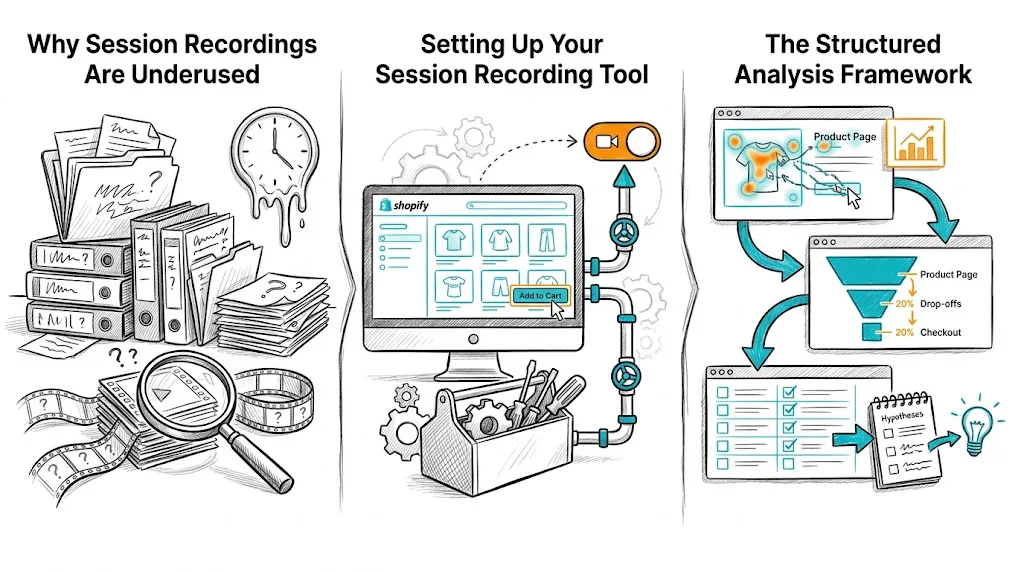
Why Session Recordings Are Underused

Most ecommerce teams either don't watch session recordings at all, or watch them randomly without a system. Random watching produces random insights. Structured, segmented analysis produces testable hypotheses.

The difference between a wasted afternoon of watching recordings and a productive one is segmentation: you filter recordings to specific behaviors before watching. Instead of watching 100 random sessions, you watch 30 sessions of users who abandoned the checkout, or 20 sessions of mobile users who rage-clicked on your product page.

Setting Up Your Session Recording Tool

Tool Options for Indian D2C Brands

Microsoft Clarity (Free)

  • Unlimited recordings, heatmaps, and click maps
  • No data sampling (captures all sessions, not a subset)
  • Integrates directly with Shopify via the theme or GTM
  • No session or pageview limits โ€” best free option for small-to-medium stores

Hotjar (Freemium, โ‚น1,700-โ‚น8,000/month)

  • Industry standard with strong filtering and tagging capabilities
  • Better for teams that need to share recordings and annotations with stakeholders
  • Free plan limited to 35 daily sessions

FullStory / LogRocket

  • Enterprise-grade, more expensive (โ‚น30,000+/month)
  • Stronger search and funnel replay capabilities
  • Overkill for most D2C brands under โ‚น1Cr/month revenue

For most Indian Shopify stores, start with Microsoft Clarity. It's genuinely free, not just a freemium trial.

Capturing the Right Sessions

Configure your recording tool to capture:

  • All checkout page sessions โ€” highest value; captures users closest to conversion
  • Product detail page sessions โ€” captures the primary purchase decision moment
  • Mobile sessions separately โ€” mobile behavior is distinctly different from desktop
  • Rage click events โ€” pre-filtered segments of users who exhibited frustration
  • Sessions with cart abandonment โ€” users who added to cart but left without purchasing

The Structured Analysis Framework

Don't watch recordings chronologically. Use a behavioral segmentation approach:

Step 1: Create Your Analysis Queue

Build 4-6 filtered segments before watching anything:

SegmentBehavior FilterWhat You're Looking For
Cart abandonersAdded to cart โ†’ did not purchaseWhere in checkout did they leave? Why?
Rage clickers3+ clicks on same elementWhat element is confusing/broken?
Mobile drop-offsMobile + bounced in < 30 secFirst impression / page speed issues
Long sessions that didn't convertSession > 5 min, no purchaseWhere is the decision paralysis?
Product page scrollers80%+ scroll depth on PDP, no ATCWhat is preventing add-to-cart?
Search users who leftUsed site search, then bouncedIs search returning poor results?

Watch 15-20 recordings per segment before drawing conclusions.

Step 2: Watch with a Tagging System

Before you start watching, create a tagging system in your recording tool. Common tags:

  • friction-checkout โ€” something in checkout caused visible hesitation
  • confusion-navigation โ€” user seems lost, goes back/forth
  • rage-click โ€” repeated frustrated clicking
  • mobile-layout-issue โ€” element doesn't render correctly on mobile
  • price-hesitation โ€” user scrolls back to price multiple times
  • trust-issue โ€” user visits return policy, shipping info, or FAQ mid-session
  • form-abandon โ€” user starts filling a form and stops

Tag sessions as you watch. After 15-20 sessions in a segment, look for the most frequent tags โ€” those are your highest-priority insights.

Step 3: Convert Observations to Hypotheses

Every session recording insight should become a specific, testable hypothesis. The format:

"We observed [behavior] in [X out of Y] recordings. We believe this is caused by [root cause]. We hypothesize that [specific change] will [measurable outcome] by [estimated amount]."

Example:

"We observed users repeatedly tapping the size guide icon on mobile product pages in 14 of 20 recordings, but the icon doesn't expand properly on mobile. We believe this is causing uncertainty about fit. We hypothesize that making the size guide open as a full-screen modal on mobile will increase add-to-cart rate by 8-12%."

This is a testable hypothesis ready for your A/B testing backlog.

High-Value Patterns to Look For

Rage Clicks

A rage click is a rapid sequence of clicks on the same element, typically indicating frustration with something that doesn't respond or isn't clickable. Common sources:

  • Non-clickable elements that look clickable โ€” product images without zoom, prices that look like links
  • Broken interactive elements โ€” accordions that don't open, CTAs that don't respond on slow connections
  • Out-of-stock "Add to Cart" buttons that appear active but trigger an error

Every rage click cluster is a high-priority fix โ€” either a UX bug or a conversion bottleneck.

Scroll Depth Drop-Offs

Where do users stop scrolling on product pages? The answer reveals the critical fold โ€” the point beyond which your content isn't being seen.

For Shopify D2C stores:

  • If 70% of users drop off before reaching the "reviews" section, reviews may not be helping conversion even if they exist
  • If 80% of mobile users drop off before reaching the "ingredients" or "specifications" section, critical purchase information is buried too far down
  • Restructure the page so your highest-conversion content appears above where most users stop

Form Abandonment Patterns

On checkout pages, session recordings reveal where in the form users stop:

  • Shipping address field โ€” may indicate friction with address input on mobile
  • After entering email but before mobile number โ€” mobile number requirement may be a trust barrier
  • At payment selection โ€” if users switch between payment methods and then abandon, your primary payment option may not be preferred

For Indian ecommerce: watch specifically for users who reach payment and then look for a "COD" option they can't find. If it's buried, moving COD to a more prominent position in the payment selector is a testable hypothesis.

Hesitation at Price or CTA

Multiple scrolls back to the price, or long pauses before the add-to-cart button, indicate:

  • Price-value uncertainty โ€” buyer isn't convinced the price is worth it
  • Missing trust signal โ€” they're looking for a return policy or guarantee nearby
  • Comparison shopping behavior โ€” they're about to leave to check a competitor

These sessions generate hypotheses around trust badges (see A/B testing trust badges), price anchoring, and guarantee language placement.

From Recordings to Testing Priority

After analyzing 100-150 recordings across your segments, you'll have a list of observed behaviors and corresponding hypotheses. Prioritize them using a simple scoring framework:

Frequency โ€” How often did this behavior appear? (1-5 score) Impact โ€” How close is this friction point to the conversion action? (1-5 score) Ease โ€” How easy is this to test/fix? (1-5 score)

Total score = Frequency + Impact + Ease. Highest scores go first in your testing backlog.

Combining Session Recordings with Other Data

Session recordings are most powerful when combined with:

Heatmaps โ€” Aggregate click patterns across all sessions; recordings show individual behavior Funnel analysis โ€” Quantitative drop-off rates tell you where to focus; recordings tell you why User surveys โ€” Post-purchase surveys tell you what customers felt; recordings show what they did A/B test results โ€” After a test runs, watch recordings of each variant to understand behavioral differences that the numbers don't explain

Tips and Best Practices

  • Never watch random sessions โ€” always apply a behavioral filter before watching; random sessions produce random insights
  • Watch in batches of 15-20 โ€” pattern recognition requires repetition; one or two recordings is anecdote, not insight
  • Share recordings with your design and product team โ€” watching recordings together (even for 30 minutes) creates shared empathy for user frustration
  • Re-watch recordings of winning test variants โ€” understanding why a variant won (not just that it did) makes your next test better
  • For Indian D2C brands, filter for COD sessions specifically โ€” COD buyer behavior in checkout is distinctly different from prepaid buyers and often reveals separate friction points
  • Use clips, not full recordings, for stakeholder sharing โ€” most session recording tools let you cut a 30-second clip of a specific behavior; this is far more persuasive than asking a stakeholder to watch a 5-minute session

Key Takeaways

  • Session recording analysis generates qualitative "why" insights that quantitative analytics cannot; the combination is more powerful than either alone
  • Segment recordings by behavior before watching โ€” cart abandoners, rage clickers, mobile drop-offs โ€” not chronologically
  • Use a tagging system while watching; frequency of tags reveals your highest-priority friction points
  • Convert every observation into a specific, testable hypothesis with an expected measurable outcome
  • Microsoft Clarity is free and adequate for most Indian D2C Shopify stores; start there before investing in premium tools
  • Combine recording insights with heatmap data and funnel analysis for the full picture before prioritizing your CRO test backlog

Related reading: CRO Pillar | CRO Budget Guide | A/B Testing Navigation Menus | Bounce Rate | Conversion Funnel