From the conversion glossary
Concepts referenced in this article, defined.
Concepts referenced in this article, defined.
Run rigorous A/B tests and personalize every visit on Shopify or any storefront — no engineers required.
A/B testing on Magento is more technically demanding than on hosted platforms like Shopify or BigCommerce. The full-page cache, complex layout XML structure, and developer-heavy customization model mean you can't just drop in a JavaScript snippet and start testing. This guide covers how to properly set up A/B testing on Magento, what technical limitations to plan for, and how to run effective experiments on one of the most powerful but complex ecommerce platforms.
Magento Open Source (Community Edition): No built-in A/B testing. Requires a third-party testing tool.
Adobe Commerce (Enterprise Edition): Includes Content Staging for scheduling content changes, but this is not A/B testing — it's content scheduling. There's no statistical significance tracking or controlled experiment infrastructure.
Adobe Commerce Cloud: Same as above. Some enterprise integrations with Adobe Target are possible, but this requires significant implementation work.
For controlled A/B testing with statistical significance, you need an external tool regardless of your Magento edition.
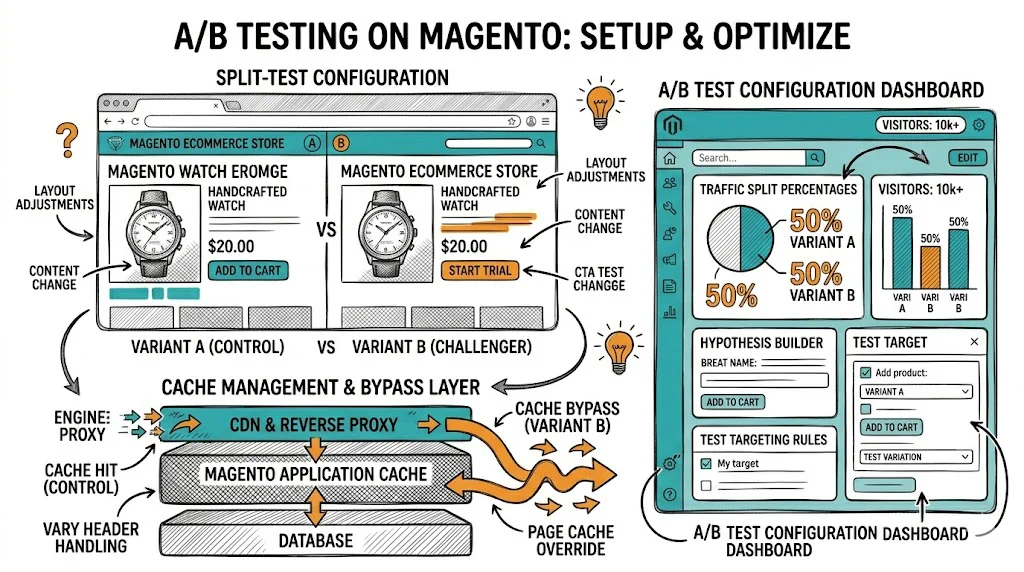
Magento's Full Page Cache (FPC) is designed for performance — it serves pre-cached HTML pages, dramatically reducing server load and improving page speed. But it creates a fundamental problem for client-side A/B testing.
How the problem occurs:
How to solve it:
Option 1: Disable full-page cache for test pages (not recommended for production) Testing on pages with FPC disabled shows accurate results but degrades page performance for all visitors, including the control group. This affects your test validity (control performance is artificially worse) and user experience.
Option 2: Server-side testing The cleanest solution. Your testing tool handles variant assignment at the server level before the page is cached. Optimizely's full-stack product, Adobe Target, and custom Magento modules can implement this. Requires developer involvement.
Option 3: Varnish cache-aware configuration If you're using Varnish as your caching layer (common in Magento deployments), configure Varnish to pass A/B testing cookies through to Magento without caching them. This requires Varnish VCL configuration and developer expertise.
Option 4: Use Hole Punching / ESI Edge Side Includes (ESI) allow Magento to cache most of a page while leaving specific sections dynamic. Your variant sections can be ESI blocks that are served dynamically even on cached pages. Complex to implement but powerful.
Recommended approach for most Magento stores: Work with your developer to configure VWO, Convert, or Optimizely in a cache-aware manner. Don't run tests without addressing the caching problem — results will be unreliable.

For mid-market Magento stores:
For enterprise Magento (Adobe Commerce):

For client-side tools, add the script via Magento's layout XML or a custom module:
<!-- In your theme's default_head_blocks.xml -->
<referenceContainer name="head.additional">
    <block class="Magento\Framework\View\Element\Template" name="ab_testing_script">
        <action method="setTemplate">
            <argument name="template" xsi:type="string">Vendor_Module::ab_testing.phtml</argument>
        </action>
    </block>
</referenceContainer>
This is more reliable than injecting scripts via the Magento Admin CMS block, which can be inconsistent across page types.
Magento's checkout generates these trackable events:
checkout_cart_add_product_complete event in Magento's JavaScript event systemcheckout_success event fires on the order confirmation page; also available via the window.dataLayer push if you're using GTMFor most testing tools, configure:
Use your testing tool's QA mode alongside your browser's developer console:
Start with a page that has high traffic and doesn't require complex Magento customization. Good first tests:
These can be implemented by modifying DOM elements via JavaScript without interfering with Magento's page template structure.
Magento PDPs are heavily customizable, which means they often have accumulated design debt — elements added over time without testing whether they help or hurt.
High-value PDP tests:
Magento category pages are heavily cached and performance-sensitive. Keep tests simple:
Magento's checkout is a multi-step React-based application (in Magento 2). A/B testing checkout changes requires either:
Simple checkout tests (headline text, trust badge placement) can be done client-side; structural changes require development.
Magento's native analytics are limited. Connect to:
After a test concludes, cross-reference:
Discrepancies between the testing tool's reported conversions and actual Magento orders are common and usually indicate tracking issues. Investigate before implementing winning variants.
For brands finding Magento's A/B testing complexity a persistent bottleneck, it's worth evaluating whether Shopify or BigCommerce is a better fit. Shopify's testing ecosystem—particularly no-code tools like CustomFit.ai—dramatically reduces the technical overhead of CRO. If your team is spending more on CRO tool implementation than on running actual tests, the platform may be part of the problem.
See how CustomFit.ai makes A/B testing no-code for Shopify stores →