From the conversion glossary
Concepts referenced in this article, defined.
Concepts referenced in this article, defined.
Run rigorous A/B tests and personalize every visit on Shopify or any storefront — no engineers required.
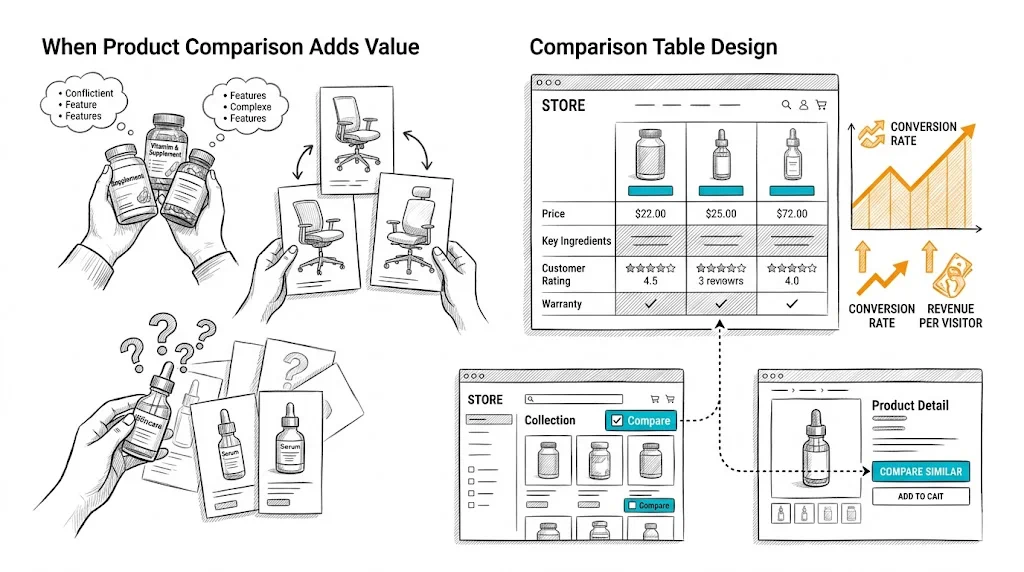
Product comparison is one of the most underutilized conversion tools in ecommerce. When shoppers are deciding between two or three similar products—a common scenario in supplements, skincare, electronics, and furniture—a side-by-side comparison table removes the mental work of holding multiple product pages in memory. For the right categories, adding a comparison feature meaningfully improves conversion rate and reduces post-purchase regret (which drives returns).
Comparison features earn their place when:
Multiple similar products exist in your catalog: If you sell three different vitamin D supplements—₹399 basic, ₹699 with K2, and ₹999 premium blend—shoppers need to understand the differences before choosing. A comparison table makes this decision straightforward.
Products have meaningful spec differences: Skincare actives (2% salicylic acid vs. 5%), supplement doses (500mg vs. 1000mg), or mattress firmness ratings are meaningful differences that drive the right product match. Comparison tables communicate these differences more clearly than individual product pages.
Purchase stakes are high: Higher-priced products receive more consideration. A ₹4,000 mattress purchase warrants comparison; a ₹199 lip balm does not.
Products are purchased as a system: Skincare brands often have serums, moisturizers, and toners that work together. A comparison feature that shows ingredient compatibility or routine placement adds genuine value.
Comparison features add little value for:
The comparison table's quality is determined by which attributes you include. Principles:
Include decision-driving attributes first. For protein supplements: protein per serving, ingredients, flavor options, serving size, price per serving. For skincare: active ingredients and concentration, skin type suitability, texture, SPF (if applicable), price.
Put price in the table. Price is always a comparison attribute. Show both unit price and value-per-use calculations for consumables (e.g., "₹83 per serving" vs. "₹110 per serving").
Include availability and ratings. In-stock status and star rating with review count should always appear at the top of each product column—they are universal decision factors.
Add differentiation markers. Use check marks, icons, or highlighted cells to show clearly which product wins on each attribute. A bold checkmark under "Contains Vitamin K2" for the relevant product is more scannable than text across all columns.
Limit to 8–12 attributes. A 25-row comparison table is overwhelming. Focus on the attributes that actually differentiate your products and matter to buyers.
Sticky product headers: As shoppers scroll down a long comparison table, the product names should remain visible in a sticky row at the top. Losing track of which column is which product breaks the comparison experience.
Fixed first column for attribute labels: On desktop, the attribute name column should be sticky as horizontal scroll happens (for wider comparisons). On mobile, horizontal scroll is the primary interaction.
Visual differentiation for best/recommended: Highlight your recommended product (or the "best value" option) with a subtle visual treatment: a colored header, a "Most Popular" badge, or a light background. This merchandising choice drives selection toward the product you want to move.
CTA in each product column: Each product column should have its own "Add to Cart" button below the attribute rows. Do not require shoppers to navigate back to the product page to buy after comparing—friction kills momentum.
Mobile comparison tables are inherently challenging—wide tables on narrow screens create horizontal scroll that feels awkward. Options:
Swipe between products: Show one product at a time with left/right swipe gestures. The attributes are fixed on the left; the product values update as you swipe. This is the best mobile pattern but requires more development investment.
Horizontal scroll with sticky attributes: Attributes in the first column remain fixed; products columns scroll horizontally. Standard approach, acceptable on mobile but not as smooth as swipe-based.
Comparison link to dedicated page: From the collection page, a "Compare" button leads to a dedicated comparison page that is mobile-optimized. This separates the comparison UX from the collection page complexity.
The comparison feature only creates value if shoppers use it. Placement and discovery matter:
Checkboxes on collection pages: Adding a "Compare" checkbox to each product card on the collection page is the most standard approach. Shoppers check 2–4 products and click a "Compare Selected" button to open the comparison view.
"Compare with similar products" link on product pages: On the product page, a link like "Compare [Product Name] with alternatives" surfaces the comparison for shoppers who have already committed to evaluating this product.
Recommendation widget comparison: If your site shows "Customers also considered" or "Similar products" on the product page, add a "Compare" action to those suggested products.
Search results comparison: For searches that return multiple very similar products, a comparison prompt is natural: "Showing 4 [category] options — compare them."
A comparison feature is only as good as the data behind it. Requirements:
Build a data maintenance process: when adding new products or changing prices, update all comparison-relevant attributes simultaneously.
If you are deciding whether to add a comparison feature, test it:
Measure: comparison feature usage rate, time-to-add-to-cart for comparison users vs. non-users, conversion rate and return rate.
CustomFit.ai makes setting up this kind of feature toggle test straightforward for Shopify stores without developer involvement.
Related reading: Conversion Rate Optimization | Product Page | Cart Abandonment | A/B Testing | Wishlist Feature
See also: D2C & Ecommerce Growth Pillar