CustomFit.ai โ€” Website personalization, A/B testing and CRO for Shopify and D2C
Product
Features
โœฑ
Website Personalization
Adapt to each visitor's behavior & intent
โง–
A/B & Multivariate Testing
Rigorous experimentation
โœจ
AI CopilotNEW
Personalize with a prompt
๐Ÿค–
AI WingmanNEW
Auto-optimize toward winners
๐ŸŽฏ
AI Conversion OptimizerNEW
GPT-grade test ideas
โœŽ
No-Code Visual Editor
Drag-and-drop edit any element
โ–ฆ
Product Recommendations
Personalized recs that lift AOV
โš‘
Feature Flags
Ship safely with kill-switches
โ—ง
Chrome Extension
Edit your store in the browser
โง‰
Shopify, WooCommerce & more
All platform integrations
View all features โ†’
Use Cases
$
Price A/B Testing
Test price points to maximize revenue
โ–ฆ
Theme A/B Testing
Compare whole layouts & designs
๐Ÿ—‚
Template A/B Testing
Test whole PDP/PLP templates
๐Ÿท
Discount A/B Testing
Find the offer that converts
๐Ÿšš
Shipping A/B Testing
Thresholds, speed & copy
โœ
Content A/B Testing
Copy, images & reviews
๐Ÿ’ณ
Checkout Gateway A/B
Payments & one-click
โŒ–
Geo-Based Personalization
Per-location content & offers
โšก
Buyer-Intent Nudges
Exit-intent & retargeting
โ†”
Split-URL / Redirection
Full-page redirect tests
View all use cases โ†’
Solutions & Guides
โคข
Conversion Rate Optimization
The complete CRO guide
โง–
A/B Testing Software
Buyer's guide for D2C
๐Ÿ›’
Cart Abandonment Recovery
Win back lost carts
๐Ÿ“ฐ
Landing Page Optimization
Convert more paid traffic
S
Shopify A/B Testing
Test your store, no code
S
Shopify Personalization
Tailor the store per shopper
โ—”
First-Time Visitor Offers
Convert new shoppers with trust & offers
โ˜…
Repeat-Customer Experiences
Reward and re-engage loyal buyers
โ—Ž
Campaign-Matched Pages
Match the landing page to the ad
โŒ–
Location-Based Experiences
Currency, language & regional offers
Explore CRO โ†’
Customer stories
GIVA
+32%
conversion via personalized recs
GIVA
Mamaearth
+18%
revenue lift from PDP A/B tests
ME
The Sleep Company
+24%
AOV from product recommendations
TSC
Read customer stories โ†’
Integrations
SWsfGA+15
โœฆ
Not sure where to start?
Let AI Copilot pick your first tests

โ€œWe wake up to evidence-backed tests ready to deploy โ€” not a backlog of maybe ideas.โ€

AN
Anirudh S.
Growth ยท Chargebee
โ˜…โ˜…โ˜…โ˜…โ˜…4.8on G2 ยท 2,400+ brands
Talk to our team โ†’
Widgets
Integrations
Ecommerce & Checkout
Shopify
Shopline
Shoplazza
GoKwik
ShopFlo
Razorpay Magic Checkout
Breeze
Shiprocket
View all integrations โ†’
Analytics & Behavior
Google Analytics 4
Microsoft Clarity
Hotjar
Mixpanel
Amplitude
Heap
Adobe Analytics
Segment (CDP)
View all integrations โ†’
Engagement, CRM & More
Klaviyo
MoEngage
CleverTap
WebEngage
HubSpot
Salesforce
Slack
Meta Ads
View all integrations โ†’
CustomersPricing
Resources
CRO
โ–ค
Playbooks
Proven strategies to boost conversions
๐ŸŽ™
Interviews
D2C leaders & marketing experts
โ–ถ
Webinars
Live deep dives & product sessions
Learn
โœŽ
Blog
Tips, experiments & best practices
๐Ÿ“•
Free E-Books
Mastering personalization
๐Ÿ“–
Conversion Glossary
Every CRO term, defined
โœฆAI CopilotNEWLog inBook a demo
Start free trial
Select your platform โ€” Install in 2 minsWe'll tailor the setup
โšก Risk-free 14-day trial ยท No credit card ยท Cancel anytime
S
Shopify
Install from Shopify App Store
โ€บ
W
WooCommerce
Install the WooCommerce plugin
โ€บ
B
BigCommerce
Install from BigCommerce App Marketplace
โ€บ
SL
Shopline
Install from Shopline App Store
โ€บ
M
Salesforce / Magento
Install from the marketplace
โ€บ
SZ
Shoplazza
Install from Shoplazza App Store
โ€บ
WP
WordPress / Webflow
Install plugin or paste the script
โ€บ
โ—ง
Others
Custom-built on React, Next.js, etc.
โ€บ
Tip: pick your platform โ€” we handle the restBook a demo โ†’
Product
Website PersonalizationA/B & Multivariate TestingAI CopilotAI WingmanAI Conversion OptimizerNo-Code Visual EditorProduct RecommendationsFeature FlagsView all features โ†’
Use Cases
Price A/B TestingTheme A/B TestingTemplate A/B TestingDiscount A/B TestingShipping A/B TestingContent A/B TestingCheckout Gateway A/BGeo-Based PersonalizationBuyer-Intent NudgesSplit-URL / Redirection
Solutions & Guides
Conversion Rate OptimizationA/B Testing SoftwareCart Abandonment RecoveryLanding Page OptimizationShopify A/B TestingShopify Personalization
Explore
WidgetsIntegrationsCustomersPricing
Resources
BlogPlaybooksWebinarsInterviewsE-BooksConversion Glossary
Platforms
ShopifyShoplineShoplazzaChrome ExtensionAll integrations
Start free trialBook a demo
Homeโ€บBlogโ€บexperimentationโ€บCRO for Non-Technical Marketers: Getting Started

CRO for Non-Technical Marketers: Getting Started

SJSapna JoharHead of Growth & CRO, CustomFit.aiJanuary 15, 20258 min read
On this page
  1. What CRO Actually Is (And Isn't)
  2. The CRO Process in 5 Steps
  3. Your First 5 Tests: A Starter Roadmap
  4. How to Read A/B Test Results Without a Statistics Degree
  5. Common Mistakes Non-Technical Marketers Make
  6. Tools Non-Technical Marketers Can Use Without Developer Help
  7. Building Momentum as a Solo CRO Marketer
  8. Key Takeaways
0%
CRO for Non-Technical Marketers: Getting Started

From the conversion glossary

Concepts referenced in this article, defined.

Definition
What Is Hypothesis? Definition & Guide
Definition
What Is Variant? Definition, Formula & Guide
Definition
What Is Control? Definition, Formula & Guide
Definition
What Is Sample Size? Definition & Guide
Definition
What Is Urgency? Definition & Guide
โ† Back to Experimentation guide
Try CustomFit.ai

Run A/B tests and personalize your store without code. 14-day free trial, no credit card.

Start free trial โ†’
Share
XLinkedInEmail

Related articles

experimentation

Testing Velocity: How Many Tests Should You Run?

Sapna Joharยท 8 min read
experimentation

Testing Culture: Getting Buy-In from Leadership

Sapna Joharยท 8 min read
experimentation

Quarterly CRO Review: What to Measure

Sapna Joharยท 8 min read

Start lifting conversions today.

Run rigorous A/B tests and personalize every visit on Shopify or any storefront โ€” no engineers required.

Start free trialBook a demo

Built for every D2C category

๐Ÿงด
Skincare
๐Ÿ’„
Beauty
๐ŸŒฟ
Wellness
โ˜•
F&B
๐Ÿ‘Ÿ
Apparel
๐Ÿ’
Jewelry
๐Ÿ›‹๏ธ
Home
๐Ÿผ
Baby
Live ยท Right now
Mamaearth โ€” free-shipping band +12.4% AOVGIVA โ€” festive collection page +34% revenueBellavita โ€” PDP CTA test +27.4% CVRKapiva โ€” Quiz-driven recs +9.48% CTRThe Sleep Co โ€” landing personalized 2ร— capturesPlum โ€” Returning shopper swap +18.2% CVRMamaearth โ€” free-shipping band +12.4% AOVGIVA โ€” festive collection page +34% revenueBellavita โ€” PDP CTA test +27.4% CVRKapiva โ€” Quiz-driven recs +9.48% CTRThe Sleep Co โ€” landing personalized 2ร— capturesPlum โ€” Returning shopper swap +18.2% CVR
Get in touch

Tell us about your store.

We reply within an hour during business hours. No sales pitch, no spam โ€” just answers from someone who's seen 2,400+ D2C stores.

โœ“ Reply within 1 hourโœ“ No spam, everโœ“ Free demo & setup help
โœ“ Thanks! We'll be in touch shortly.
CustomFit.ai

The all-in-one website personalization, A/B testing & CRO platform for high-growth D2C brands. Made by marketers, fueled by coffee.

in๐•โ—Žโ–ถf
Product
  • Features
  • A/B Testing
  • Personalization
  • AI Copilot
  • AI Wingman
  • AI Conversion Optimizer
  • Feature Flags
  • Widgets
  • Integrations
  • ROI Calculator
Platforms
  • Shopify
  • Shopline
  • Shoplazza
  • Salesforce
  • Chrome Extension
  • All Integrations
Resources
  • Blog
  • Playbooks
  • Webinars
  • GrowthFit Interviews
  • Free E-Books
  • Conversion Glossary
  • Case Studies
Compare
  • vs VWO
  • vs Optimizely
  • vs Google Optimize
  • vs Mutiny
  • vs Intelligems
  • vs Shoplift
  • vs AB Tasty
  • vs Convert
  • vs Kameleoon
Company
  • About Us
  • Partners
  • CustomFit Awards
  • Recognition
  • Contact
  • Privacy Policy
  • Terms & Conditions
ยฉ 2026 CustomFit.ai ยท Valley Monks Pvt Ltd ยท Made by marketers, fueled by coffee, and obsessed with conversions.
SOC 2 Type II ยท GDPR ยท CCPA ยท ISO 27001

Conversion rate optimization (CRO) doesn't require a developer, a data scientist, or coding knowledge. With no-code A/B testing tools and a structured approach, any marketer on a D2C team can run experiments that genuinely improve store performance. CRO is fundamentally about asking questions โ€” "why aren't more visitors buying?" โ€” and using controlled tests to find answers. This guide starts from zero and walks you through your first real A/B test.

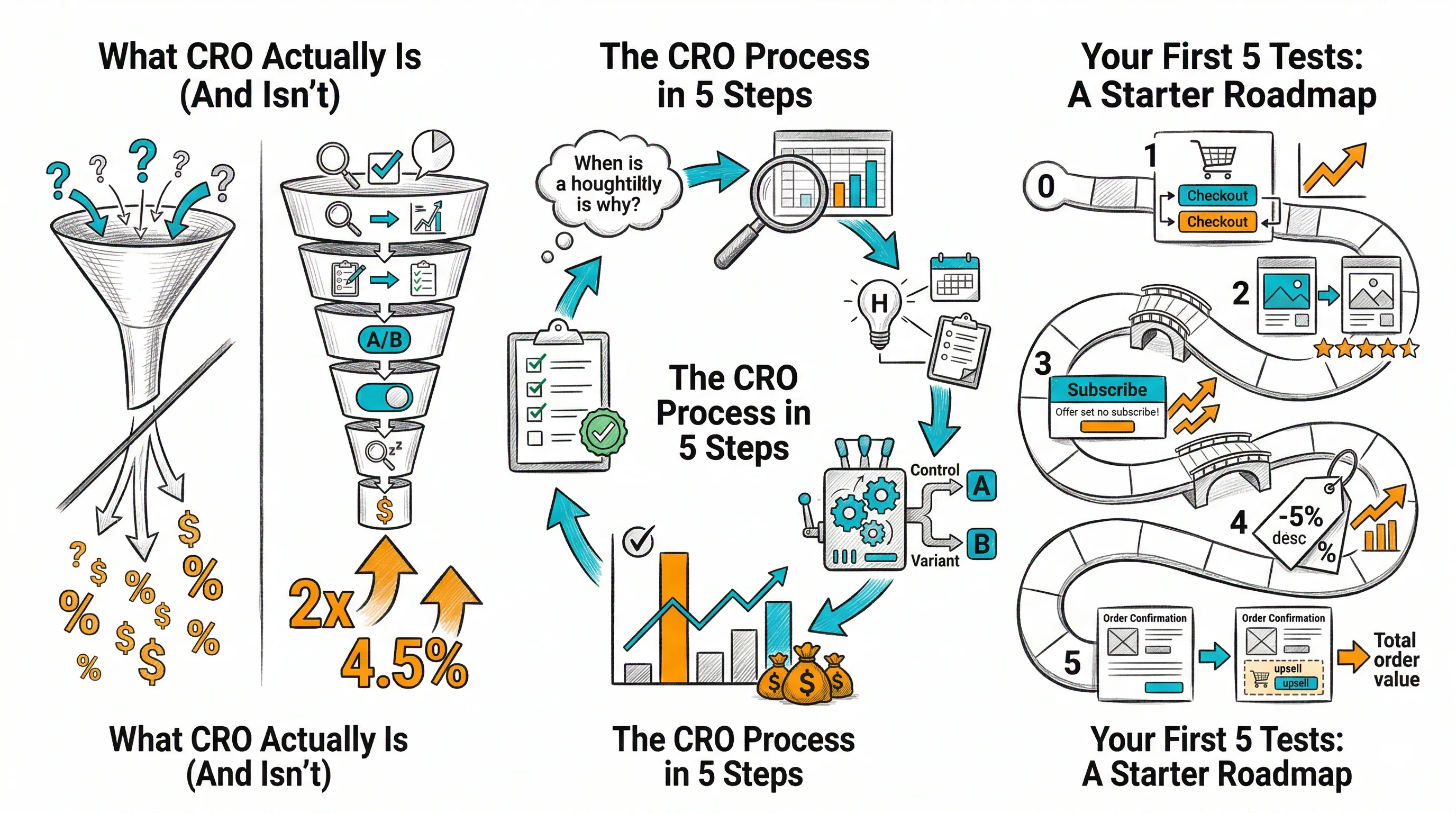
What CRO Actually Is (And Isn't)

CRO is improving the percentage of visitors who take the action you want them to take. For ecommerce, the primary action is purchase โ€” but CRO also applies to micro-conversions: clicking add-to-cart, reaching checkout, completing a form.

CRO is not:

  • Redesigning your website based on aesthetics or opinion
  • Implementing "best practices" from blog posts without testing
  • Copying what big brands do and assuming it will work for you

CRO is:

  • Identifying specific points where buyers drop off
  • Forming a hypothesis about why they drop off
  • Running a controlled test of a proposed fix
  • Making decisions based on the test result, not opinion

The key distinction: CRO replaces "I think this will work" with "here's what the data shows."

The CRO Process in 5 Steps

Step 1: Find the drop-off

Before testing, identify where buyers are leaving your store. You need:

  • Google Analytics or Shopify Analytics: Where in the funnel (homepage โ†’ category โ†’ PDP โ†’ cart โ†’ checkout) are you losing the most buyers?
  • Heatmaps (Microsoft Clarity โ€” free): Where are buyers clicking? What are they ignoring?
  • Session recordings: Watch 20โ€“30 actual buyer sessions. You'll see problems you never would have guessed.

Look for pages with high bounce rate or low progression to the next funnel step. Those are your testing priorities.

Step 2: Form a hypothesis

A hypothesis is not a guess โ€” it's an evidence-based prediction.

Format: "Because [evidence], I believe changing [element] will improve [metric] by [estimated amount] for [audience]."

Example: "Because session recordings show 40% of mobile buyers try to zoom in on product images (indicating they want a closer look), I believe adding a swipe-to-zoom feature on mobile PDPs will improve mobile add-to-cart rate."

Step 3: Design the test

Define:

  • Control: The current experience
  • Variant: What you're testing
  • Primary metric: One metric that determines success (add-to-cart rate, CVR)
  • Sample size needed: Use a sample size calculator (most tools have one built in)
  • Duration: Based on your traffic and sample size needed

Step 4: Run the test

Set up in your testing tool. For non-technical marketers on Shopify, CustomFit.ai lets you make visual changes (text, images, buttons, layout) through a point-and-click interface. No HTML, no CSS, no JavaScript.

Run the test until you reach statistical significance (95% confidence) OR until the pre-defined sample size is reached. Don't stop early.

Step 5: Analyze and decide

When the test completes:

  • If the variant wins (95%+ confidence): Ship the winning change
  • If the control wins: Keep the original, document what you learned
  • If inconclusive: The change may be too small to detect, or you may need more traffic

Document every result in your hypothesis library. Even losing tests teach you something.

Your First 5 Tests: A Starter Roadmap

These are the highest-impact, lowest-effort tests for non-technical marketers on Shopify:

Test 1: CTA Button Copy

  • Where: Your highest-traffic PDP
  • What to test: "Add to Cart" vs. "Buy Now" vs. "Get Yours Today"
  • Primary metric: Add-to-cart rate
  • Why: Copy changes take minutes in CustomFit.ai. High traffic means results in days, not weeks.

Test 2: Trust Badges Placement

  • Where: PDP, above the add-to-cart button
  • What to test: No trust badges (control) vs. trust badges showing "Secure Payment | Free Returns | COD Available"
  • Primary metric: Checkout initiation rate
  • Why: Indian shoppers have high purchase anxiety. Trust signals near the CTA reduce hesitation.

Test 3: Product Image Order

  • Where: PDP on your top-selling product
  • What to test: Lifestyle image first (control) vs. clean product-on-white image first (variant)
  • Primary metric: Add-to-cart rate
  • Why: Image order matters enormously. Which type of lead image better matches buyer expectations?

Test 4: Urgency Messaging

  • Where: PDP or cart page
  • What to test: No urgency messaging (control) vs. "Only [X] left in stock" or "X people viewing this now"
  • Primary metric: Checkout completion rate
  • Why: Urgency reduces abandonment โ€” but only if buyers believe it. Test to know if your audience responds.

Test 5: Social Proof Positioning

  • Where: PDP
  • What to test: Reviews below the fold (control) vs. review count/stars directly below the product title (variant)
  • Primary metric: Add-to-cart rate
  • Why: Getting reviews visible earlier in the page journey can significantly impact buyer confidence.

How to Read A/B Test Results Without a Statistics Degree

You don't need to understand p-values. You need to understand three things:

1. Statistical confidence (look for 95%) Your testing tool will show a percentage confidence. "95% confidence" means you can be 95% sure the result isn't random. Below 90%: too uncertain to act on. 90โ€“95%: borderline. 95%+: sufficient to make a decision.

2. Relative improvement "Variant increased add-to-cart rate by 12%" is relative improvement. That means: if control was 8%, variant was 8.96%. Sounds small โ€” but multiplied across 10,000 monthly visitors, that's 96 additional add-to-cart events per month.

3. Revenue impact estimate Convert the result to rupees. Add-to-cart rate improvement ร— purchase completion rate ร— average order value = estimated monthly revenue impact. This is how you justify continuing to invest in CRO.

Common Mistakes Non-Technical Marketers Make

Stopping tests early: You see your variant is winning by 10% after 3 days. You stop the test and ship the change. This is the #1 mistake in A/B testing. Early results are volatile. Tests that look like winners at 3 days often show no difference at 3 weeks. Always run to your pre-defined sample size.

Testing too many things at once: If your variant changes the CTA, the image, and the heading simultaneously, and it wins, you don't know which change drove the win. Test one change at a time (or use proper multivariate testing if you need to test multiple changes together).

Choosing the wrong primary metric: Don't track 10 metrics and call the test based on whichever one looks best. Define one primary metric before the test starts. Secondary metrics provide context; the primary metric determines the decision.

Testing low-traffic pages: Testing a page with 30 visitors/day will take months to reach significance. Prioritize high-traffic pages โ€” even if lower-converting pages seem like better optimization opportunities, results take too long to get.

Not documenting results: Every test result โ€” win, loss, or inconclusive โ€” should be documented. Three months later, a "losing" test might contain a hypothesis that unlocks a major win on a related page.

Tools Non-Technical Marketers Can Use Without Developer Help

A/B Testing and Personalization:

  • CustomFit.ai โ€” Shopify-native, visual editor, $99/mo, 14-day free trial

Analytics (free):

  • Shopify Analytics โ€” built in, covers funnel basics
  • Google Analytics 4 โ€” requires basic setup, but free

Heatmaps and Session Recording (free tier available):

  • Microsoft Clarity โ€” completely free, good for Shopify
  • Hotjar โ€” free tier available, more features paid

Post-Purchase Surveys:

  • Grapevine Surveys (Shopify app)
  • KnoCommerce โ€” Shopify-native, designed for D2C

Hypothesis and Test Tracking:

  • Notion or Airtable โ€” free, flexible
  • Google Sheets โ€” works fine for teams starting out

Building Momentum as a Solo CRO Marketer

Starting a CRO program as a non-technical marketer without a dedicated team can feel overwhelming. Start small:

  • Week 1โ€“2: Set up analytics, install Clarity, install CustomFit.ai
  • Week 3: Watch 20 session recordings. Note patterns. Write 5 hypotheses.
  • Week 4: Launch your first test (CTA copy)
  • Month 2: Run 2 tests/month
  • Month 3: Review learnings, refine your hypothesis backlog, report results to leadership

The compound effect of running 2 tests/month โ€” with a typical 30% win rate and 5โ€“10% average CVR lift per winner โ€” generates meaningful improvement over 12 months. You don't need a technical background to achieve this. You need discipline, curiosity, and the right tools.

Key Takeaways

  • CRO for non-technical marketers starts with identifying drop-off points, not with guessing what to test
  • No-code tools like CustomFit.ai let you run A/B tests on Shopify without any developer involvement
  • Your first 5 tests: CTA copy, trust badges, image order, urgency messaging, and review positioning
  • Never stop a test early โ€” wait for 95% confidence or your pre-defined sample size
  • Test one thing at a time, track one primary metric per test
  • Document every result โ€” failed tests are as valuable as winners when properly analyzed