CustomFit.ai — Website personalization, A/B testing and CRO for Shopify and D2C
Product
Features
✱
Website Personalization
Adapt to each visitor's behavior & intent
⧖
A/B & Multivariate Testing
Rigorous experimentation
✨
AI CopilotNEW
Personalize with a prompt
🤖
AI WingmanNEW
Auto-optimize toward winners
🎯
AI Conversion OptimizerNEW
GPT-grade test ideas
✎
No-Code Visual Editor
Drag-and-drop edit any element
▦
Product Recommendations
Personalized recs that lift AOV
⚑
Feature Flags
Ship safely with kill-switches
◧
Chrome Extension
Edit your store in the browser
⧉
Shopify, WooCommerce & more
All platform integrations
View all features →
Use Cases
$
Price A/B Testing
Test price points to maximize revenue
▦
Theme A/B Testing
Compare whole layouts & designs
🗂
Template A/B Testing
Test whole PDP/PLP templates
🏷
Discount A/B Testing
Find the offer that converts
🚚
Shipping A/B Testing
Thresholds, speed & copy
✍
Content A/B Testing
Copy, images & reviews
💳
Checkout Gateway A/B
Payments & one-click
⌖
Geo-Based Personalization
Per-location content & offers
⚡
Buyer-Intent Nudges
Exit-intent & retargeting
↔
Split-URL / Redirection
Full-page redirect tests
View all use cases →
Solutions & Guides
⤢
Conversion Rate Optimization
The complete CRO guide
⧖
A/B Testing Software
Buyer's guide for D2C
🛒
Cart Abandonment Recovery
Win back lost carts
📰
Landing Page Optimization
Convert more paid traffic
S
Shopify A/B Testing
Test your store, no code
S
Shopify Personalization
Tailor the store per shopper
◔
First-Time Visitor Offers
Convert new shoppers with trust & offers
★
Repeat-Customer Experiences
Reward and re-engage loyal buyers
◎
Campaign-Matched Pages
Match the landing page to the ad
⌖
Location-Based Experiences
Currency, language & regional offers
Explore CRO →
Customer stories
GIVA
+32%
conversion via personalized recs
GIVA
Mamaearth
+18%
revenue lift from PDP A/B tests
ME
The Sleep Company
+24%
AOV from product recommendations
TSC
Read customer stories →
Integrations
SWsfGA+15
✦
Not sure where to start?
Let AI Copilot pick your first tests

“We wake up to evidence-backed tests ready to deploy — not a backlog of maybe ideas.”

AN
Anirudh S.
Growth · Chargebee
★★★★★4.8on G2 · 2,400+ brands
Talk to our team →
Widgets
Integrations
Ecommerce & Checkout
Shopify
Shopline
Shoplazza
GoKwik
ShopFlo
Razorpay Magic Checkout
Breeze
Shiprocket
View all integrations →
Analytics & Behavior
Google Analytics 4
Microsoft Clarity
Hotjar
Mixpanel
Amplitude
Heap
Adobe Analytics
Segment (CDP)
View all integrations →
Engagement, CRM & More
Klaviyo
MoEngage
CleverTap
WebEngage
HubSpot
Salesforce
Slack
Meta Ads
View all integrations →
CustomersPricing
Resources
CRO
▤
Playbooks
Proven strategies to boost conversions
🎙
Interviews
D2C leaders & marketing experts
▶
Webinars
Live deep dives & product sessions
Learn
✎
Blog
Tips, experiments & best practices
📕
Free E-Books
Mastering personalization
📖
Conversion Glossary
Every CRO term, defined
✦AI CopilotNEWLog inBook a demo
Start free trial
Select your platform — Install in 2 minsWe'll tailor the setup
⚡ Risk-free 14-day trial · No credit card · Cancel anytime
S
Shopify
Install from Shopify App Store
›
W
WooCommerce
Install the WooCommerce plugin
›
B
BigCommerce
Install from BigCommerce App Marketplace
›
SL
Shopline
Install from Shopline App Store
›
M
Salesforce / Magento
Install from the marketplace
›
SZ
Shoplazza
Install from Shoplazza App Store
›
WP
WordPress / Webflow
Install plugin or paste the script
›
◧
Others
Custom-built on React, Next.js, etc.
›
Tip: pick your platform — we handle the restBook a demo →
Product
Website PersonalizationA/B & Multivariate TestingAI CopilotAI WingmanAI Conversion OptimizerNo-Code Visual EditorProduct RecommendationsFeature FlagsView all features →
Use Cases
Price A/B TestingTheme A/B TestingTemplate A/B TestingDiscount A/B TestingShipping A/B TestingContent A/B TestingCheckout Gateway A/BGeo-Based PersonalizationBuyer-Intent NudgesSplit-URL / Redirection
Solutions & Guides
Conversion Rate OptimizationA/B Testing SoftwareCart Abandonment RecoveryLanding Page OptimizationShopify A/B TestingShopify Personalization
Explore
WidgetsIntegrationsCustomersPricing
Resources
BlogPlaybooksWebinarsInterviewsE-BooksConversion Glossary
Platforms
ShopifyShoplineShoplazzaChrome ExtensionAll integrations
Start free trialBook a demo
Home›Blog›d2c ecommerce›Ecommerce Filter & Sort Optimization

Ecommerce Filter & Sort Optimization

SJSapna JoharHead of Growth & CRO, CustomFit.aiJanuary 15, 20257 min read
On this page
  1. Why Filters and Sort Options Are a Conversion Lever
  2. Designing Your Filter Architecture
  3. Principle 1: Category-Specific Filters, Not Universal Ones
  4. Principle 2: Fewer, More Relevant Filters Win
  5. Principle 3: Multi-Select, Not Single-Select
  6. Principle 4: Show Result Count in Real Time
  7. Sort Order Optimization
  8. Default Sort Order
  9. Sort Label Language
  10. Mobile Filter UX
  11. Active Filter Display and Removal
  12. Filter SEO Considerations
  13. Tips / Best Practices
  14. Key Takeaways
0%
Ecommerce Filter & Sort Optimization

From the conversion glossary

Concepts referenced in this article, defined.

Definition
What Is Collection Page? Definition & Guide
Definition
What Is Breadcrumb Navigation? Definition & Guide
Definition
What Is Social Proof? Definition & Guide
Definition
What Is Variant? Definition, Formula & Guide
← Back to D2c Ecommerce guide
Try CustomFit.ai

Run A/B tests and personalize your store without code. 14-day free trial, no credit card.

Start free trial →
Share
XLinkedInEmail

Related articles

d2c ecommerce

Wishlist Feature: Impact on Conversions & Retargeting

Sapna Johar· 7 min read
d2c ecommerce

User-Generated Content Strategy for D2C

Sapna Johar· 9 min read
d2c ecommerce

Seasonal Demand Planning for Ecommerce

Sapna Johar· 6 min read

Start lifting conversions today.

Run rigorous A/B tests and personalize every visit on Shopify or any storefront — no engineers required.

Start free trialBook a demo

Built for every D2C category

🧴
Skincare
💄
Beauty
🌿
Wellness
☕
F&B
👟
Apparel
💍
Jewelry
🛋️
Home
🍼
Baby
Live · Right now
Mamaearth — free-shipping band +12.4% AOVGIVA — festive collection page +34% revenueBellavita — PDP CTA test +27.4% CVRKapiva — Quiz-driven recs +9.48% CTRThe Sleep Co — landing personalized 2× capturesPlum — Returning shopper swap +18.2% CVRMamaearth — free-shipping band +12.4% AOVGIVA — festive collection page +34% revenueBellavita — PDP CTA test +27.4% CVRKapiva — Quiz-driven recs +9.48% CTRThe Sleep Co — landing personalized 2× capturesPlum — Returning shopper swap +18.2% CVR
Get in touch

Tell us about your store.

We reply within an hour during business hours. No sales pitch, no spam — just answers from someone who's seen 2,400+ D2C stores.

✓ Reply within 1 hour✓ No spam, ever✓ Free demo & setup help
✓ Thanks! We'll be in touch shortly.
CustomFit.ai

The all-in-one website personalization, A/B testing & CRO platform for high-growth D2C brands. Made by marketers, fueled by coffee.

in𝕏◎▶f
Product
  • Features
  • A/B Testing
  • Personalization
  • AI Copilot
  • AI Wingman
  • AI Conversion Optimizer
  • Feature Flags
  • Widgets
  • Integrations
  • ROI Calculator
Platforms
  • Shopify
  • Shopline
  • Shoplazza
  • Salesforce
  • Chrome Extension
  • All Integrations
Resources
  • Blog
  • Playbooks
  • Webinars
  • GrowthFit Interviews
  • Free E-Books
  • Conversion Glossary
  • Case Studies
Compare
  • vs VWO
  • vs Optimizely
  • vs Google Optimize
  • vs Mutiny
  • vs Intelligems
  • vs Shoplift
  • vs AB Tasty
  • vs Convert
  • vs Kameleoon
Company
  • About Us
  • Partners
  • CustomFit Awards
  • Recognition
  • Contact
  • Privacy Policy
  • Terms & Conditions
© 2026 CustomFit.ai · Valley Monks Pvt Ltd · Made by marketers, fueled by coffee, and obsessed with conversions.
SOC 2 Type II · GDPR · CCPA · ISO 27001

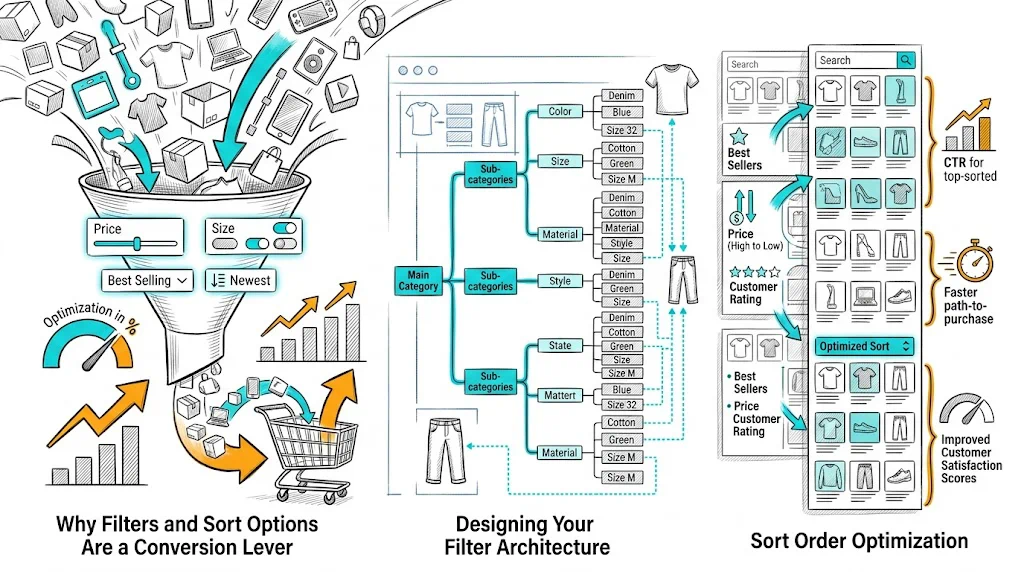
Collection pages are where browsing shoppers decide what to explore and where high-intent shoppers confirm their choice. Filters and sort options are the primary tools shoppers use to navigate from a 50-product collection to the 3–5 products they actually want to consider. Get this UX right and you reduce time-to-decision; get it wrong and shoppers leave without finding what they were looking for—even when you have exactly the product they want.

Why Filters and Sort Options Are a Conversion Lever

The path from landing on a collection page to adding a product to cart involves:

  1. Scan the collection (what do you have?)
  2. Narrow down (show me only what fits my needs)
  3. Evaluate (pick the best option)
  4. Add to cart

Filters and sort tools power Step 2. If Step 2 fails—filters are too broad, too narrow, or missing the relevant attribute—shoppers either wade through irrelevant products (time-consuming, conversion-negative) or give up entirely.

Ecommerce research consistently shows that shoppers who use filters have 40–60% higher add-to-cart rates than those who do not. The filter experience is a conversion experience.

Designing Your Filter Architecture

Principle 1: Category-Specific Filters, Not Universal Ones

The worst filter UX is a one-size-fits-all filter panel with 15 attributes, most of which are irrelevant to the current category. A skincare buyer does not need to filter by "fabric type." A fashion buyer does not need to filter by "skin type."

Build filter sets specific to each collection:

  • Skincare collection: Skin type (dry, oily, combination, sensitive), concern (acne, pigmentation, hydration, anti-aging), ingredient, SPF yes/no, price range
  • Apparel collection: Size, color, fabric, occasion, price range, length/fit
  • Supplements collection: Health goal, form (capsule/powder/gummies), brand, price range, diet preference (vegan, vegetarian)

Shopify's native filtering uses product tags, variant options, and metafields. Most filter apps allow custom filter sets per collection.

Principle 2: Fewer, More Relevant Filters Win

Decision paralysis is real. A filter panel with 12 attribute categories overwhelms shoppers. Research shows that optimal filter count is 4–6 main filter attributes per category, with individual options collapsible.

Within each filter attribute, show the 5–7 most commonly used options first with a "Show more" option. For color filters, 6–8 colors visible before "Show 12 more" is a better UX than all 20 colors displayed simultaneously.

Principle 3: Multi-Select, Not Single-Select

Shoppers do not always want exactly one option. A shopper looking for moisturizers suitable for "oily or combination" skin needs to be able to select both. Multi-select filters are strongly preferred over radio buttons that allow only one selection per attribute.

Principle 4: Show Result Count in Real Time

As a shopper applies filters, showing "12 products" or updating the count in a button ("See 12 results") dramatically improves filter UX. It prevents the "I applied too many filters and got 0 results" dead end by letting shoppers see the impact of each filter before committing.

Sort Order Optimization

Default Sort Order

The default sort order (what shoppers see before they change anything) is your highest-impact choice:

Best Selling: Leverages social proof—the products most other people have bought rank first. Works well for trust-building and reduces decision anxiety for new visitors.

Recommended/Featured: A manually curated or algorithmically personalized order. Works best when you have strong data on what converts for each visitor segment. CustomFit.ai enables personalized product ranking on collection pages without custom development.

Newest First: Works for fashion, trends, and categories where recency is a quality signal. Use for "New Arrivals" collections.

Price Low to High / High to Low: Self-selected by shoppers who are price-conscious or luxury-seeking. Rarely a good default but essential as an option.

Test your default sort with A/B testing. The difference between "Best Selling" and "Featured" can be 10–20% in add-to-cart rate for the same collection.

Sort Label Language

Label sort options clearly:

  • "Best Selling" beats "Sort by Popularity"
  • "Newest First" beats "Date Added"
  • "Price: Low to High" beats "Ascending Price"

Match the language your customers use. If your user research or search queries show customers use "top rated," consider that as a sort label over "Average Rating."

Mobile Filter UX

Mobile shoppers use filters differently from desktop. Best practices for mobile:

Filters in a slide-in drawer, not a side panel. A full-width drawer that slides in from the left or bottom is more usable on mobile than a collapsible side panel.

"Filter" and "Sort" as separate prominent buttons near the top of the collection page—not buried in a dropdown. Visible controls increase filter usage.

Sticky filter bar: On mobile, a filter/sort bar that sticks to the top of the viewport as the user scrolls allows filtering without returning to the top of the page.

Large tap targets for filter options: Checkboxes with small tap targets lead to mis-selections on mobile. Minimum 44×44px tap targets for each filter option.

Apply button, not auto-apply: On mobile, auto-applying filters on every selection is jarring. Let shoppers select multiple options, then tap "Apply Filters" to see results.

Active Filter Display and Removal

When shoppers have active filters applied, show them clearly:

  • Active filters displayed as removable chips/tags ("Skin Type: Oily ✕")
  • "Clear all filters" button accessible without scrolling
  • Product count update in real time as filters are applied/removed

Hidden active filters (shoppers forget they have filters applied and wonder why results seem narrow) are a common usability failure. Make active filter state impossible to miss.

Filter SEO Considerations

Filter combinations can generate thousands of crawlable URLs: /collections/skincare?filter.p.tag=oily&filter.p.tag=acne&sort_by=price-ascending. If search engines crawl these, you risk:

  • Duplicate content penalties
  • Crawl budget waste
  • Index bloat

Solutions:

  • Add rel="canonical" to the base collection URL on all filter parameter URLs
  • Use noindex on paginated filter result pages
  • Most dedicated Shopify search/filter apps handle this with built-in canonical configuration

Tips / Best Practices

  • Audit your filter usage data before redesigning. Analytics tools show which filters are used most. This reveals which attributes shoppers care about and which are cluttering your panel.
  • Add price range as a filter on every collection. It is the most universally used filter attribute.
  • Test filter placement (sidebar vs. horizontal bar) with A/B experiments—layout preferences vary by category and device.
  • Watch for "0 result" filter combinations in your analytics. These represent shoppers who over-filtered and hit a dead end. Fix by showing "No results—try removing a filter" with a one-click option to remove the last filter.
  • Update filters when your catalog changes. Filters showing attributes that no products currently have (like a discontinued size) erode trust and create empty result states.

Key Takeaways

  • Category-specific filter sets outperform universal filter panels because they show only relevant attributes for each collection.
  • Fewer, well-chosen filters (4–6 attributes) with multi-select options outperform comprehensive but overwhelming filter sets.
  • Default sort order has a major impact on add-to-cart rate; test "Best Selling" vs. "Recommended" with A/B experiments.
  • Mobile filter UX requires dedicated attention: slide-in drawers, visible filter buttons, large tap targets, and an explicit apply action.
  • Active filter state must be clearly visible with easy removal; hidden active filters are a major usability failure.

Related reading: Conversion Rate Optimization | Product Page | Cart Abandonment | Ecommerce Site Search | Ecommerce Breadcrumb Navigation

See also: D2C & Ecommerce Growth Pillar