From the conversion glossary
Concepts referenced in this article, defined.
Concepts referenced in this article, defined.
Run rigorous A/B tests and personalize every visit on Shopify or any storefront — no engineers required.
A CDN is the closest thing ecommerce has to a guaranteed conversion improvement without changing a single word of copy or running a single A/B test. It makes your store faster — and faster stores convert more visitors, rank better in search, and reduce bounce rate. For Indian D2C brands with traffic from across a geographically diverse country, a properly configured CDN can be one of the highest-ROI technical investments you make.
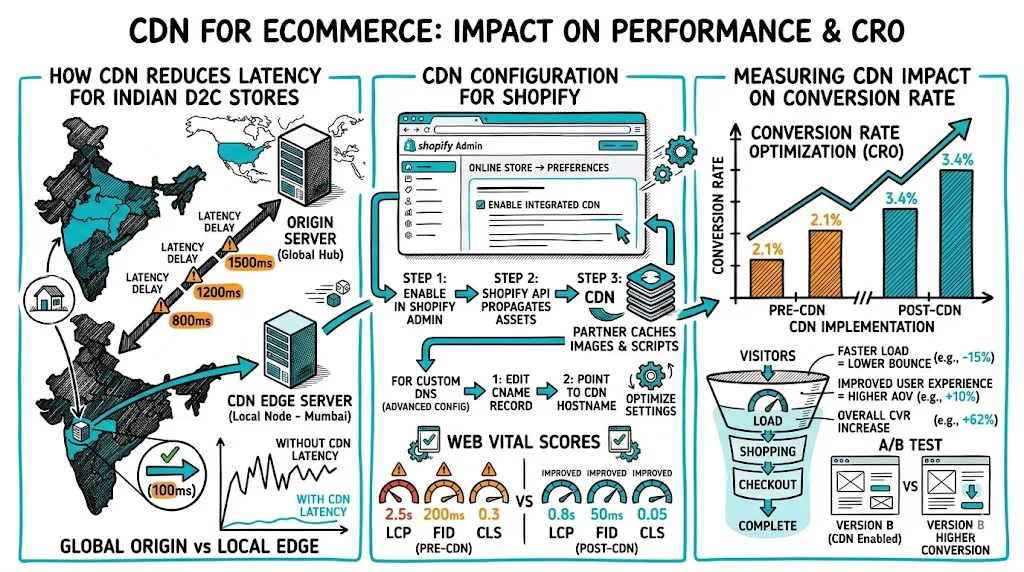
When a visitor in Jaipur loads your website hosted on a server in Mumbai, their browser has to make a round-trip to Mumbai for every asset: images, CSS, JavaScript, fonts. At 4G speeds with typical latency, this adds 200–500ms per asset request.
A CDN solves this by placing copies of your assets on edge servers — in Jaipur, Chennai, Kolkata, Delhi, and dozens of other locations. When the Jaipur visitor loads your site, their browser fetches images from the Jaipur edge server (10–30ms latency) rather than Mumbai (200–500ms).
The practical result: pages load 2–4x faster for visitors outside your origin server's city.
Why this matters specifically for India:
India is geographically enormous with visitors spread across zones from J&K to Tamil Nadu. A server in Mumbai is fast for Mumbai visitors but slow for anyone in tier-2/3 cities in Rajasthan, Uttar Pradesh, or the Northeast. A CDN equalizes the experience.
India also has highly variable mobile connectivity. A CDN with a good edge presence in India (Cloudflare, Akamai, AWS CloudFront, or Fastly) can serve cached assets even when origin connectivity is temporarily degraded.
The conversion rate impact of speed improvements is well-documented:
For a D2C brand doing ₹3 crore/month with a 2% baseline CVR:
The ROI is clear. CDN is not a luxury — it is infrastructure.
This is where CDN configuration for ecommerce requires care. Caching everything makes your store fast. Caching the wrong things breaks the shopping experience.
Cache these:
Do not cache these:
Cache with care:
| CDN Provider | India Edge Coverage | Best For | Approx. Cost |
|---|---|---|---|
| Cloudflare | Excellent (20+ India PoPs) | Most D2C brands | Free tier available; Pro from $20/mo |
| AWS CloudFront | Good | AWS-hosted stores | Pay-per-use; cost-effective at scale |
| Akamai | Very good | Enterprise | Premium pricing |
| Fastly | Good | Shopify uses Fastly natively | Custom pricing |
| BunnyCDN | Good India coverage | Budget-conscious brands | From $1/mo |
For most Indian D2C brands on Shopify, the built-in Fastly CDN handles product images and static assets automatically. For custom Magento or headless setups, Cloudflare is the most practical choice — good India coverage, easy setup, free tier for basic use.
Images are typically 60–80% of a D2C page's total byte weight. A CDN that also performs image optimization doubles the performance benefit:
Cloudflare Images, Cloudinary, and Imgix all provide CDN-delivered image optimization. For product photography-heavy Indian D2C stores (lifestyle images, multi-angle product shots), this alone can cut page weight by 50%.
Configure your origin server to send proper cache control headers so the CDN knows how long to cache each asset:
Cache-Control: public, max-age=2592000, s-maxage=2592000

Cache-Control: public, max-age=31536000, immutable

Cache-Control: public, max-age=60, s-maxage=60, stale-while-revalidate=300

Cache-Control: no-store
This is the section most performance guides skip and most brands get wrong.
The problem: If your CDN caches a full HTML page and your A/B testing tool runs server-side or edge-side, the CDN might serve the same variant to all visitors in a region — breaking the random assignment that makes A/B testing valid.
Three solutions:
1. Cache only static assets, never full HTML The simplest approach: configure your CDN to cache images, CSS, and JS, but pass all HTML requests through to your origin. Your A/B testing tool runs client-side (JavaScript) on the uncached HTML.
Downside: Full-page load isn't cached, so you don't get the maximum speed benefit for HTML.
2. Vary cache by experiment cookie If you run server-side or edge A/B tests, your CDN can use the visitor's experiment assignment cookie as a cache key dimension. Visitors in variant A get the variant A cached page; visitors in control get the control cached page.
This requires CDN configuration but gives you both full-page caching and valid A/B testing.
3. Bypass cache for pages with active experiments Use a cache bypass rule: if a request path matches a page that has an active experiment, bypass the CDN and serve from origin. Clean but impacts performance for those pages.
CustomFit.ai runs client-side JavaScript personalization and A/B testing — it works after the CDN delivers cached HTML. This means no conflict with CDN caching, because the testing logic runs in the browser on the already-delivered page.
Before your CDN is configured:
After CDN implementation:
Allow 2–4 weeks post-implementation before drawing conclusions to account for traffic variability.
Caching the cart page: Visitors end up seeing each other's carts. This has happened to real brands and is a critical trust failure.
Not setting cache busting on CSS/JS: After a site update, visitors continue seeing old styles because the CDN is serving cached stylesheets with old filenames. Always use versioned filenames (main.v3.css) or content hash filenames.
Forgetting to flush CDN cache after price changes: If product pages are cached and you change prices (flash sale, festival discount), visitors may see old prices until the cache expires.
Not testing CDN performance in India specifically. Use tools like GTmetrix with a Mumbai or Singapore server — what looks fast from a US server may still be slow in India.
Related reading: