CustomFit.ai โ€” Website personalization, A/B testing and CRO for Shopify and D2C
Product
Features
โœฑ
Website Personalization
Adapt to each visitor's behavior & intent
โง–
A/B & Multivariate Testing
Rigorous experimentation
โœจ
AI CopilotNEW
Personalize with a prompt
๐Ÿค–
AI WingmanNEW
Auto-optimize toward winners
๐ŸŽฏ
AI Conversion OptimizerNEW
GPT-grade test ideas
โœŽ
No-Code Visual Editor
Drag-and-drop edit any element
โ–ฆ
Product Recommendations
Personalized recs that lift AOV
โš‘
Feature Flags
Ship safely with kill-switches
โ—ง
Chrome Extension
Edit your store in the browser
โง‰
Shopify, WooCommerce & more
All platform integrations
View all features โ†’
Use Cases
$
Price A/B Testing
Test price points to maximize revenue
โ–ฆ
Theme A/B Testing
Compare whole layouts & designs
๐Ÿ—‚
Template A/B Testing
Test whole PDP/PLP templates
๐Ÿท
Discount A/B Testing
Find the offer that converts
๐Ÿšš
Shipping A/B Testing
Thresholds, speed & copy
โœ
Content A/B Testing
Copy, images & reviews
๐Ÿ’ณ
Checkout Gateway A/B
Payments & one-click
โŒ–
Geo-Based Personalization
Per-location content & offers
โšก
Buyer-Intent Nudges
Exit-intent & retargeting
โ†”
Split-URL / Redirection
Full-page redirect tests
View all use cases โ†’
Solutions & Guides
โคข
Conversion Rate Optimization
The complete CRO guide
โง–
A/B Testing Software
Buyer's guide for D2C
๐Ÿ›’
Cart Abandonment Recovery
Win back lost carts
๐Ÿ“ฐ
Landing Page Optimization
Convert more paid traffic
S
Shopify A/B Testing
Test your store, no code
S
Shopify Personalization
Tailor the store per shopper
โ—”
First-Time Visitor Offers
Convert new shoppers with trust & offers
โ˜…
Repeat-Customer Experiences
Reward and re-engage loyal buyers
โ—Ž
Campaign-Matched Pages
Match the landing page to the ad
โŒ–
Location-Based Experiences
Currency, language & regional offers
Explore CRO โ†’
Customer stories
GIVA
+32%
conversion via personalized recs
GIVA
Mamaearth
+18%
revenue lift from PDP A/B tests
ME
The Sleep Company
+24%
AOV from product recommendations
TSC
Read customer stories โ†’
Integrations
SWsfGA+15
โœฆ
Not sure where to start?
Let AI Copilot pick your first tests

โ€œWe wake up to evidence-backed tests ready to deploy โ€” not a backlog of maybe ideas.โ€

AN
Anirudh S.
Growth ยท Chargebee
โ˜…โ˜…โ˜…โ˜…โ˜…4.8on G2 ยท 2,400+ brands
Talk to our team โ†’
Widgets
Integrations
Ecommerce & Checkout
Shopify
Shopline
Shoplazza
GoKwik
ShopFlo
Razorpay Magic Checkout
Breeze
Shiprocket
View all integrations โ†’
Analytics & Behavior
Google Analytics 4
Microsoft Clarity
Hotjar
Mixpanel
Amplitude
Heap
Adobe Analytics
Segment (CDP)
View all integrations โ†’
Engagement, CRM & More
Klaviyo
MoEngage
CleverTap
WebEngage
HubSpot
Salesforce
Slack
Meta Ads
View all integrations โ†’
CustomersPricing
Resources
CRO
โ–ค
Playbooks
Proven strategies to boost conversions
๐ŸŽ™
Interviews
D2C leaders & marketing experts
โ–ถ
Webinars
Live deep dives & product sessions
Learn
โœŽ
Blog
Tips, experiments & best practices
๐Ÿ“•
Free E-Books
Mastering personalization
๐Ÿ“–
Conversion Glossary
Every CRO term, defined
โœฆAI CopilotNEWLog inBook a demo
Start free trial
Select your platform โ€” Install in 2 minsWe'll tailor the setup
โšก Risk-free 14-day trial ยท No credit card ยท Cancel anytime
S
Shopify
Install from Shopify App Store
โ€บ
W
WooCommerce
Install the WooCommerce plugin
โ€บ
B
BigCommerce
Install from BigCommerce App Marketplace
โ€บ
SL
Shopline
Install from Shopline App Store
โ€บ
M
Salesforce / Magento
Install from the marketplace
โ€บ
SZ
Shoplazza
Install from Shoplazza App Store
โ€บ
WP
WordPress / Webflow
Install plugin or paste the script
โ€บ
โ—ง
Others
Custom-built on React, Next.js, etc.
โ€บ
Tip: pick your platform โ€” we handle the restBook a demo โ†’
Product
Website PersonalizationA/B & Multivariate TestingAI CopilotAI WingmanAI Conversion OptimizerNo-Code Visual EditorProduct RecommendationsFeature FlagsView all features โ†’
Use Cases
Price A/B TestingTheme A/B TestingTemplate A/B TestingDiscount A/B TestingShipping A/B TestingContent A/B TestingCheckout Gateway A/BGeo-Based PersonalizationBuyer-Intent NudgesSplit-URL / Redirection
Solutions & Guides
Conversion Rate OptimizationA/B Testing SoftwareCart Abandonment RecoveryLanding Page OptimizationShopify A/B TestingShopify Personalization
Explore
WidgetsIntegrationsCustomersPricing
Resources
BlogPlaybooksWebinarsInterviewsE-BooksConversion Glossary
Platforms
ShopifyShoplineShoplazzaChrome ExtensionAll integrations
Start free trialBook a demo
Homeโ€บBlogโ€บecommerce techโ€บJavaScript Impact on Ecommerce Performance

JavaScript Impact on Ecommerce Performance

SKSharan KumarCo-Founder & CTO, CustomFit.aiJanuary 15, 20258 min read
On this page
  1. Why JavaScript Hurts Ecommerce Conversion Rates
  2. Audit Your JavaScript
  3. Step 1 โ€” Chrome DevTools Network Panel
  4. Step 2 โ€” Google Lighthouse
  5. Step 3 โ€” WebPageTest
  6. Common JavaScript Performance Killers on Ecommerce Sites
  7. 1. Unused Third-Party Scripts
  8. 2. Render-Blocking Scripts in <head>
  9. 3. Large, Unoptimized JavaScript Bundles
  10. 4. Synchronous API Calls
  11. 5. jQuery in 2025
  12. Performance Optimization Checklist
  13. JavaScript and A/B Testing
  14. Impact on Core Web Vitals
  15. Tips and Best Practices
  16. Key Takeaways
0%
JavaScript Impact on Ecommerce Performance

From the conversion glossary

Concepts referenced in this article, defined.

Definition
What Is Bundle? Definition & Guide
Definition
What Is Core Web Vitals? Definition & Guide
Definition
What Is Pixel? Definition & Guide
Definition
What Is Experiment? Definition, Formula & Guide
Definition
What Is Lazy Loading? Definition & Guide
โ† Back to Ecommerce Tech guide
Try CustomFit.ai

Run A/B tests and personalize your store without code. 14-day free trial, no credit card.

Start free trial โ†’
Share
XLinkedInEmail

Related articles

ecommerce tech

Third-Party Scripts Audit for Speed & CRO

Sapna Joharยท 10 min read
ecommerce tech

Progressive Web Apps (PWA) for Ecommerce

Sapna Joharยท 9 min read
ecommerce tech

Page Speed & Conversion Rate Correlation

Sapna Joharยท 9 min read

Start lifting conversions today.

Run rigorous A/B tests and personalize every visit on Shopify or any storefront โ€” no engineers required.

Start free trialBook a demo

Built for every D2C category

๐Ÿงด
Skincare
๐Ÿ’„
Beauty
๐ŸŒฟ
Wellness
โ˜•
F&B
๐Ÿ‘Ÿ
Apparel
๐Ÿ’
Jewelry
๐Ÿ›‹๏ธ
Home
๐Ÿผ
Baby
Live ยท Right now
Mamaearth โ€” free-shipping band +12.4% AOVGIVA โ€” festive collection page +34% revenueBellavita โ€” PDP CTA test +27.4% CVRKapiva โ€” Quiz-driven recs +9.48% CTRThe Sleep Co โ€” landing personalized 2ร— capturesPlum โ€” Returning shopper swap +18.2% CVRMamaearth โ€” free-shipping band +12.4% AOVGIVA โ€” festive collection page +34% revenueBellavita โ€” PDP CTA test +27.4% CVRKapiva โ€” Quiz-driven recs +9.48% CTRThe Sleep Co โ€” landing personalized 2ร— capturesPlum โ€” Returning shopper swap +18.2% CVR
Get in touch

Tell us about your store.

We reply within an hour during business hours. No sales pitch, no spam โ€” just answers from someone who's seen 2,400+ D2C stores.

โœ“ Reply within 1 hourโœ“ No spam, everโœ“ Free demo & setup help
โœ“ Thanks! We'll be in touch shortly.
CustomFit.ai

The all-in-one website personalization, A/B testing & CRO platform for high-growth D2C brands. Made by marketers, fueled by coffee.

in๐•โ—Žโ–ถf
Product
  • Features
  • A/B Testing
  • Personalization
  • AI Copilot
  • AI Wingman
  • AI Conversion Optimizer
  • Feature Flags
  • Widgets
  • Integrations
  • ROI Calculator
Platforms
  • Shopify
  • Shopline
  • Shoplazza
  • Salesforce
  • Chrome Extension
  • All Integrations
Resources
  • Blog
  • Playbooks
  • Webinars
  • GrowthFit Interviews
  • Free E-Books
  • Conversion Glossary
  • Case Studies
Compare
  • vs VWO
  • vs Optimizely
  • vs Google Optimize
  • vs Mutiny
  • vs Intelligems
  • vs Shoplift
  • vs AB Tasty
  • vs Convert
  • vs Kameleoon
Company
  • About Us
  • Partners
  • CustomFit Awards
  • Recognition
  • Contact
  • Privacy Policy
  • Terms & Conditions
ยฉ 2026 CustomFit.ai ยท Valley Monks Pvt Ltd ยท Made by marketers, fueled by coffee, and obsessed with conversions.
SOC 2 Type II ยท GDPR ยท CCPA ยท ISO 27001

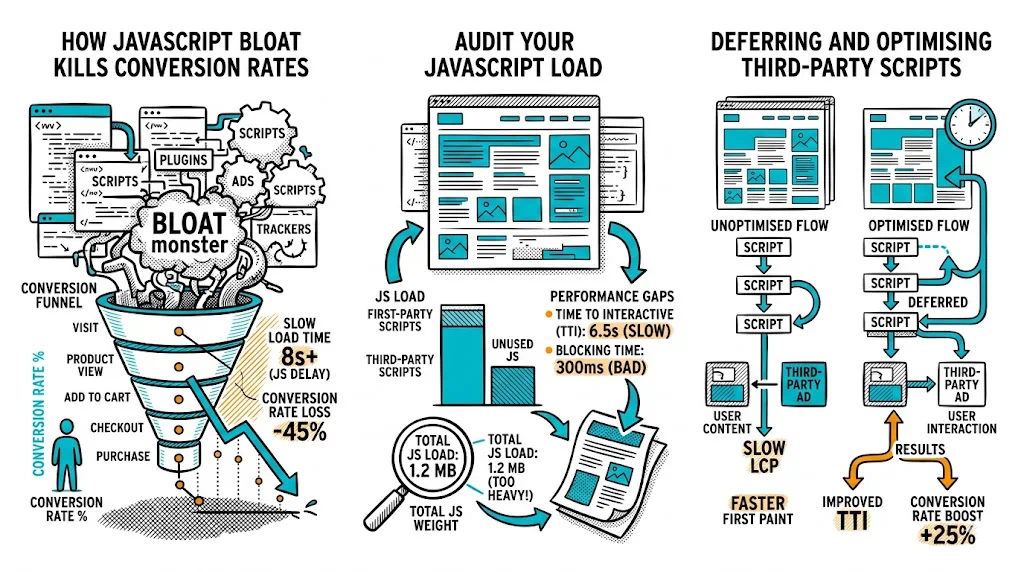
JavaScript is the single biggest performance variable on most ecommerce sites โ€” and the most commonly ignored one. Images get compressed, CDNs get configured, but JS bundles grow unchecked as marketing adds pixel after pixel and developers add library after library. The result: a homepage that takes 6 seconds to become interactive on a โ‚น10,000 Android, costing you 30% of your mobile conversions before a visitor even sees your product. Fix your JS, and the conversion gains rival any A/B test result.

Why JavaScript Hurts Ecommerce Conversion Rates

JavaScript affects performance at multiple points in the page load:

1. Download size: Every kilobyte of JavaScript must be downloaded before it can be executed. On a 4G connection in tier-2 India, a 1MB JavaScript bundle adds 1โ€“3 seconds of download time alone.

2. Parse and compile time: Browsers must parse (read) and compile (prepare to execute) JavaScript before running it. Parsing 1MB of JS on a low-end Android phone takes 3โ€“5 seconds โ€” even after it's downloaded.

3. Execution time: Scripts that run during page load compete with rendering. A heavy analytics script that fires on page load delays the time when the page becomes interactive for the visitor.

4. Render blocking: Scripts in the <head> without async or defer attributes pause all HTML rendering until the script completes. A 100KB render-blocking script can add 1โ€“2 seconds to Largest Contentful Paint (LCP).

The compounding effect: Most ecommerce sites have not 1 but 15โ€“30 JavaScript files running on each page: the platform's own JS, theme JS, chat widget, analytics, A/B testing tool, heatmap tool, retargeting pixel, loyalty program widget, push notification service, live chat, review widget, product recommendations script. Each adds milliseconds to seconds. Together, they kill performance.

The conversion cost: Google's research quantifies this: every 1-second delay in mobile load time reduces CVR by 7%. A site that takes 6 seconds to interactive instead of 3 seconds can lose 20โ€“25% of mobile conversions to slow load time alone.

Audit Your JavaScript

Before optimizing, you need to know what you have. Run a JS audit using these free tools:

Step 1 โ€” Chrome DevTools Network Panel

  1. Open Chrome, navigate to your store in incognito mode (no cache, no extensions)
  2. Open DevTools (F12) โ†’ Network tab โ†’ check "Disable cache"
  3. Reload the page
  4. Filter by "JS" file type
  5. Note: total JS size, number of files, and the heaviest individual files

A healthy ecommerce page should have under 400KB of JavaScript (after gzip compression). Above 800KB is a problem. Above 1.5MB is a serious performance emergency.

Step 2 โ€” Google Lighthouse

  1. In Chrome DevTools, go to the Lighthouse tab
  2. Run an audit on Mobile device
  3. Look for:
    • "Remove unused JavaScript" (shows KB of unused code per file)
    • "Reduce JavaScript execution time" (shows which scripts take longest to execute)
    • "Eliminate render-blocking resources" (shows render-blocking scripts)
    • Time to Interactive (TTI) score

Step 3 โ€” WebPageTest

Run a test from a Mumbai or Singapore server (approximating Indian connectivity) with a typical mid-range Android device profile. The waterfall chart shows every script request in sequence โ€” you can identify which scripts block rendering and which are render-safe.

Common JavaScript Performance Killers on Ecommerce Sites

1. Unused Third-Party Scripts

The most common culprit. Marketing adds:

  • Facebook Pixel
  • Google Analytics / GA4
  • Google Tag Manager (often running 10+ tags)
  • Hotjar or FullStory
  • Intercom or Freshchat
  • Klaviyo or Mailchimp embed
  • Yotpo or Stamped reviews widget
  • Loyalty program (LoyaltyLion, Smile.io)
  • Push notification service (OneSignal)
  • A/B testing tool
  • Affiliate tracking script

Each is "small" individually. Together, they add 500KBโ€“2MB+ of JavaScript and fire dozens of network requests.

Fix: Audit every script in Google Tag Manager. Remove any script for a tool you're not actively using. Consolidate analytics if you're running both GA4 and a separate heatmap tool โ€” most heatmap tools have GA integration.

2. Render-Blocking Scripts in <head>

Scripts placed in the <head> without async or defer attributes block the browser from rendering the page until each script is downloaded and executed.

Fix: Add defer to all non-critical scripts:

<!-- Bad: blocks rendering -->
<script src="/theme.js"></script>
 
<!-- Good: deferred, does not block -->
<script src="/theme.js" defer></script>

Use async for independent scripts that don't depend on DOM being ready (analytics pixels, most tracking scripts).

3. Large, Unoptimized JavaScript Bundles

Modern JavaScript build tools (Webpack, Rollup, Vite) can bundle your entire codebase into one large file. This is convenient but means visitors download code for features they'll never use on the current page.

Fix:

  • Code splitting: Break the bundle into smaller chunks that load only when needed
  • Tree shaking: Remove exported functions from libraries that your code doesn't import
  • Lazy loading: Load below-the-fold components (chat widget, reviews section) only when the user scrolls near them

4. Synchronous API Calls

Some ecommerce scripts make synchronous network calls that block execution. Product recommendation engines that fetch data on page load before rendering anything are a common example.

Fix: All API calls should be asynchronous. If recommendations need to be visible immediately, consider server-side rendering them rather than fetching client-side.

5. jQuery in 2025

Many Shopify themes and legacy Magento installations still load full jQuery (30โ€“40KB gzipped) when modern JavaScript can accomplish the same tasks natively. If you're loading jQuery 1.x, you're paying a performance tax for 15-year-old compatibility.

Fix: Audit whether your theme actually uses jQuery. Many modern Shopify 2.0 themes do not. If you're on Magento 2, jQuery is embedded in the platform โ€” optimize elsewhere.

Performance Optimization Checklist

  • Total JavaScript size under 400KB (gzip) per page
  • No render-blocking scripts in <head> without defer or async
  • Google Tag Manager cleaned up โ€” only active tools have active tags
  • Critical scripts (A/B testing, analytics) load asynchronously
  • Non-critical scripts (chat widget, reviews, recommendations) lazy-loaded
  • Time to Interactive (TTI) under 3.5 seconds on mobile (Lighthouse)
  • No duplicate scripts (two analytics scripts, two chat scripts)
  • JavaScript bundle size checked with Source Map Explorer or Bundlephobia

JavaScript and A/B Testing

Your A/B testing tool is a JavaScript file. How it loads matters:

Synchronous loading (bad for performance): The testing script blocks page rendering while it fetches the experiment configuration. This eliminates flicker but adds 200โ€“500ms to page load.

Asynchronous loading (better for performance): The page renders immediately; the testing script loads in parallel. A minor flicker may be visible as the variant swaps in, but overall page performance is preserved.

CustomFit.ai's approach: Loads asynchronously with an anti-flicker snippet for above-the-fold elements only. This minimizes both performance impact and visible content flicker.

Best practice: Load your A/B testing script with async and implement an anti-flicker snippet only for the specific elements being tested, not the entire page.

Impact on Core Web Vitals

JavaScript affects all three Core Web Vitals:

  • LCP (Largest Contentful Paint): Render-blocking JS delays when the main page content appears. Target: under 2.5 seconds.
  • FID (First Input Delay) / INP (Interaction to Next Paint): Heavy JS execution makes the page unresponsive to clicks and taps. Target FID: under 100ms.
  • CLS (Cumulative Layout Shift): Scripts that inject content after load (ads, recommendations, chat widgets) cause layout shifts. Target CLS: under 0.1.

Core Web Vitals are now Google ranking signals. Poor performance costs you both SEO traffic and conversion rate simultaneously.

Tips and Best Practices

  • Audit your GTM container every 6 months. Marketing team turnover means old scripts accumulate without anyone noticing.
  • Load chat widgets on interaction, not on page load. The chat widget fires on every page load but is only used by 1โ€“3% of visitors. Load it when a visitor hovers over the chat button.
  • Set performance budgets. Define a maximum JS size (e.g., 450KB total) and fail your CI/CD build if new code pushes you over the limit.
  • Use Lighthouse CI to run performance audits on every pull request โ€” catch regressions before they reach production.
  • For Indian visitors, test on real devices. The โ‚น10,000โ€“15,000 Android phones that represent a large share of Indian D2C traffic have 2โ€“3 GB RAM and older chipsets. Use Chrome DevTools device emulation or, better, real device testing.

Key Takeaways

  • JavaScript is the most common and most impactful performance bottleneck on ecommerce sites โ€” more so than images or server response time.
  • Third-party scripts (analytics, chat, pixels, widgets) accumulate without governance and collectively add seconds to TTI.
  • Render-blocking scripts without defer or async directly harm LCP โ€” the most important Core Web Vitals metric for ecommerce.
  • A JS audit (Lighthouse + DevTools Network) takes 30 minutes and reveals the highest-impact optimization opportunities.
  • Your A/B testing tool is a JS file โ€” load it asynchronously and monitor its performance impact alongside its conversion impact.

Related reading:

  • Ecommerce Tech Pillar
  • D2C Growth Pillar
  • CDN for Ecommerce Performance
  • Third-Party Scripts Audit
  • Bounce Rate