From the conversion glossary
Concepts referenced in this article, defined.
Concepts referenced in this article, defined.
Run rigorous A/B tests and personalize every visit on Shopify or any storefront — no engineers required.
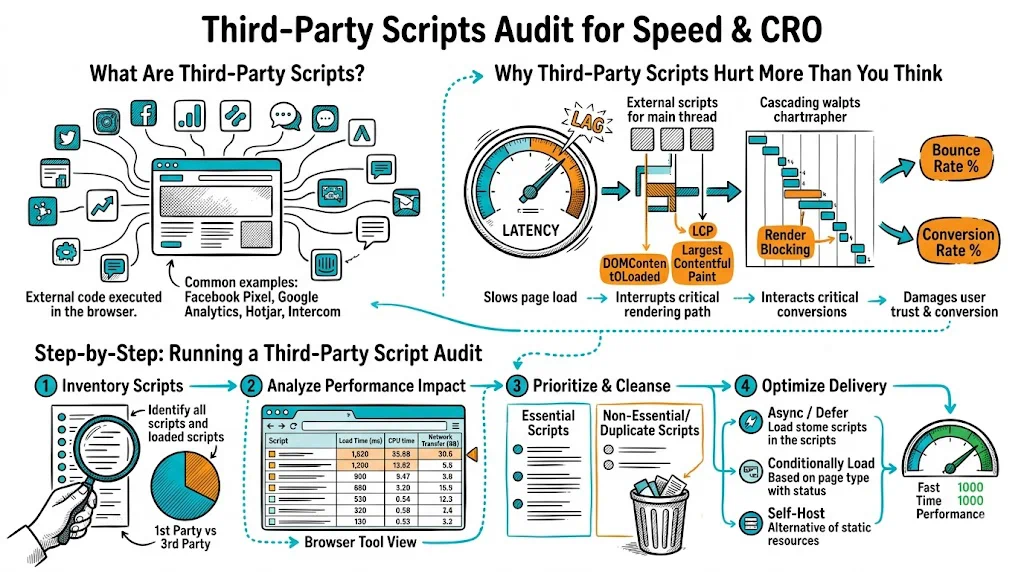
The average ecommerce site loads 15–25 third-party scripts on every page. Most were added by different team members at different times, none was ever removed, and collectively they add 2–4 seconds to your page load and cost you 10–25% of your mobile conversions. A third-party script audit is a systematic process to find this hidden tax, eliminate what's not earning its keep, and optimize what remains. You can run one in a day, and the conversion gains often rival months of A/B testing.
Third-party scripts are JavaScript files hosted on external domains — not your own origin — that you've added to your site. They typically arrive via a <script> tag pointing to another company's server.
Common examples on ecommerce sites:
Each one makes you faster to use the tool and slower to serve your customers.
The performance hit from third-party scripts is not just the script file size. It is the cascade of costs:
1. DNS lookup: Before downloading a script, the browser must resolve the domain (e.g., connect.facebook.net). Each unique domain adds 50–150ms of DNS lookup time. If you have 15 scripts from 15 different domains, that's 15 DNS lookups.
2. Connection establishment: Each new domain requires a TCP handshake and TLS negotiation — another 100–300ms per unique domain.
3. Download: The script file itself. Even a "small" 50KB script adds download time, especially on mobile.
4. Parse and execute: The browser must parse and execute every script. Heavy scripts (heatmap recorders, complex chat widgets) take 200–800ms of main thread time.
5. Render blocking: Scripts without async or defer pause the browser from rendering anything until they finish loading.
6. Origin dependence: Third-party scripts are served from servers you don't control. If Hotjar's CDN has a bad day, your site slows down. If a vendor's script has an error, it can break your entire page.
The cumulative result: A typical ecommerce site with 20 third-party scripts can have 2–4 seconds of load time entirely attributable to third-party overhead — before your own code, images, or platform scripts load.
You need a complete inventory before you can make decisions.
Method 1 — Chrome DevTools:
Method 2 — Request Map: Go to requestmap.webperf.tools, enter your URL, and generate a visual map of every request your page makes. Third-party requests appear as nodes on the map — you can instantly see which external domains are loading the most resources.
Method 3 — Google Tag Manager: If you use GTM, log in and view all tags. Each active tag loads at least one external script. List them all.
Create a spreadsheet with columns:
Not all scripts are equally harmful. Measure the impact of each.
Google Lighthouse — "Reduce third-party code" opportunity: Run a Lighthouse audit (Chrome DevTools → Lighthouse → Mobile). Look for the "Reduce impact of third-party code" section. It lists every third-party script with:
WebPageTest — Third-party summary: Run a test from Mumbai or Singapore. In the results, go to "Content Breakdown" → "Third-Party" section. You'll see the exact byte count and request count attributable to each third-party domain.
Prioritize by impact: Focus your audit efforts on scripts with >200ms of blocking time or >100KB transfer size. Small, asynchronous scripts with <20KB transfer size are not your primary problem.
For each script in your inventory, classify it:
Essential — Active and business-critical:
Active but optimizable:
Inactive — Added but no longer in use:
Unknown — No one knows who added it or why: Common in GTM containers that haven't been audited. These are candidates for removal (test in staging first).
Remove inactive scripts immediately:
In Google Tag Manager, pause or delete tags for tools you no longer use. For scripts in code (not GTM), remove the <script> tag. Test in staging before pushing to production.
Lazy-load optimizable scripts:
Load live chat on interaction only:
// Load chat widget only when user clicks the chat button
document.getElementById('chat-trigger').addEventListener('click', function() {
  // Load chat script dynamically
  const script = document.createElement('script');
  script.src = 'https://chat-vendor.com/widget.js';
  document.head.appendChild(script);
});
Load heatmap only on specific pages:
// Only load Hotjar on product pages and checkout
if (window.location.pathname.includes('/products/') ||
    window.location.pathname.includes('/checkout')) {
  // Load Hotjar
}
Defer all non-critical scripts:
Ensure every non-critical script uses async or defer. In GTM, this is often the default — but check each tag's firing trigger to ensure it's not set to fire synchronously.
Self-host critical third-party scripts (advanced): For scripts that are essential and frequently updated, self-hosting (downloading and serving from your own domain) eliminates the DNS lookup cost. This works well for scripts that update infrequently (Google Analytics JS, for example).
Note: Self-hosting Meta Pixel or other ad network scripts violates their terms of service. Only self-host analytics and utility scripts you have the rights to host.
After making changes, re-run your Lighthouse and WebPageTest audits and compare:
| Metric | Before | After |
|---|---|---|
| Total JS size (third-party) | __ KB | __ KB |
| Third-party blocking time | __ ms | __ ms |
| Time to Interactive (TTI) | __ s | __ s |
| Largest Contentful Paint | __ s | __ s |
| Bounce rate (mobile) | _% | _% |
| CVR (mobile) | _% | _% |
Allow 2–4 weeks of post-change data before drawing conclusions from CVR changes.
Google Tag Manager deserves its own audit because it's where script sprawl is worst. Marketing teams add tags via GTM without touching code — which means tags accumulate without developer visibility.
GTM audit steps:
?gtm_debug=false or temporarily unpublish your GTM container in staging)Set a policy: every new GTM tag requires a business owner, a purpose, and a review date (6 months). Tags without an owner at review get paused.
Specific to India's traffic context:
Highest priority to remove/optimize:
Essential to keep but optimize loading:
Worth self-monitoring:
Related reading: